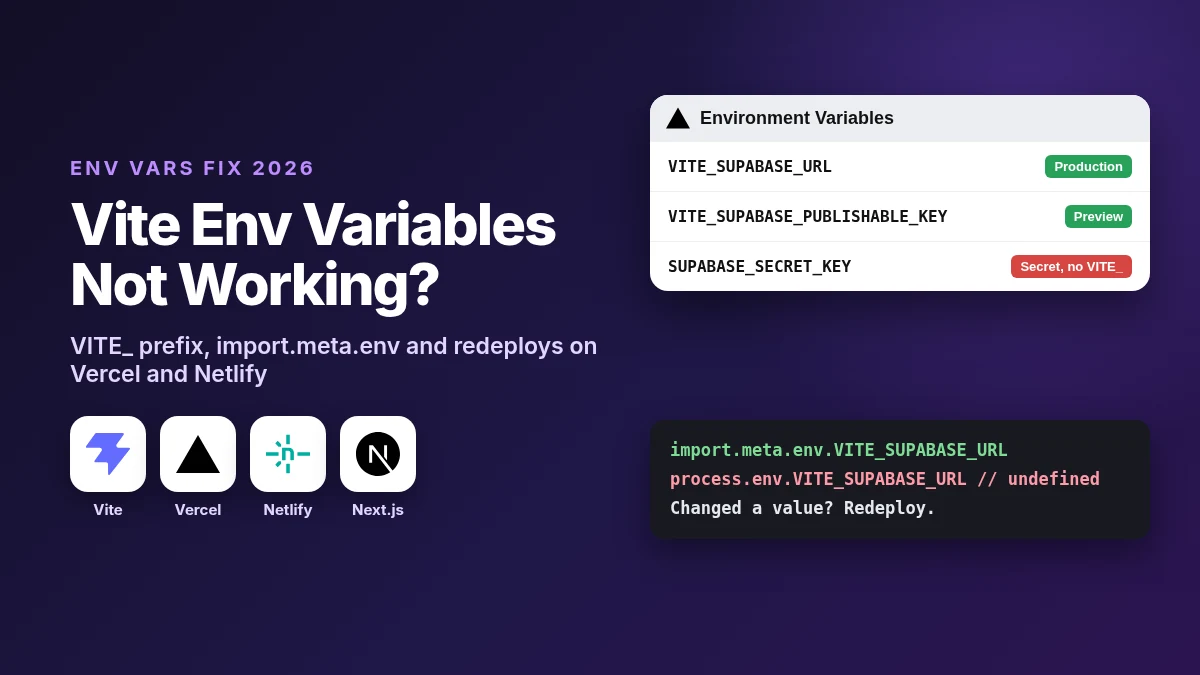
Vite Env Variables Not Working on Vercel and Netlify? How to Fix It (2026)
Your app runs perfectly on your laptop. You push it to Vercel, or to Netlify, open the live URL, and get a blank white screen. The console says something like supabaseUrl is required, or your API URL comes back as undefined. Sound familiar? This is one of the most common reasons a vibe-coded app breaks after deploy, and the good news is that it’s almost always one of five small mistakes.
This guide covers every common cause of Vite env variables not working on your host: the VITE_ prefix rule, why .env works locally but not in production, exact steps for Vercel and Netlify, why you must redeploy, how Next.js NEXT_PUBLIC_ variables differ, how Lovable and Bolt store their values, and which keys are dangerous to ship in the browser.
Quick answer: Vite env variables not working on Vercel and Netlify? Check five things. The name must start with VITE_. Your code must read it with import.meta.env, not process.env. The variable must be added in your host’s dashboard, not only in .env.local. It must be set for the right environment. And you must redeploy after every change.
| If you see… | Most likely cause | Fix |
|---|---|---|
| Value is undefined in the browser | No VITE_ prefix, or read with process.env | Rename to VITE_NAME, read import.meta.env.VITE_NAME |
| Works locally, undefined on the host | Value only lives in .env.local, which git ignores | Add it in the dashboard of your host (Vercel, Netlify) |
| Changed a value, live site still old | Old deployment, values baked in at build time | Redeploy (Vercel) or trigger a new build and deploy (Netlify) |
| Works in production, broken in previews | Variable only set for Production | Also tick Preview, or set the Deploy Preview context |
| Netlify build fails with a secret detected | Public VITE_ value marked as a secret | Unflag public values, keep real secrets out of VITE_ |
| Next.js value undefined in the browser | No NEXT_PUBLIC_ prefix, or a dynamic lookup | Use process.env.NEXT_PUBLIC_NAME written out in full |
| Key visible in DevTools | A secret was given a public prefix | Move it to a server function and rotate the key |
Want your env vars, keys and sign-in sorted on accounts you own? Launch Mango moves your Lovable, Bolt, v0 or Cursor app onto your own GitHub, Supabase and Vercel accounts, including the code, database and env vars, and makes it safe for real users. Own and Secure is $199 one-off and also removes exposed API keys and secrets from the frontend, locks down Supabase RLS, fixes sign-in redirects and sets up live Stripe webhooks, with money back if it isn’t live on your accounts. Not sure what your app needs? Run the free 2-minute app check.
Why Are Your Vite Env Variables Undefined in Production?
Vite only exposes variables that start with VITE_, and it swaps them into your JavaScript while the app builds. If the name has no prefix, your code reads process.env, or the host had no value when it ran the build, the browser gets undefined. Nothing is read at runtime, because a Vite app is just static files.
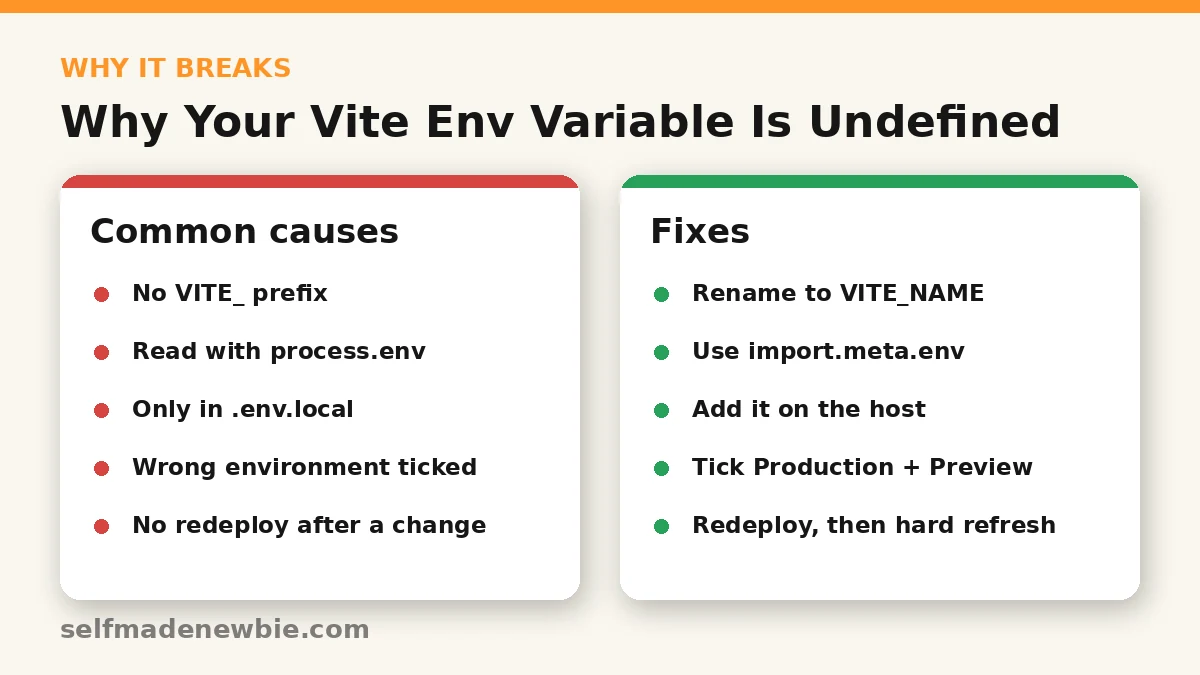
This is the part most guides skip. Per the Vite env and modes docs, Vite’s constants are “statically replaced at build time.” So import.meta.env.VITE_SUPABASE_URL in your code becomes the literal text "https://your-project.supabase.co" in the files your host serves. If the value didn’t exist during the build, the literal becomes undefined, and adding it later changes nothing until the next build.
That one fact explains every symptom in this post:
- No prefix: Vite drops anything without VITE_ from the browser bundle on purpose, so secrets don’t leak.
- Wrong object: Vite puts values on
import.meta.env. Code written for Create React App or Node often readsprocess.env, which is not filled in for browser code. - Missing at build time: the host never saw the value because it only lives in a file on your computer.
- No rebuild: you added the value after the last build, so the live files still contain the old one.
One more detail from the Vite docs that trips people up: every env value is a string. A variable set to false arrives as the text “false”, which counts as true in an if statement. Compare it to the string or convert it before you use it.
Does Your Variable Need the VITE_ Prefix?
Yes, if browser code needs it. Vite only exposes variables prefixed with VITE_ to client-side code, and you read them with import.meta.env.VITE_NAME. Server-only values like secret keys should never get the prefix. You can change the prefix with the envPrefix option, but most Lovable and Bolt projects use the default.
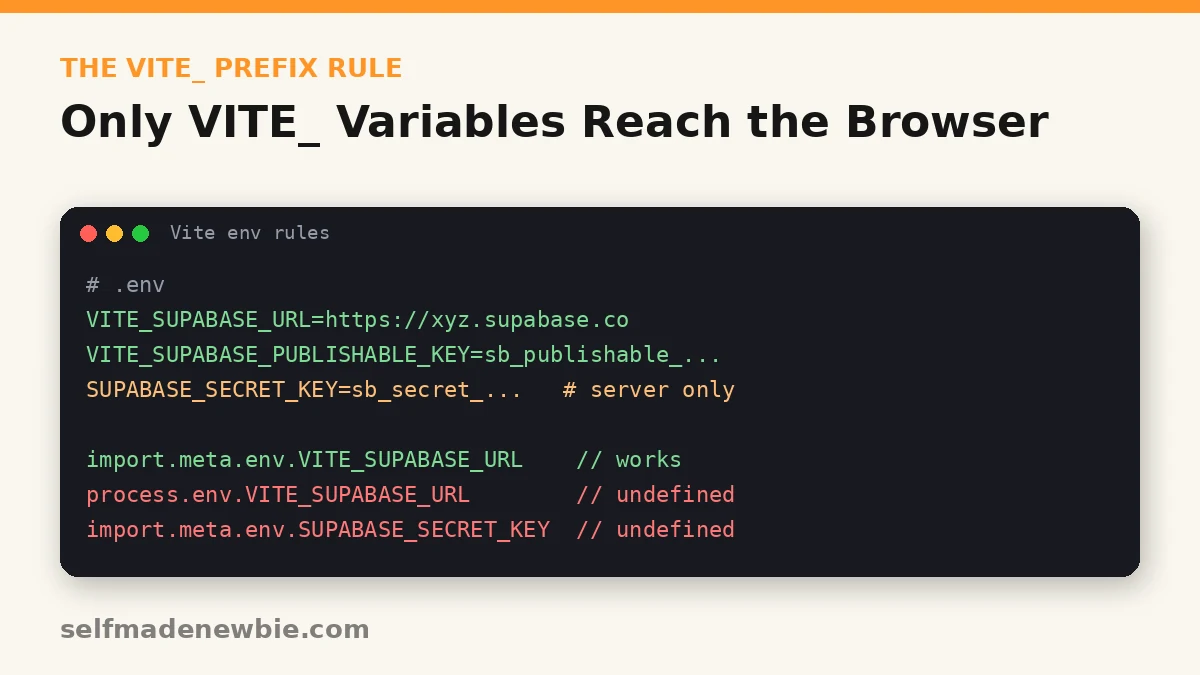
Here is what a correct .env file looks like for a typical Supabase app. The public values get the prefix, the secrets don’t:
# .env (Vite reads this at build time)

# Reaches the browser: has the VITE_ prefix
VITE_SUPABASE_URL=https://your-project.supabase.co
VITE_SUPABASE_PUBLISHABLE_KEY=sb_publishable_...

# Stays out of the browser: no prefix, server code only
SUPABASE_SECRET_KEY=sb_secret_...
STRIPE_SECRET_KEY=sk_live_...
And here is how your code should read them, plus the two mistakes that return undefined:
// Works in Vite (browser code)
const url = import.meta.env.VITE_SUPABASE_URL

// undefined in Vite browser code: wrong object
const url2 = process.env.VITE_SUPABASE_URL

// undefined in the browser: no VITE_ prefix, so Vite never exposes it
const secret = import.meta.env.SUPABASE_SECRET_KEY
The Vite docs give the same example: VITE_SOME_KEY is exposed, while DB_PASSWORD returns undefined in the browser. They also warn that VITE_ variables “should not contain sensitive information such as API keys” because their values are bundled into your source code. Anyone can read them by opening DevTools.
Using TypeScript? Add your variables to an ImportMetaEnv interface in src/vite-env.d.ts to get autocomplete, as the Vite docs show. That catches typos like VITE_SUPABSE_URL before they ever reach your host.
Why Does Your .env File Work Locally but Not on Vercel and Netlify?
Because your host only sees what’s in your Git repository and its own settings. Vite’s docs say .env.local and .env.[mode].local are ignored by Git, so values you keep there never reach Vercel, and never reach Netlify. Netlify’s build system doesn’t read .env files into its environment either. Add every variable in the host’s dashboard instead.
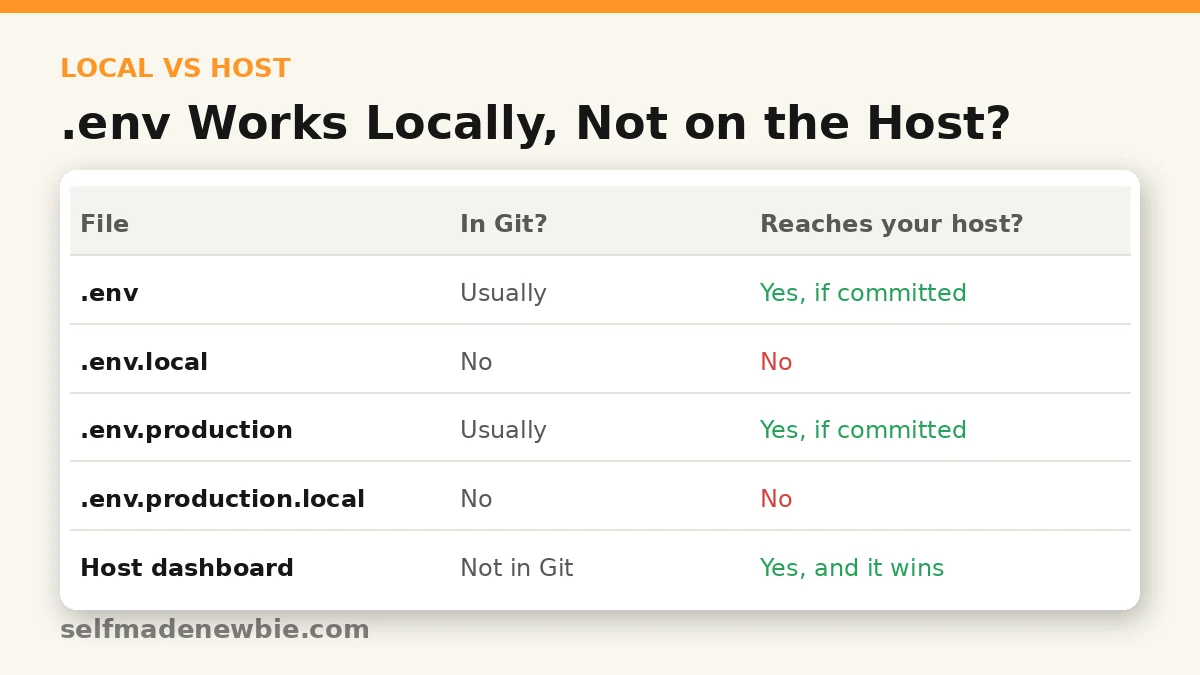
Vite loads up to four files, per the Vite docs:
| File | Loaded when | In Git? | Reaches your host? |
|---|---|---|---|
.env | Always | Usually yes | Yes, if it is committed |
.env.local | Always | No (local only) | No |
.env.production | Only in production mode (vite build) | Usually yes | Yes, if it is committed |
.env.production.local | Only in production mode | No (local only) | No |
| Host dashboard variables | During the host build | Not in Git | Yes, and they win over .env files |
That last row matters. Vite says variables that already exist when it runs have the highest priority and are not overwritten by .env files. Your host’s dashboard values are exactly that, so a dashboard value beats a committed .env value with the same name.
Netlify spells this out: when you build on Netlify, “the build system does not read .env files,” and it recommends importing your .env values into the dashboard. A committed .env still gets picked up by Vite itself during vite build, which is how Lovable projects work, but anything that only lives in .env.local is invisible to both hosts.
Changed vite.config.ts to read an env value? Vite’s config docs note that .env files are not loaded into process.env while the config runs. Use loadEnv:
// vite.config.ts: .env files are NOT in process.env here
import { defineConfig, loadEnv } from 'vite'

export default defineConfig(({ mode }) => {
  // '' loads every variable, not only VITE_ ones
  const env = loadEnv(mode, process.cwd(), '')
  return {
    server: { port: env.APP_PORT ? Number(env.APP_PORT) : 5173 },
  }
})
How Do You Add Environment Variables on Vercel?
Open your project, choose Environment Variables in the sidebar, enter the name and value, pick Config or Secret, and tick Production, Preview and Development as needed. Click Save, then redeploy. Vercel’s docs say changes only apply to new deployments, so the current live site keeps its old values until you deploy again.
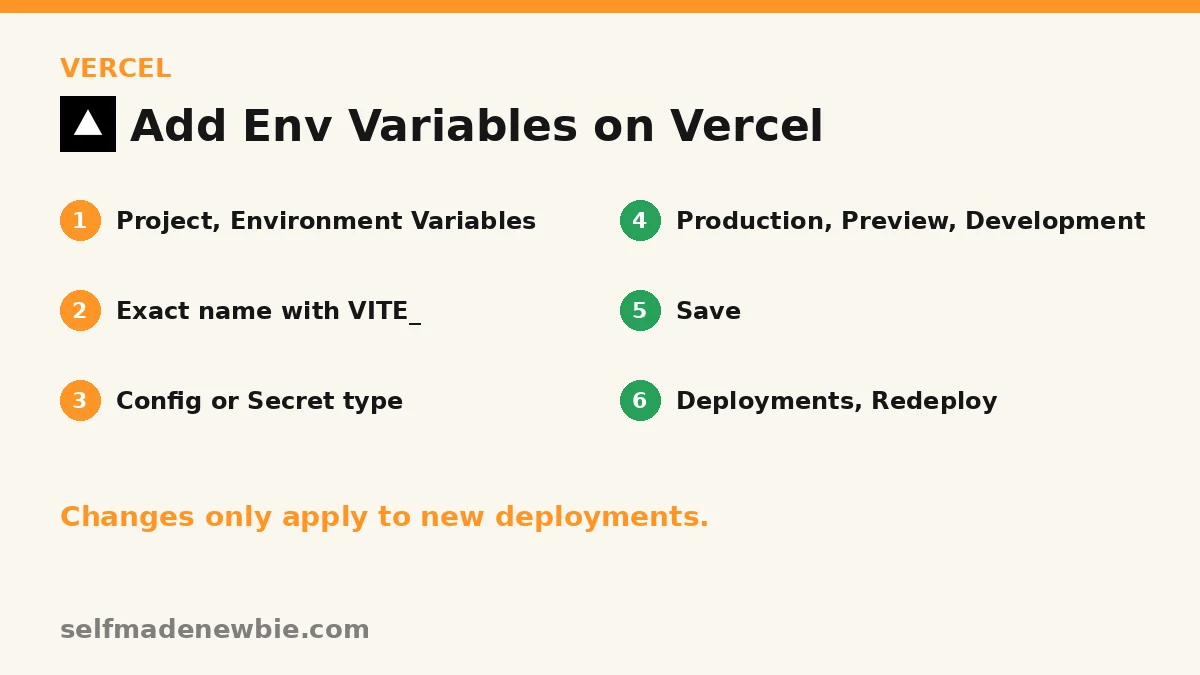
- From your Vercel dashboard, select the project and open Environment Variables in the sidebar.
- Enter the exact name your code reads, for example
VITE_SUPABASE_URL. A typo or a missing prefix is the most common cause of undefined. - Choose the type. Config values stay readable for your team and suit public values like a Supabase URL. Secret values are write-only after saving and suit passwords, API keys and tokens.
- Tick the environments: Production for your main branch, Preview for every other branch, and Development for local work with the Vercel CLI.
- Click Save, then open Deployments, click the three dots on the latest deployment and choose Redeploy.
Sources: Vercel managing environment variables, Vercel environment variables overview and Config and Secret variables. Vercel also notes that a Secret value of 32 characters or more is replaced with [REDACTED] if it shows up in build logs.
Prefer the terminal? The Vercel CLI can add values and pull your Development values into a local file, and the Netlify CLI has matching commands:
# Vercel CLI: add a variable to Production, then pull Development values locally
vercel env add VITE_SUPABASE_URL production
vercel env pull .env.local

# Netlify CLI: set a variable for the production deploy context only
netlify env:set VITE_SUPABASE_URL https://your-project.supabase.co --context production

# Netlify CLI: import everything from a local .env file
netlify env:import .env
Two soft warnings. Vercel’s docs say values are encrypted at rest, but encryption doesn’t help a VITE_ value, because Vite copies it into public JavaScript anyway. And Vercel adds its own system values for Vite, such as VITE_VERCEL_ENV, which reads production, preview or development, per its framework environment variables page. That’s handy for showing a staging banner.
How Do You Add Environment Variables on Netlify?
Go to Project configuration, Environment variables, and add each key with one value for all deploy contexts or separate values for Production, Deploy Previews and Branch deploys. Then build and deploy again, because Netlify says variable changes need a new build to take effect. Values in netlify.toml override the dashboard, so check that file too.
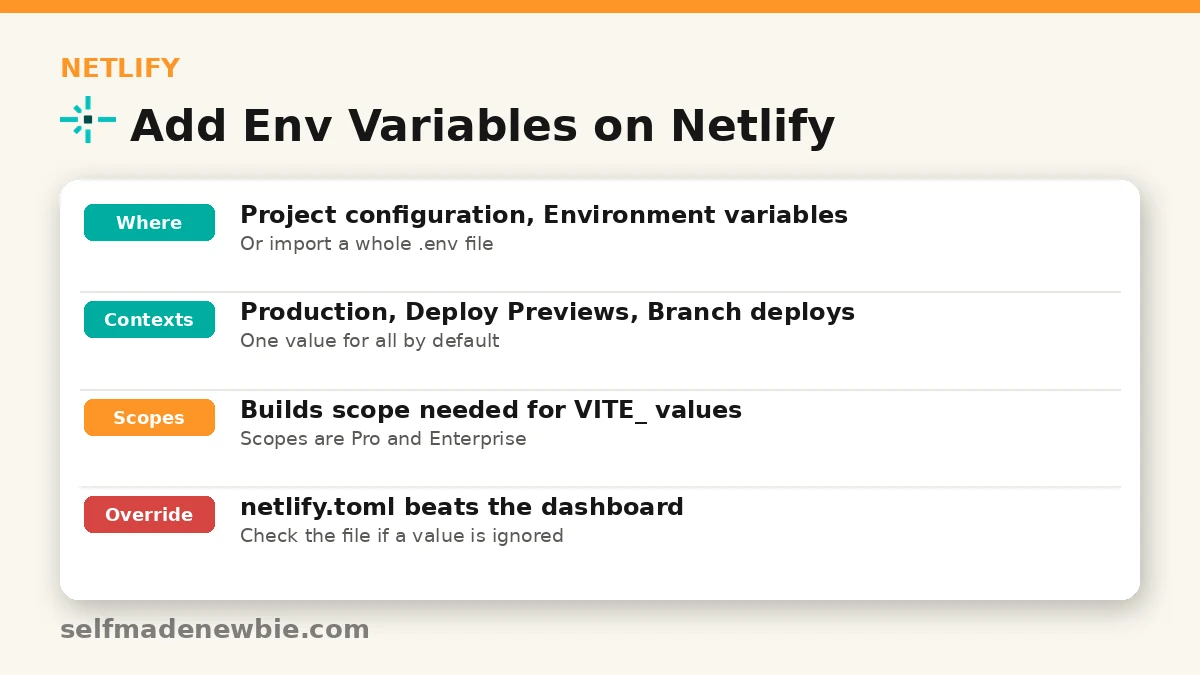
Per Netlify’s get started guide and environment variables overview:
- Where: Project configuration, Environment variables for one site, or Team settings, Environment variables for values shared across sites (shared variables are a Pro and Enterprise feature).
- Import your .env: Add a variable, Import from a .env file lets you paste your whole file at once and choose scopes and deploy contexts.
- Deploy contexts: by default one value applies everywhere. You can set different values for Production, Deploy Previews, Branch deploys, a specific branch, and local development.
- Scopes (Pro and Enterprise): limit a variable to Builds, Functions, Runtime or Post processing. A VITE_ value must include the Builds scope, or Vite never sees it.
- Overrides: a value in netlify.toml wins over the same key in the dashboard. Site variables win over shared team variables.
- Name rules: keys can only use letters, numbers and underscores, and must start with a letter. Values can be up to 5,000 characters.
Netlify also recommends keeping sensitive values in the dashboard, CLI or API rather than in netlify.toml, because that file lives in your repository. The Netlify CLI env commands let you set values per context, as shown in the code block above.
Why Do You Have to Redeploy After Changing Env Variables?
Because a Vite app reads its variables only once, while it builds. Vercel’s docs say changes are not applied to previous deployments, only new ones, and Netlify says changes require a build and deploy to take effect. Editing a value in the dashboard does nothing to the live site until a fresh build bakes the new value in.
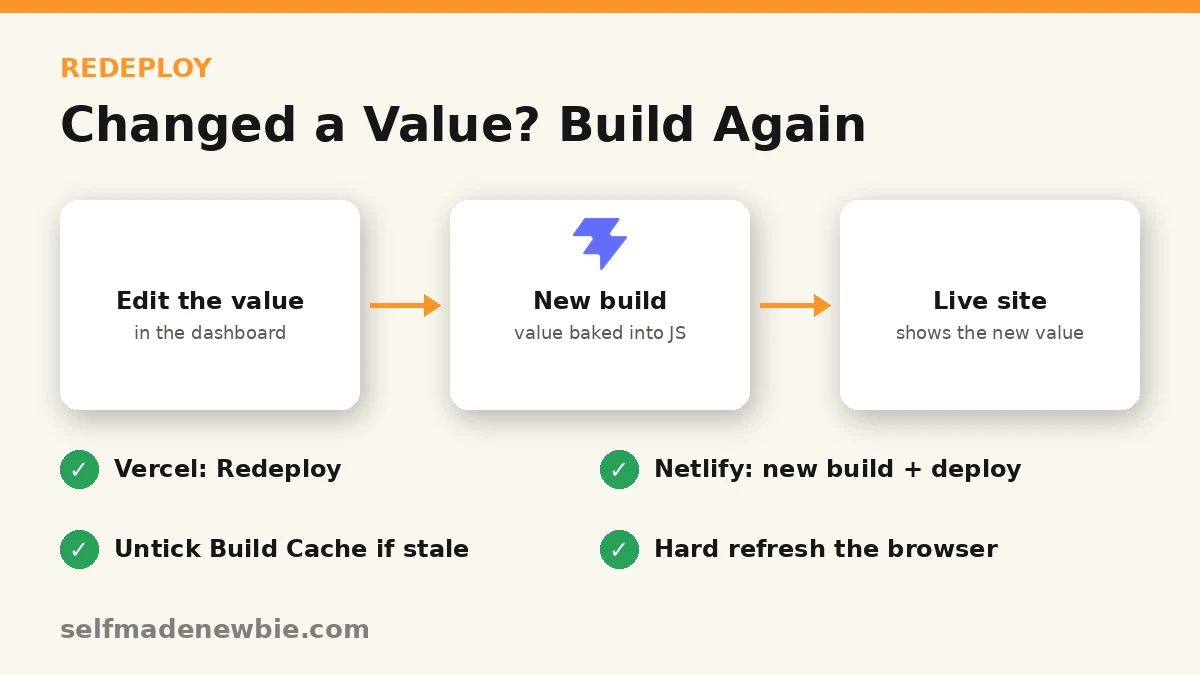
| Host | How to redeploy | Watch out for |
|---|---|---|
| Vercel | Deployments, three dots on the latest deployment, Redeploy | The Redeploy dialog asks whether to use the existing Build Cache. Untick it if a stale value survives. |
| Netlify | Push a new commit, or start a fresh deploy of the project from the Netlify UI | A netlify.toml value with the same key still overrides the dashboard |
| Both | Any push to the production branch builds again | Preview deployments use Preview or Deploy Preview values, not Production |
Vercel’s managing deployments docs list changing environment variables as one of the cases where you should always redeploy. If the old value still shows after a redeploy, hard refresh the page (Cmd + Shift + R on Mac, Ctrl + Shift + R on Windows) so your browser drops the old JavaScript file.
Getting a 404 when you refresh a page after the redeploy? That’s a different problem with the same deploy step, covered in my guide to the Vercel 404 on refresh fix.
Why Does Netlify Fail Your Build With a Secret Detected Error?
Netlify scans your repository and build output for any environment variable marked as a secret. If it finds the value, it fails the build before deploy. A VITE_ value is copied into your public bundle by design, so marking it secret always trips the scan. Unflag public values, and keep real secrets out of VITE_.
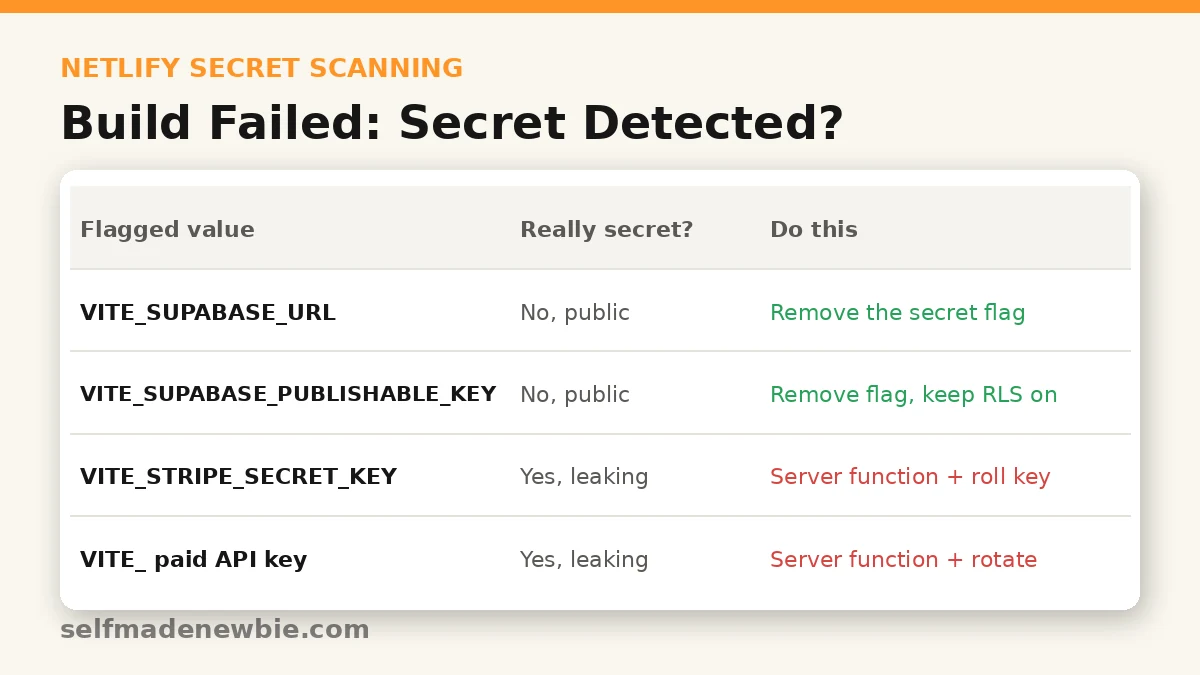
Per Netlify’s Secrets Controller docs, when you tick Contains secret values, the value becomes write-only, and secret scanning searches every file in the build, including base64 and URL-encoded copies. That’s a great safety net, and it usually points to one of two situations:
| What was flagged | Is it really secret? | What to do |
|---|---|---|
VITE_SUPABASE_URL | No, it is public by design | Remove the secret flag, keep it as a normal variable |
VITE_SUPABASE_PUBLISHABLE_KEY | No, Supabase says it is safe to expose | Remove the secret flag, make sure RLS is on |
VITE_STRIPE_SECRET_KEY | Yes, and it is leaking | Remove the VITE_ prefix, call it from a server function, roll the key |
VITE_OPENROUTER_KEY | Yes, and it is leaking | Same: move it server-side and rotate it |
Netlify lets you skip keys with SECRETS_SCAN_OMIT_KEYS, and you can turn scanning off with SECRETS_SCAN_ENABLED=false. Only use the first for values that are truly public. Turning the scan off to make a real secret build pass just hides the leak. Netlify also has smart detection on Personal, Pro and Enterprise plans, which looks for likely secrets you never flagged.
How Are Next.js NEXT_PUBLIC_ Variables Different From Vite?
They work the same way with a different prefix. Next.js only sends variables prefixed with NEXT_PUBLIC_ to the browser and inlines them during next build, so they’re frozen after the build. Variables without the prefix stay on the server and can be read at request time. Apps from v0 use Next.js, so they follow these rules.
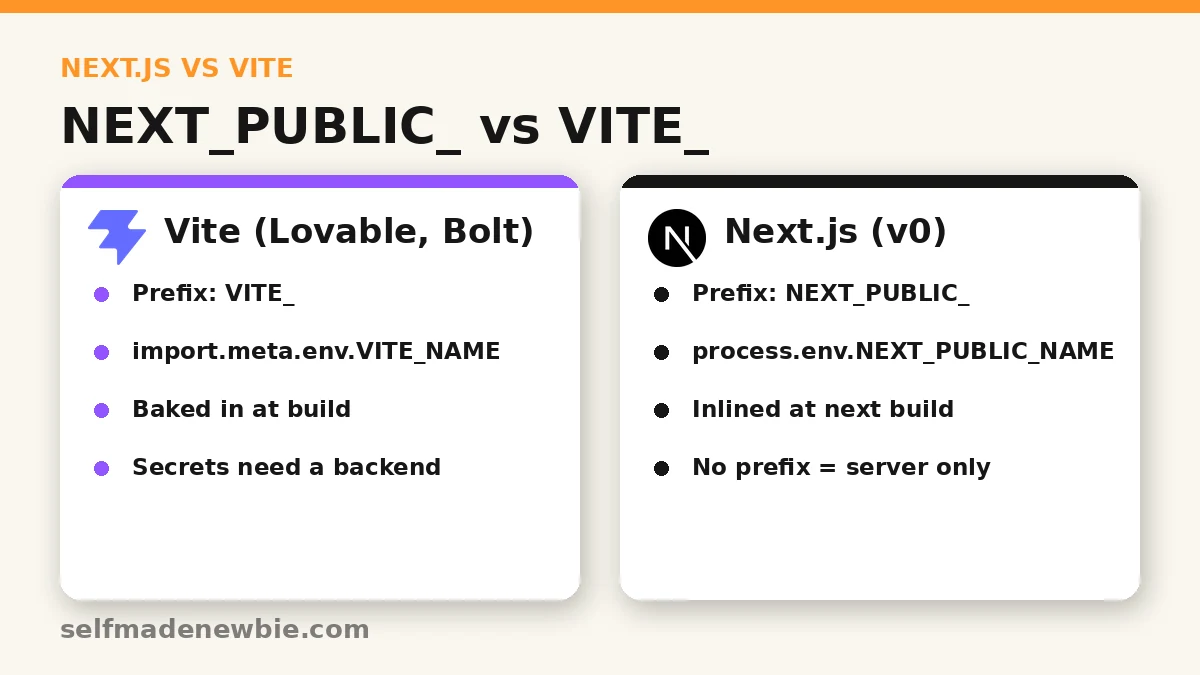
| Vite (Lovable, Bolt) | Next.js (v0) | |
|---|---|---|
| Browser prefix | VITE_ | NEXT_PUBLIC_ |
| How you read it | import.meta.env.VITE_NAME | process.env.NEXT_PUBLIC_NAME |
| When the browser value is set | At build time | At build time (next build) |
| Server-only values | Not available to a static Vite app | Any name without the prefix, readable at runtime on the server |
| Common trap | process.env | Dynamic lookups like process.env[name] are not inlined |
| Local files | .env, .env.local, .env.[mode], .env.[mode].local | process.env, .env.$(NODE_ENV).local, .env.local, .env.$(NODE_ENV), .env |
Source: the Next.js environment variables guide. It warns that after the build “your app will no longer respond to changes to these environment variables,” which is the same reason you redeploy a Vite app. It also says const env = process.env followed by env.NEXT_PUBLIC_NAME is not inlined, so always write the full name.
The upside of Next.js is the server side. A secret like a Stripe key can live in a normal, unprefixed variable and be used in a route handler, where the browser never sees it. A plain Vite app has no server of its own, so its secrets have to live in a Supabase Edge Function or another backend.
Which Keys Are Safe to Put in VITE_ Variables?
Only values you’d be happy to publish, like your Supabase project URL, a Supabase publishable or legacy anon key, a Stripe publishable key, or an analytics ID. Anything that grants extra access, like a Supabase secret or service_role key, a Stripe secret key or a paid API key, must stay server-side and never get the VITE_ prefix.
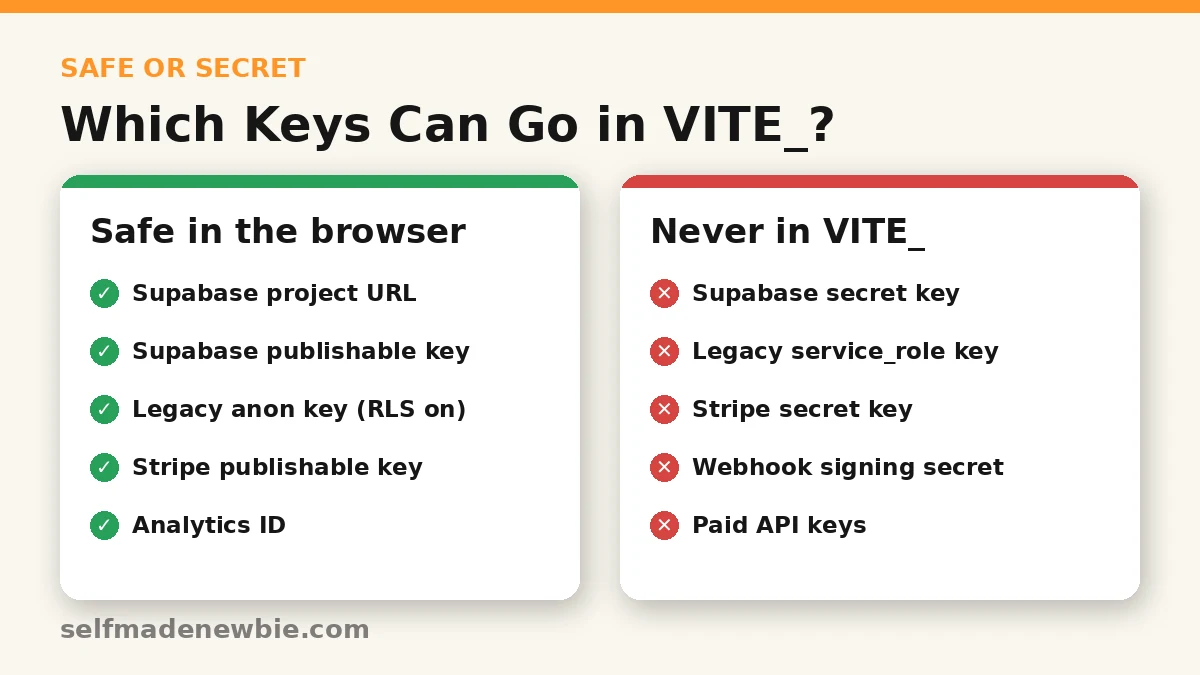
| Value | Safe with VITE_? | Why |
|---|---|---|
| Supabase project URL | Yes | Public endpoint |
Supabase publishable key (sb_publishable_...) or legacy anon key | Yes, with RLS on | Only reaches what Row Level Security allows |
Supabase secret key (sb_secret_...) or legacy service_role key | Never | Bypasses Row Level Security, full access to your data |
Stripe publishable key (pk_live_...) | Yes | Designed for the browser |
Stripe secret key (sk_live_...) or webhook signing secret | Never | Can charge, refund and read your Stripe account |
| Email, SMS or paid API keys | Never | Anyone can copy them and run up your bill |
Supabase’s API keys docs put it simply: the publishable key is for anything you ship, like a browser or mobile app, and the secret key is for anything you control, like a server or Edge Function. The secret key “bypasses Row Level Security, so it must never leave your control.” Supabase also says it is deprecating the legacy anon and service_role keys by the end of 2026 in favor of publishable and secret keys.
A safe key is only safe if your database rules are right. A publishable key with RLS turned off still lets anyone read your tables. My Supabase RLS guide has copy-paste policies to fix that. For Stripe, the signing secret belongs on the server only, as covered in my Stripe webhook not working guide.
What Should You Do if a Secret Key Was Exposed in Your Frontend?
Treat it as leaked, even if nobody seems to have used it. Fix the code first so the key is only read by a server function, then create a new key, update it everywhere, confirm nothing still uses the old one, and delete or deactivate the old key. Removing it from the code alone is not enough.
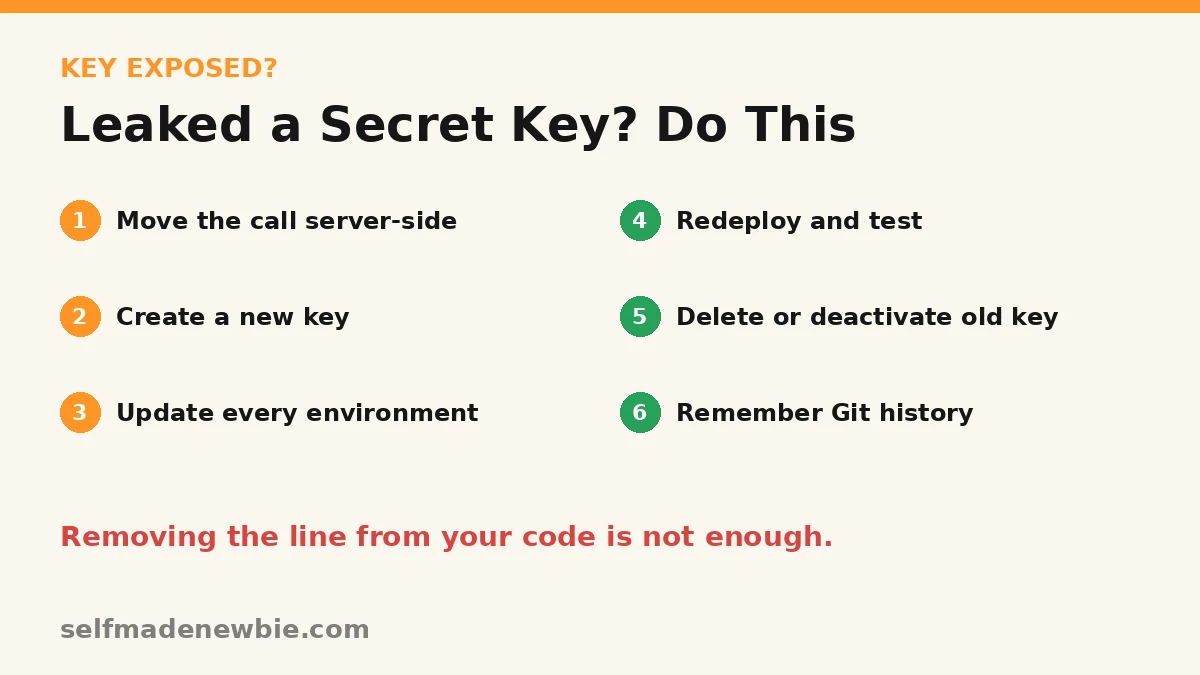
This follows Supabase’s own order in its leaked key procedure, which says to fix the root cause before you rotate anything:
- Move the call server-side. Put the code that needs the secret in a Supabase Edge Function, a Next.js route handler or a serverless function on your host, and drop the VITE_ prefix.
- Create a new key at the provider. For Supabase, that’s Settings, API Keys, then create a new secret key.
- Update every place that uses it: your host’s environment variables (as a Secret on Vercel), Supabase Edge Function secrets, and any server you run.
- Redeploy so the new value is live, then confirm every part of the app works.
- Retire the old key. Supabase says deleting a secret key can’t be undone, while deactivating legacy keys can be reversed if you missed a client.
- Check Git history. If the key was ever committed, it’s in your repository’s history even after you delete the line, so the rotation is what actually protects you.
Supabase adds a few rules worth taping to your monitor: never put a secret key in a browser, even on localhost, never send one over chat or email, and use a separate secret key for each backend part so a leak only means rotating one.
How Do Lovable and Bolt Handle Env Variables When You Deploy Elsewhere?
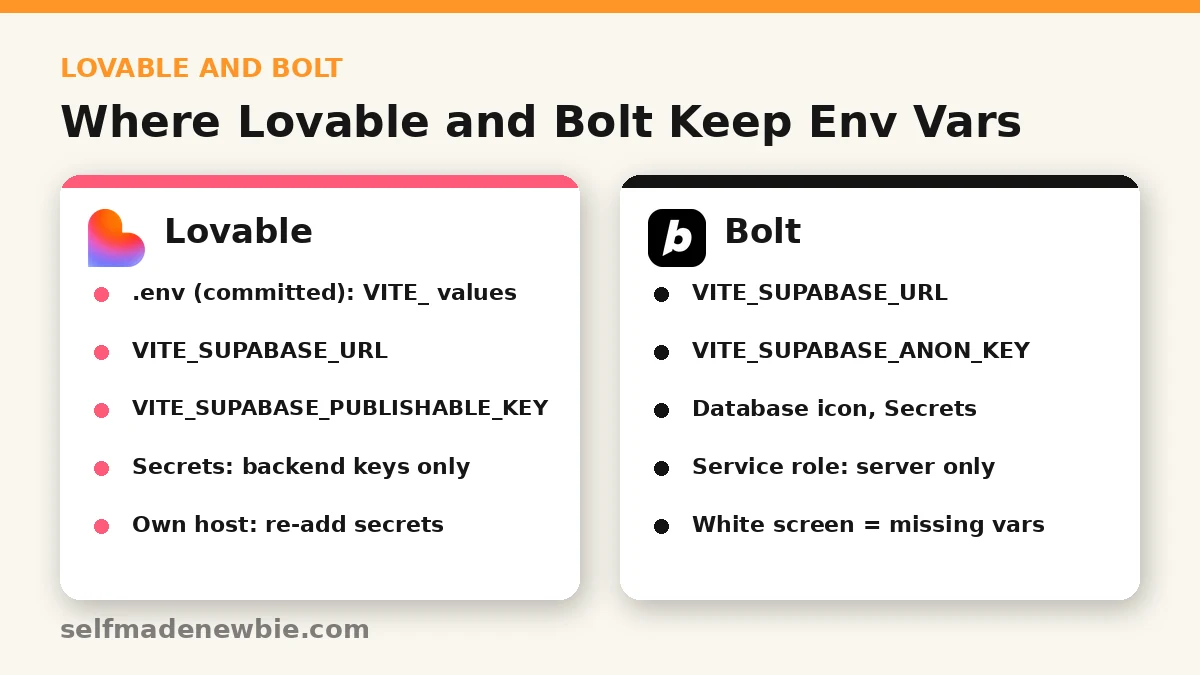
Lovable keeps browser values like VITE_SUPABASE_URL and VITE_SUPABASE_PUBLISHABLE_KEY in a committed .env file, and backend keys in Secrets, which never reach the browser. Bolt apps read values like VITE_SUPABASE_URL and VITE_SUPABASE_ANON_KEY, with server keys in its Secrets tab. On your own host, you re-add the backend secrets yourself.
Lovable
- Frontend values live in .env. Lovable’s Secrets docs say anything prefixed with VITE_ is a build-time, browser-exposed value that belongs in the project’s .env file, and that you should not add .env to .gitignore, because Lovable needs it committed for its builds.
- Backend values live in Secrets. Keys like STRIPE_SECRET_KEY and RESEND_API_KEY go in More, Settings, Secrets, are write-only and are injected into Edge Functions. Lovable rejects VITE_ names in Secrets.
- On your own host: Lovable’s external deployment guide says a project on the built-in backend needs
VITE_SUPABASE_URLandVITE_SUPABASE_PUBLISHABLE_KEYfor the browser andSUPABASE_URLandSUPABASE_PUBLISHABLE_KEYfor the server, plus the secrets your server functions read, which are not in the repository. It recommends Node.js 22 and a local test run first.
Bolt
- Typical names: Bolt’s intro to databases uses
VITE_SUPABASE_URL,VITE_SUPABASE_ANON_KEYandSUPABASE_SERVICE_ROLE_KEYas examples. Only the first two belong in the browser. - Secrets: server keys go in the database icon, Secrets, and are read by server functions, per Bolt’s secrets settings page.
- White screen? Bolt’s preview troubleshooting page says projects often show a white screen when required variables are missing, and suggests asking Bolt to list every environment variable the app needs and where each value comes from.
Moving a Lovable app to your own Vercel project? My guide on how to deploy a Lovable app walks through the build settings, and my roundup of Lovable hosting alternatives compares where to host it. If you also move the domain, the Lovable custom domain guide covers the DNS side, and your sign-in URLs need updating too, as shown in my OAuth redirect to localhost fix, since redirect URLs are often build-time env values as well.
What Is the Fastest Way to Debug a Missing Env Variable?
Build the app locally exactly like your host does, then search the output. If your public value isn’t in the dist folder, the build never saw it. If a secret shows up there, it’s leaking. Then compare the variable name, prefix, environment and last deploy time against the table below. Most cases are solved in minutes.
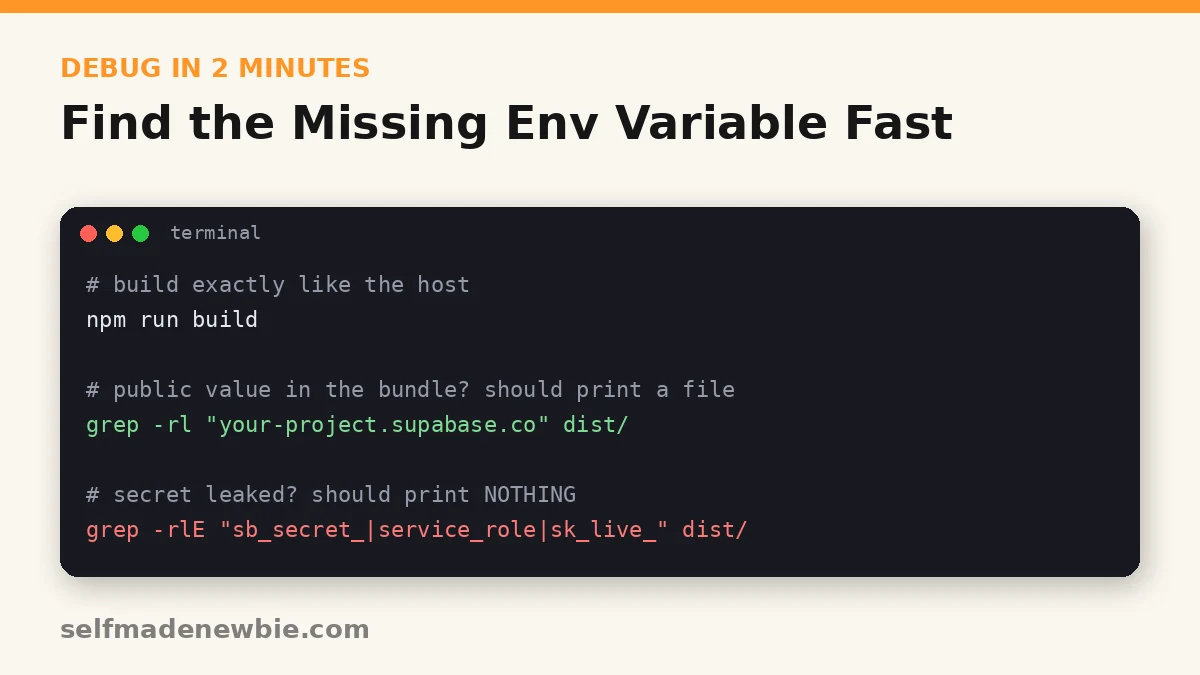
Run these from your project folder on Mac or Linux:
# 1. Build exactly like the host does
npm run build

# 2. Is the public value in the bundle? (should print a file name)
grep -rl "your-project.supabase.co" dist/

# 3. Did a secret leak into the bundle? (should print NOTHING)
grep -rlE "sb_secret_|service_role|sk_live_" dist/
Or drop a temporary check into your app and look at the browser console on the live site. It shows the mode and whether the value arrived, without printing the value itself:
// Temporary check, remove after debugging
console.log('mode:', import.meta.env.MODE)
console.log('has Supabase URL:', Boolean(import.meta.env.VITE_SUPABASE_URL))
Then match what you see to this table. I built it from the Vite, Vercel, Netlify, Next.js, Supabase, Lovable and Bolt docs, so it covers the problems people actually hit:
| Symptom | What the check shows | Cause | Fix |
|---|---|---|---|
| undefined everywhere | Value not in dist | No VITE_ prefix or never set on the host | Add the prefix, add it in the dashboard, redeploy |
| undefined, but name is right | Value not in dist | process.env | import.meta.env |
| Works locally only | Value in local dist, not on host | Lives in .env.local | Add it in your Vercel and Netlify settings |
| Old value after an edit | Old value in the live JS | No new build | Redeploy, untick Build Cache on Vercel |
| Fine in production, broken in previews | Preview build lacks the value | Only Production ticked | Tick Preview or set Deploy Previews |
| Netlify value ignored | Dashboard value not used | Same key in netlify.toml | Remove it from netlify.toml |
| Netlify value missing (Pro) | Value not in dist | Scope excludes Builds | Add the Builds scope |
| Netlify secret detected | Build fails before deploy | Public value flagged secret | Unflag public values, move real secrets |
| Feature flag always on | “false” in dist | Env values are strings | Compare to ‘true’ |
| vite.config value undefined | Config cannot read .env | .env not in process.env yet | loadEnv(mode, process.cwd(), '') |
| Next.js browser value undefined | Not inlined | No NEXT_PUBLIC_ or dynamic lookup | Prefix it, write the full name |
| Secret visible in DevTools | Secret found in dist | Secret has a public prefix | Server function, then rotate the key |
Vite Env Variables FAQ
Why is import.meta.env undefined on Vercel?
Usually the variable has no VITE_ prefix, or it was never added in the Vercel project’s Environment Variables settings for the environment you’re viewing. Add it, tick Production and Preview as needed, and redeploy. Vercel only applies new values to new deployments.
Can I use process.env in a Vite app?
Not in browser code. Vite exposes env values on import.meta.env, so process.env.VITE_NAME comes back undefined in the browser. process.env does work inside vite.config, but .env files aren’t loaded there automatically, so use Vite’s loadEnv helper.
Do I need to redeploy after changing environment variables?
Yes. Vite and Next.js bake browser values into your JavaScript during the build. Vercel applies changes only to new deployments, and Netlify needs a new build and deploy. Edit the value, then redeploy, and hard refresh your browser.
Is it safe to put my Supabase anon key in a VITE_ variable?
Yes. Supabase designs the publishable key, and the legacy anon key it replaces, to be public. It only reaches what your Row Level Security policies allow, so make sure RLS is on for every table. Never do this with the secret or service_role key.
Why does Netlify say a secret was detected in my build?
You marked a variable as containing secret values and Netlify found that value in your build output. If it’s a public VITE_ value, remove the secret flag. If it’s a real secret, stop exposing it in frontend code and rotate it.
Should I commit my .env file?
Never commit secrets. For a plain Vite app, keep secrets in .env.local, which Git ignores, and add values in your host’s dashboard. Lovable is the exception: it asks you to keep its .env committed, but that file should only hold public VITE_ values.
Should You Fix Your Env Variables Yourself or Hand It Off?
Fix it yourself if a value is simply undefined and one row of the table above matches. That’s usually a five-minute job. Hand it off if secret keys have already shipped in your frontend, if payments or real user data depend on the app, or if you want everything moved onto accounts you own.

Env variables are usually one rule away from working: the VITE_ prefix, import.meta.env, the value set on the host for the right environment, and a redeploy. Once they work, check that nothing secret made it into your bundle. My guide on how to launch your vibe-coded app covers everything else to check before real users arrive, and my DIY vs done-for-you breakdown shows what the do-it-yourself route really costs in time.
Handing it off is what we do at Launch Mango. Own and Secure ($199 one-off) is the natural fit when keys are involved: everything in Own Your App, plus exposed API keys and secrets removed from the frontend, Supabase RLS and database permissions locked down, sign-in and redirects fixed, live Stripe payments and webhooks, a security report and your custom domain included. Own Your App ($79 one-off) moves your Lovable, Bolt, v0 or Cursor app onto your own GitHub, Supabase and Vercel accounts, including the code, database and env vars, live at a real URL with a plain-English handover report, usually in 1 to 2 days. Either way, your money back if it isn’t live on your accounts.
Want to see how locked in and exposed your app is first? Run the free 2-minute app check. Or read my Launch Mango review and my roundup of the best app launch services first.
Your app, on your accounts, safe for real users. Get your variables right, then go get customers.