

Vercel 404 on Refresh? How to Fix It for Your Vibe-Coded App (2026)
Your app works perfectly. You click around, every page loads, you share the link. Then someone refreshes the page, or opens a link like yourapp.com/dashboard from an email, and gets a big ugly 404: NOT_FOUND.
If that sounds familiar, you’re not alone. The Vercel 404 on refresh problem (and its twin, the Netlify “Page not found” on reload) is one of the most common things that breaks when a Lovable, Bolt or Cursor app leaves the builder and lands on its own hosting. The good news: for most vibe-coded apps the fix is one small file.
In this guide I’ll show you why it happens in plain English, give you copy-paste fixes for Vercel, Netlify and Cloudflare, and flag the apps where you should not use the usual fix (Next.js apps from v0 and newer Lovable projects). Every fix and config file below comes from the official Vercel, Netlify, Cloudflare, React Router and Lovable docs, checked on October 21, 2026.
Here’s the quick fix:
| Your host | What to add | Where it goes |
|---|---|---|
| Vercel | A vercel.json rewrite that sends every path to /index.html | The root of your repo, next to package.json |
| Netlify | A _redirects file with /* /index.html 200 (or the same rule in netlify.toml) | public/_redirects in a Vite app, or netlify.toml at the repo root |
| Cloudflare Pages | Usually nothing. Pages serves your app for unknown paths if there is no top-level 404.html | Remove a stray 404.html if you have one |
| Next.js (v0) | No SPA rewrite. Next.js handles its own routes | Fix routing in next.config.js instead |
| Lovable TanStack Start (new projects) | No SPA rewrite. The host has to run the server part | Follow the TanStack Start hosting setup for your host |
Rather not touch config files? 404 on refresh is one of the gaps we fix when we move your app off the builder. Launch Mango‘s Own Your App ($79 one-off) puts your Lovable, Bolt, v0 or Cursor app on your own GitHub, Supabase and Vercel accounts, live at a real URL, with your money back if it isn’t live on your accounts. Run the free app check »
Why Your App Shows a 404 When You Refresh the Page
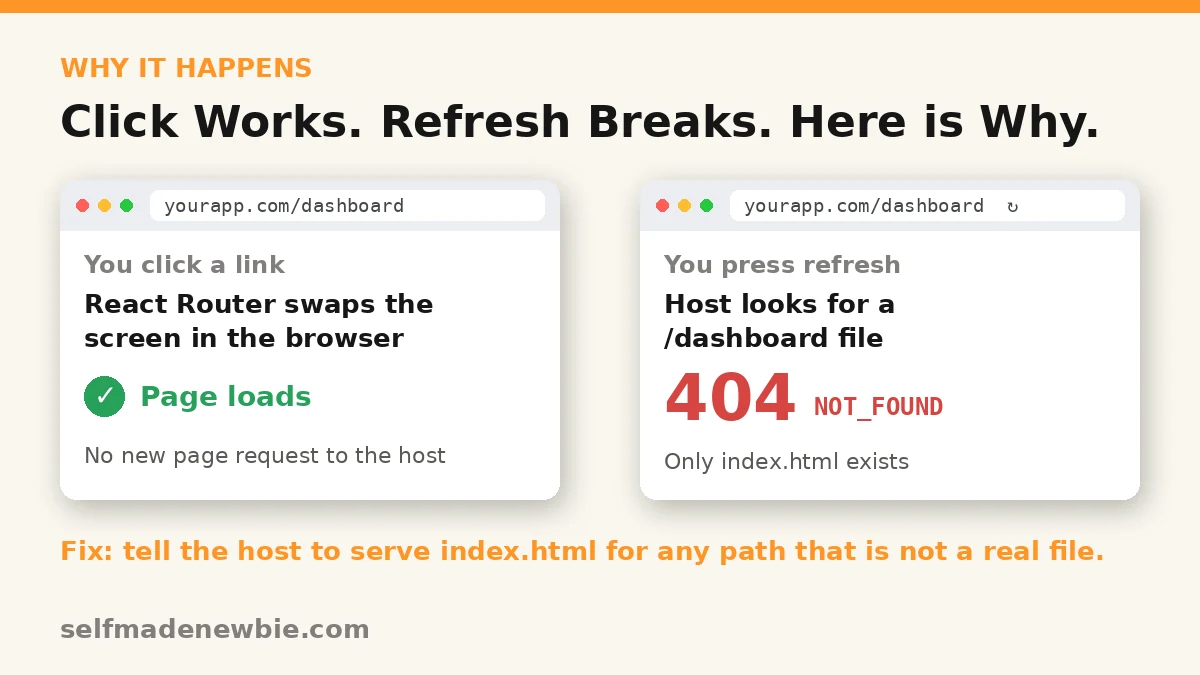
Most apps built with Lovable (older projects), Bolt and Cursor are single page apps (SPAs), usually built with Vite and React Router. When you build one, you get a single index.html file plus some JavaScript. There is no dashboard.html or settings.html. Every page lives inside that one file.
Here’s what happens:
- Clicking a link works. You land on
/, the host servesindex.html, and React Router takes over. When you click to/dashboard, the router just changes the address bar and swaps the screen. The browser never asks the host for a new page. - Refreshing breaks. A refresh (or a deep link from an email, a bookmark or a sign-in redirect) is a brand new request. The browser asks the host for
/dashboard. The host looks for that file, can’t find it, and returns a 404 before your JavaScript ever runs.
Vercel’s own knowledge base says it plainly: Vercel resolves every URL as a file path by default, and it can’t tell that your project is an SPA, so you have to add an SPA fallback yourself. The React Router docs say the same thing for any static host: you need to direct all URLs to index.html, and if you’re getting 404s at valid routes, it’s likely your host needs configuring.
So the fix is always the same idea: tell the host to serve index.html for any path that isn’t a real file, and let React Router handle the rest. That’s called a rewrite. Unlike a redirect, the URL in the address bar doesn’t change.
First, Check Which Kind of App You Have
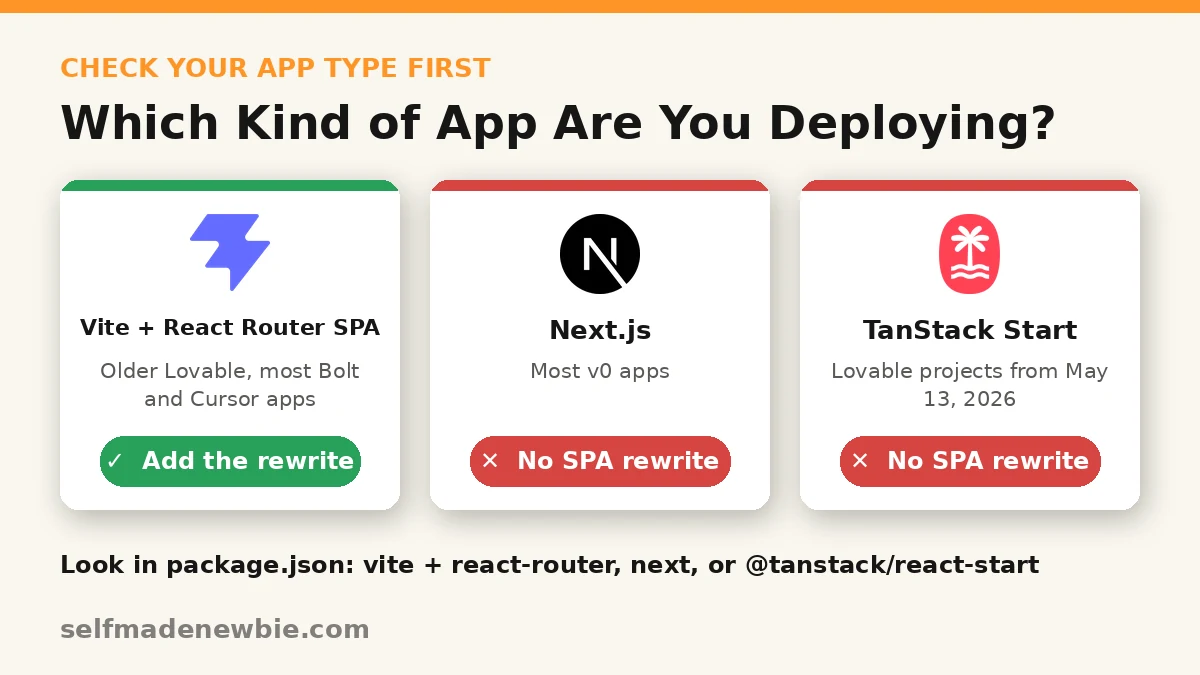
Before you paste anything, take 30 seconds to check what you’re deploying. The usual fix is right for one kind of app and wrong for the other two.
| App type | How to spot it | Needs the SPA rewrite? |
|---|---|---|
| Vite + React Router SPA (older Lovable projects, most Bolt and Cursor apps) | vite and react-router-dom (or react-router) in package.json, builds to a dist folder | Yes |
| Next.js (most v0 apps) | next in package.json, a next.config.js or next.config.ts file | No |
| TanStack Start (Lovable projects created from May 13, 2026) | @tanstack/react-start in package.json | No |
For Lovable specifically, its docs explain that new apps created from May 13, 2026 use TanStack Start, which runs server code, while older apps are React + Vite and build to static files. To check, open package.json in Lovable’s Code tab and look for @tanstack/react-start. You can also just ask Lovable in the chat which stack your project uses.
If you’re still at the “how do I even get it onto Vercel” stage, start with my step-by-step guide on how to deploy a Lovable app, then come back here if refresh breaks.
How to Fix the Vercel 404 on Refresh (vercel.json)
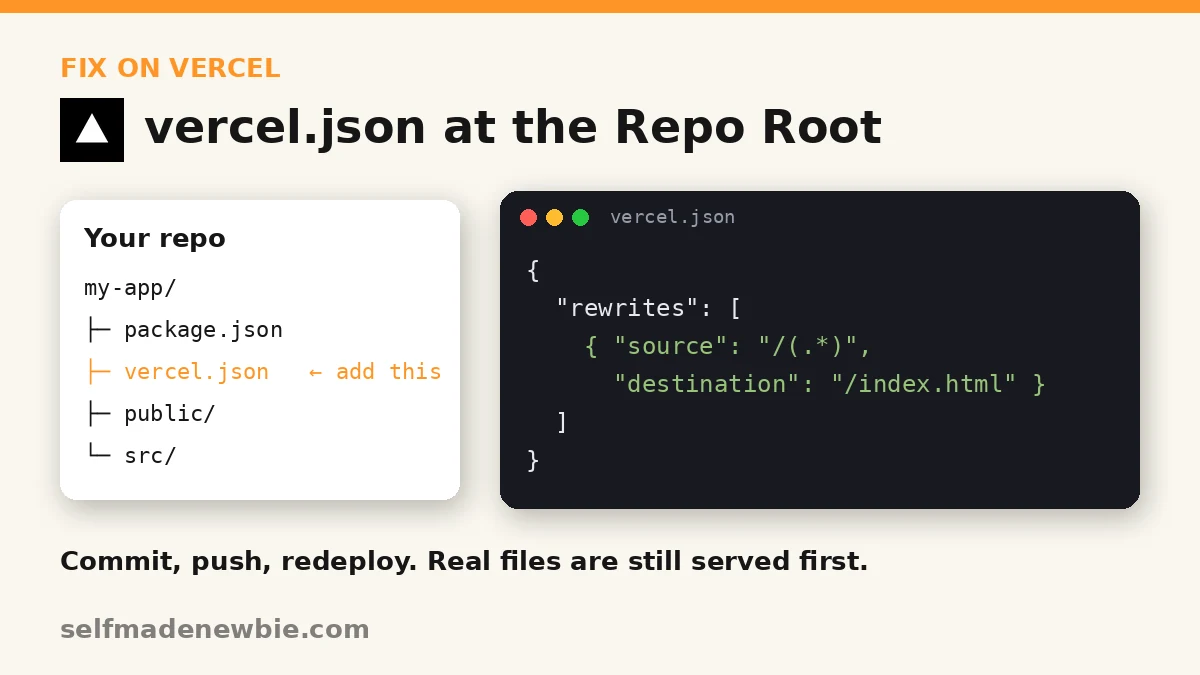
This is the fix for a Vite + React Router app on Vercel. It’s straight from Vercel’s Vite docs, which note that deep linking won’t work out of the box for a Vite SPA.
- In your project, create a file called
vercel.jsonat the root of the repo, in the same folder aspackage.json. Not insidesrc, and not insidedist. - Paste this in:
{
  "rewrites": [{ "source": "/(.*)", "destination": "/index.html" }]
}- Commit it and push to the branch Vercel builds from (usually
main). If you’re syncing from Lovable or Bolt to GitHub, you can add the file right in GitHub with Add file, Create new file. - Wait for the new deployment to finish, then open a deep link like
/dashboardand hit refresh. It should load your app, not the 404 page.
Why doesn’t this break your images, CSS and JavaScript? Vercel checks for a real file first. Its vercel.json docs say precedence is given to the filesystem before rewrites are applied, so /assets/index.js still gets the real file. Only paths with no matching file fall through to index.html.
If your app has an /api folder
If your project also serves API routes from Vercel (an api folder), use this version so API calls don’t get rewritten to your homepage. It’s the pattern from Vercel’s 404 guide:
{
  "rewrites": [{ "source": "/((?!api/).*)", "destination": "/index.html" }]
}
If you turned on cleanUrls
If your vercel.json already has "cleanUrls": true, Vercel says the destination has to drop the .html extension:
{
  "rewrites": [{ "source": "/(.*)", "destination": "/index" }],
  "cleanUrls": true
}
Two more traps from Vercel’s guide: the file does nothing if it’s in your .gitignore or never got committed (and Vercel won’t show an error), and a Framework Preset set to “Other” can stop a correct rewrite from working. For a Vite app, the preset in Project Settings, Build and Deployment should say Vite.
How to Fix the Netlify 404 on Refresh (_redirects or netlify.toml)
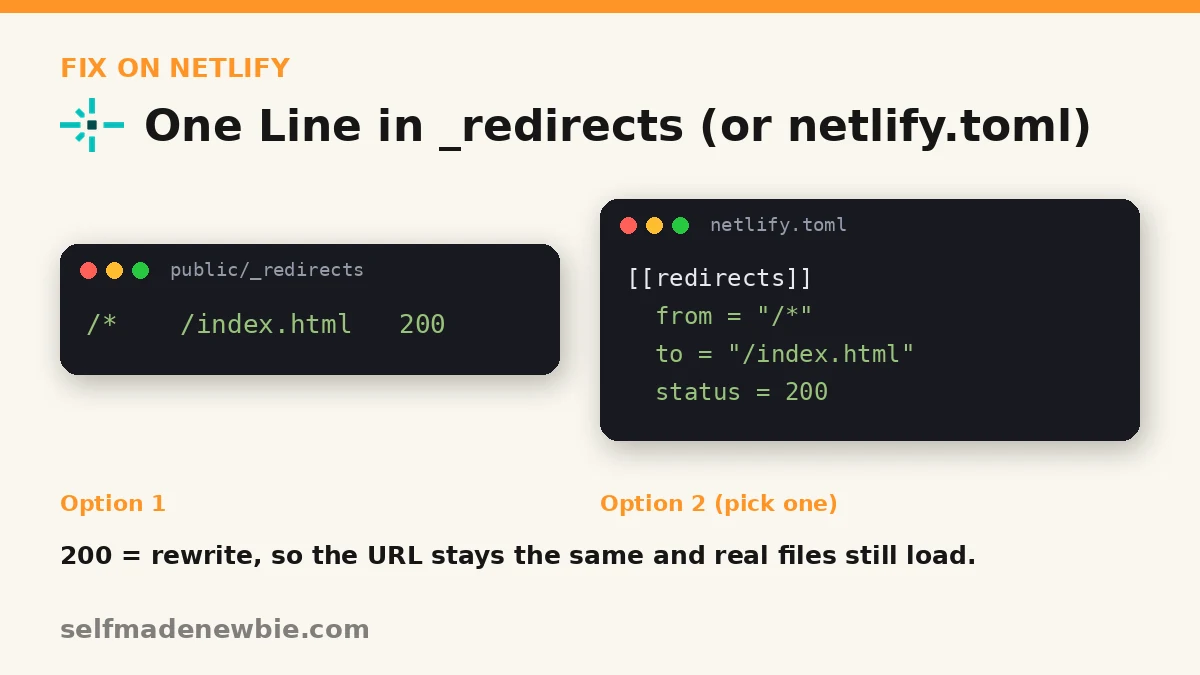
On Netlify the symptom is a “Page not found” screen when you reload anything other than the homepage. Netlify’s rewrites docs give you the exact rule for single page apps. Pick one of these two options.
Option 1: a _redirects file (easiest)
Create a plain text file called _redirects (no file extension) with this one line:
/* /index.html 200Where you put it matters. Netlify reads _redirects from your publish directory, which is dist for a Vite app. Since dist gets rebuilt every time, put the file in your public folder instead. Vite copies everything in public into dist when it builds, so it ends up in the right place. Netlify’s redirects overview also warns that the file has to end up in the folder you deploy.
Option 2: netlify.toml
If you already have a netlify.toml at the root of your repo, add this instead:
[[redirects]]
  from = "/*"
  to = "/index.html"
  status = 200
The 200 is what makes it a rewrite rather than a redirect, so the address bar keeps showing /dashboard while Netlify serves index.html behind the scenes. Netlify also won’t “shadow” real files by default, so your scripts, images and CSS keep loading. Don’t add a ! to the end of the status unless you really mean to override real files.
One heads-up if you have other rules: Netlify processes the first matching rule from top to bottom, and _redirects rules run before netlify.toml rules. Keep this catch-all as the last rule, or it will swallow the ones below it.
Cloudflare Pages and Other Hosts
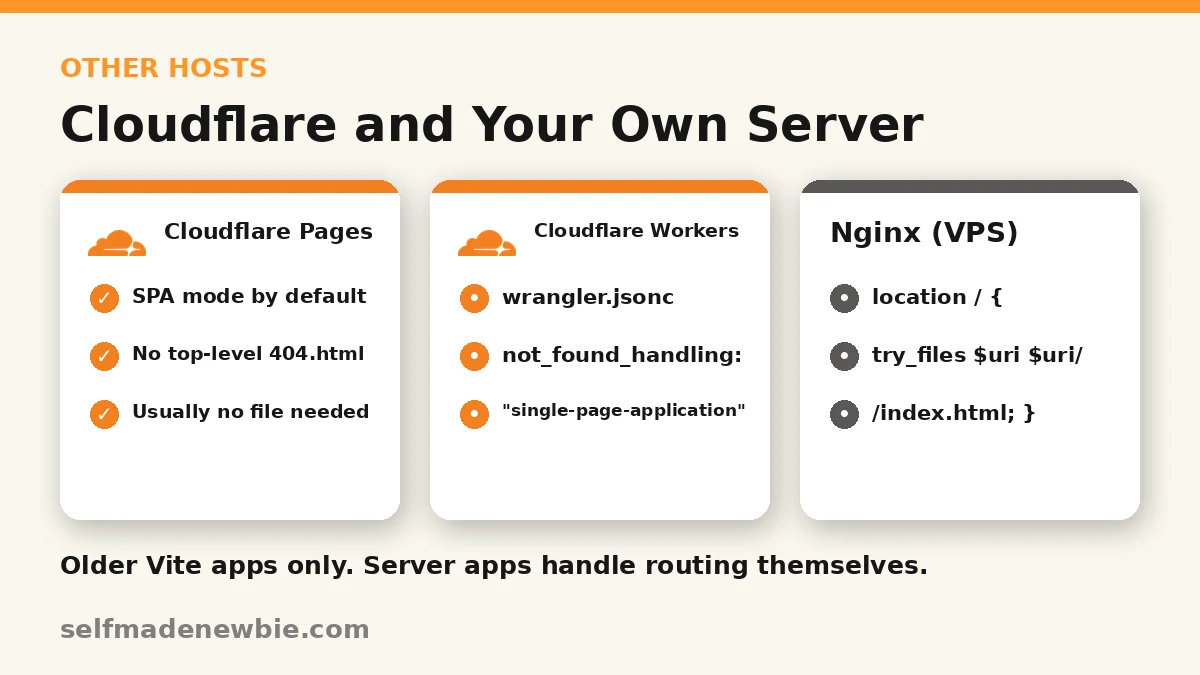
Cloudflare Pages
Good news here. Cloudflare’s docs say that if your project does not include a top-level 404.html file, Pages assumes you are deploying a single page app and serves your root page for any path that isn’t a real file. So a plain Vite build usually just works. If refresh still 404s on Pages, check whether a 404.html got into your build output and remove it.
Cloudflare Workers (static assets)
If you deploy to Workers instead of Pages, you have to turn on SPA mode yourself. Cloudflare’s single page application guide uses this in wrangler.jsonc:
{
  "name": "my-app",
  "compatibility_date": "2026-10-21",
  "assets": {
    "directory": "./dist/",
    "not_found_handling": "single-page-application"
  }
}
Your own server (Nginx)
Self-hosting on a VPS with Nginx? Lovable’s hosting docs use this try_files rule for older React + Vite apps:
location / {
    try_files $uri $uri/ /index.html;
}
Lovable’s same page lists the matching setting for other hosts too: staticwebapp.config.json on Azure, rewrite rules on AWS Amplify and firebase.json on Firebase.
Next.js (v0) and New Lovable Apps: Don’t Copy the Rewrite
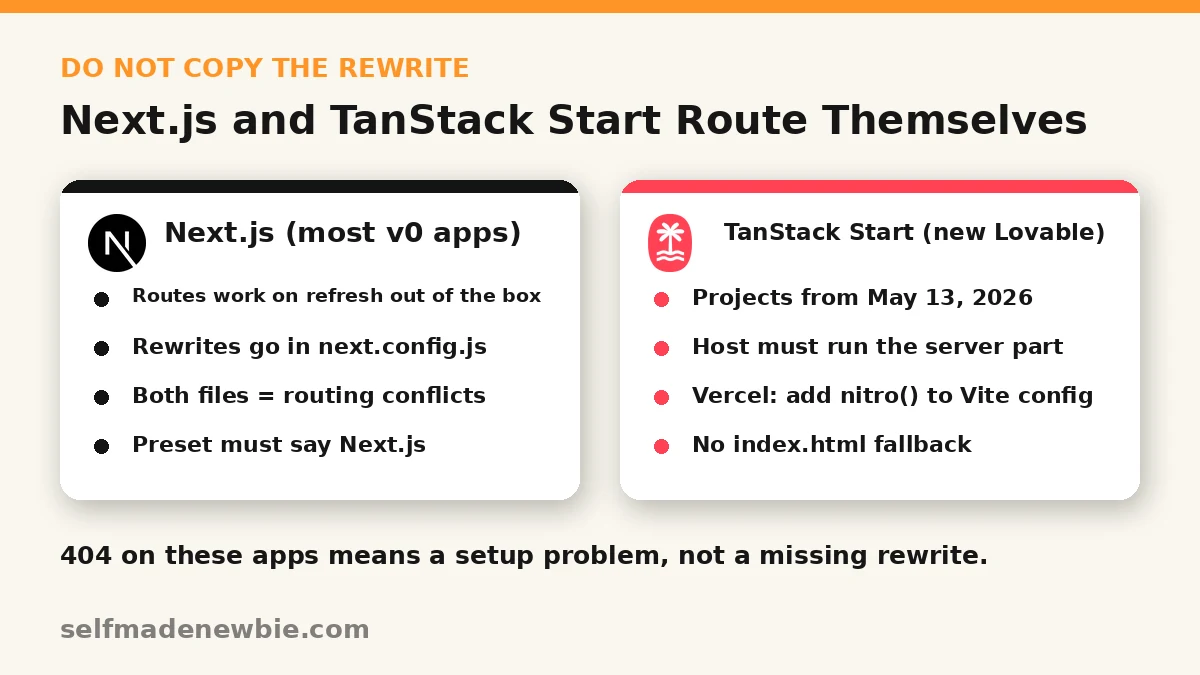
This is where a lot of copy-paste fixes from Stack Overflow make things worse.
Next.js apps (most v0 projects)
Next.js isn’t a single page app in this sense. It knows about every route itself, so on Vercel a route like /dashboard works on refresh without any extra file. Vercel’s 404 guide says routing for Next.js belongs in next.config.js, and that rewrites in both vercel.json and next.config.js conflict. If a Next.js app 404s on every route after a clean build, check that the Framework Preset says Next.js, not “Other”.
Lovable TanStack Start apps (created from May 13, 2026)
Newer Lovable projects use TanStack Start, which renders pages on a server. Lovable’s deployment docs explain that a 404 on a nested route here usually means the host isn’t running the server part, not that a rewrite is missing. A blanket rewrite to index.html won’t help, and Lovable specifically says not to use the try_files fallback for these apps.
The fix is to deploy it as a server app. On Vercel, its TanStack Start guide uses the Nitro Vite plugin, and says that if the home page loads but routes return 404, you should confirm nitro() is in your Vite config and redeploy. Netlify and Cloudflare have their own plugins, listed in the TanStack Start hosting guide.
Still Getting a 404? Check These Before You Panic

Added the file and still seeing a 404? Run down this list. It’s almost always one of these:
- Wrong folder.
vercel.jsonbelongs at the repo root._redirectsbelongs inpublicfor a Vite app (so it lands indist). - Not committed or ignored. Check the file shows up in your GitHub repo and isn’t listed in
.gitignore. - No new deploy. Config files only kick in on the next deployment. Check the latest deploy actually includes your commit.
- Wrong file name. It’s
_redirectswith an underscore and no extension, not_redirects.txtorredirects. - Framework Preset set to “Other” on Vercel. Vercel’s guide calls this out as a common cause of 404s even with a correct rewrite.
- The whole site 404s, not just refresh. That’s a different problem, usually a wrong output directory (should be
distfor Vite) or a build that didn’t publishindex.html. - Works on the .vercel.app URL but not your domain. Vercel says that points to DNS or domain setup, not your rewrite.
- Refresh loads a blank white page instead of a 404. Good news, the rewrite works. A blank page usually means a missing
VITE_environment variable or a JavaScript error. Open the browser console to see which. - It’s a Next.js or TanStack Start app. Go back to the section above. The SPA rewrite is the wrong fix for those.
Fixed the 404 but not sure what else might break once real users show up? Our free app check asks five quick questions and flags your lock-in, security and deploy risks.
Last resort: some guides suggest switching React Router to HashRouter, which puts a # in every URL (like /#/dashboard) so the host only ever sees /. It works, but the URLs look dated and are worse for sharing and SEO. The rewrite is the cleaner fix.
How to Test That Refresh Works
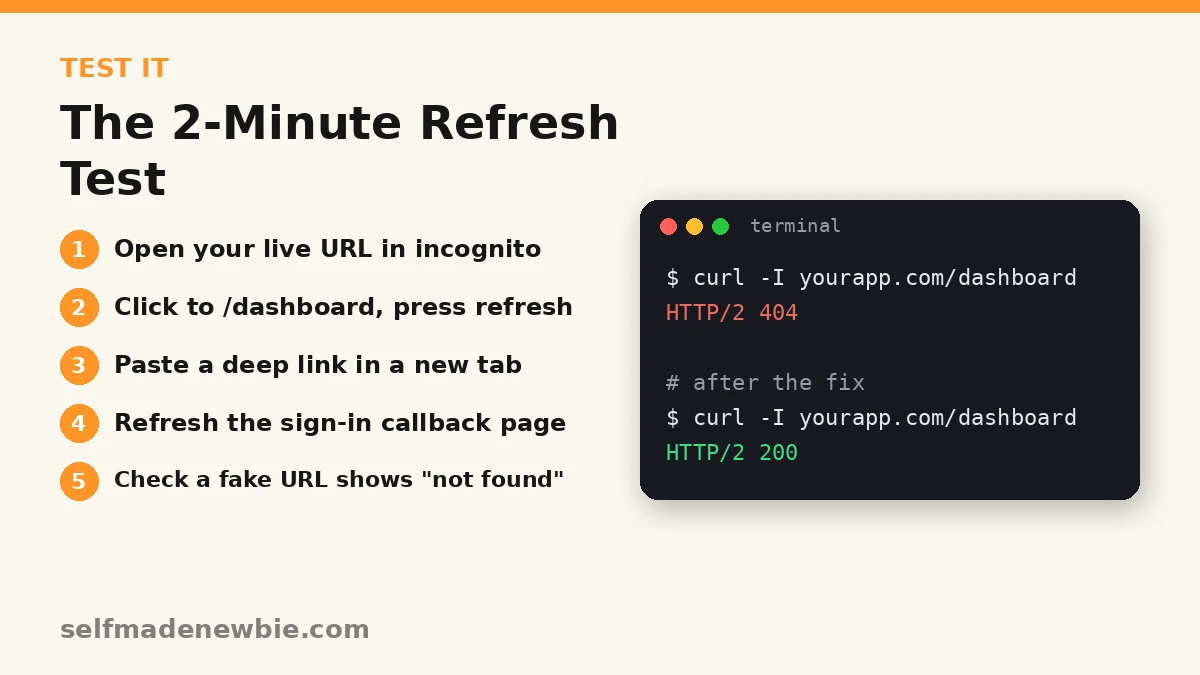
Don’t just test the homepage. Here’s the 2-minute check I’d run after every deploy:
- Open your live URL in an incognito window (no cached pages).
- Click through to an inner page like
/dashboard, then press refresh. You should see your app. - Paste a deep link straight into a new tab, the way a user would from an email.
- Test the page your sign-in sends people to after login (often something like
/auth/callback). A sign-in redirect lands on that route as a fresh page load, so it has to survive a refresh too. - Visit a path that really doesn’t exist, like
/this-page-is-fake. With the rewrite, your app loads instead, so make sure your router shows a friendly “not found” screen for unknown routes.
If you’re comfortable with a terminal, curl -I https://yourapp.com/dashboard should now return 200 instead of 404.
Refresh is only one item on the go-live list. The others (env vars, sign-in redirects, database permissions, live payments) are all in my guide on how to launch your vibe-coded app.
Vercel 404 on Refresh FAQ

Why does my Vercel app work until I refresh the page?
Because clicking links is handled by React Router inside the browser, but a refresh asks Vercel for a file at that path. In a single page app there’s only index.html, so Vercel returns 404 until you add a rewrite in vercel.json.
Does the vercel.json rewrite hurt SEO or slow my app down?
No. It’s a rewrite, not a redirect, so there’s no extra hop and the URL stays the same. Real files are still served first. One side effect: unknown URLs return your app instead of a 404, so give your router a proper not-found page.
Is the fix the same for a Bolt or Cursor app?
Yes, if it’s a Vite + React Router single page app, which most are. Check package.json: if you see vite and react-router-dom or react-router and no next, use the vercel.json or _redirects fix above.
My Lovable app works on lovable.app but 404s on Vercel. Why?
Lovable’s own hosting handles this for you. Your own host doesn’t until you tell it to. For older Lovable projects, add the vercel.json rewrite. For projects created from May 13, 2026 (TanStack Start), make sure Vercel is running the server part instead.
Do I need both _redirects and netlify.toml?
No, one is enough. If you have both, Netlify reads _redirects first, then netlify.toml. Pick one place for your rules so they’re easy to find later.
Should I use HashRouter instead?
Only if you can’t change your host settings at all. A rewrite gives you clean URLs, which are nicer to share and better for search.
Final Thoughts: Fix It Once, Then Own Your Setup

For most vibe-coded apps, the Vercel 404 on refresh fix is one small vercel.json file, and the Netlify fix is one line in _redirects. Check your app type first, put the file in the right folder, redeploy, and test a real deep link.
But if this is the first of several things breaking now that your app is off the builder, that’s normal. Refresh 404s usually show up alongside missing env vars, sign-in that bounces to localhost and a Supabase database nobody has locked down. You can work through them yourself (my DIY vs done-for-you breakdown shows what that really takes), or hand them off.
That’s what we do at Launch Mango. Own Your App ($79 one-off) moves your Lovable, Bolt, v0 or Cursor app onto your own GitHub, Supabase and Vercel accounts, live at a real URL with a plain-English handover report, usually in 1 to 2 days, and your money back if it isn’t live on your accounts. Own and Secure ($199 one-off) adds sign-in and redirects, Supabase RLS and permissions, exposed API keys, live Stripe payments and webhooks, a security report and a custom domain.
Want the full picture first? Read my Launch Mango review, compare it with the best app launch services, or see the ways to get your Lovable or Bolt app live. Or just run the free 2-minute app check and see what your app needs.
Your app, on your accounts, safe for real users. Fix the 404, then go get users.


