Stripe Webhook Not Working? How to Fix It in Lovable, Bolt, v0 and Cursor Apps (2026)
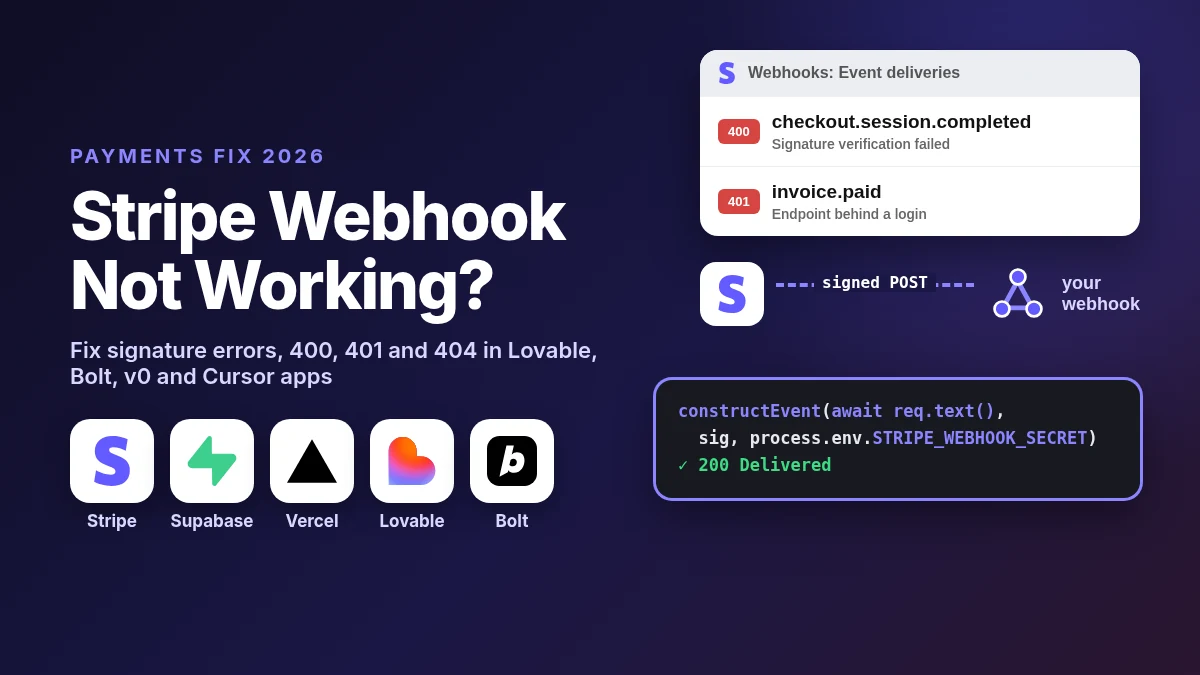
A customer pays. Stripe says the payment succeeded. And your app does… nothing. No plan upgrade, no unlocked course, no order in your database. Or you open Stripe and see a wall of red: Failed, 400, “No signatures found matching the expected signature for payload”. It worked in the preview. It worked on your laptop. Now it’s live and it’s broken.
Stripe webhook not working? The good news is that the cause is almost always one of a handful of things: the wrong signing secret, a body that got changed before you checked it, a URL Stripe can’t reach, or events you never subscribed to. Every one of them shows up clearly in Stripe’s own delivery logs once you know where to look.
This guide walks through each cause in the order I’d check them, with working code for Next.js, Supabase Edge Functions and Express, plus what Lovable and Bolt set up for you. Every step, setting and error message below comes from the official Stripe, Supabase, Vercel, Next.js, Express, Lovable and Bolt docs, checked on October 24, 2026.
Here’s the quick version:
| What you see | What it usually means | Fix |
|---|---|---|
| 400 and “signature verification failed” | Wrong whsec_ secret (test vs live, CLI vs Dashboard), or the body was parsed first | Use the secret for this endpoint and verify the raw body |
| 401 or 403 | The endpoint is behind a login: Vercel Deployment Protection or Supabase verify_jwt | Use the production domain or a bypass, set verify_jwt = false |
| 404 | The URL is wrong, or the function or route was never deployed | Copy the real live URL into the endpoint settings |
| 500 | Your code crashed after receiving the event | Read your function or server logs |
| Nothing at all | The event isn’t selected, or the endpoint is in the other mode | Add the event types in the live endpoint |
| Duplicates | Stripe retried, or sent the same event twice | Store each event ID and skip repeats |
Want your payments fixed for you? “People pay and nothing unlocks” is one of the gaps we see again and again in vibe-coded apps. Launch Mango‘s Own and Secure ($199 one-off) moves your Lovable, Bolt, v0 or Cursor app onto your own GitHub, Supabase and Vercel accounts, then sets up live Stripe payments and webhooks, fixes sign-in and redirects, locks down your Supabase RLS, removes exposed API keys and hands you a security report, with a custom domain included. Money back if it isn’t live on your accounts. Run the free app check »
Works in test, not firing in production?
If Stripe works in test but nothing fires in production, you usually have a mode mismatch. Live events never hit a test endpoint, each endpoint has its own whsec_ secret, and the CLI listen secret is not the Dashboard one. Create a live endpoint on your production URL, select the events, swap the live key and whsec_, then confirm deliveries.
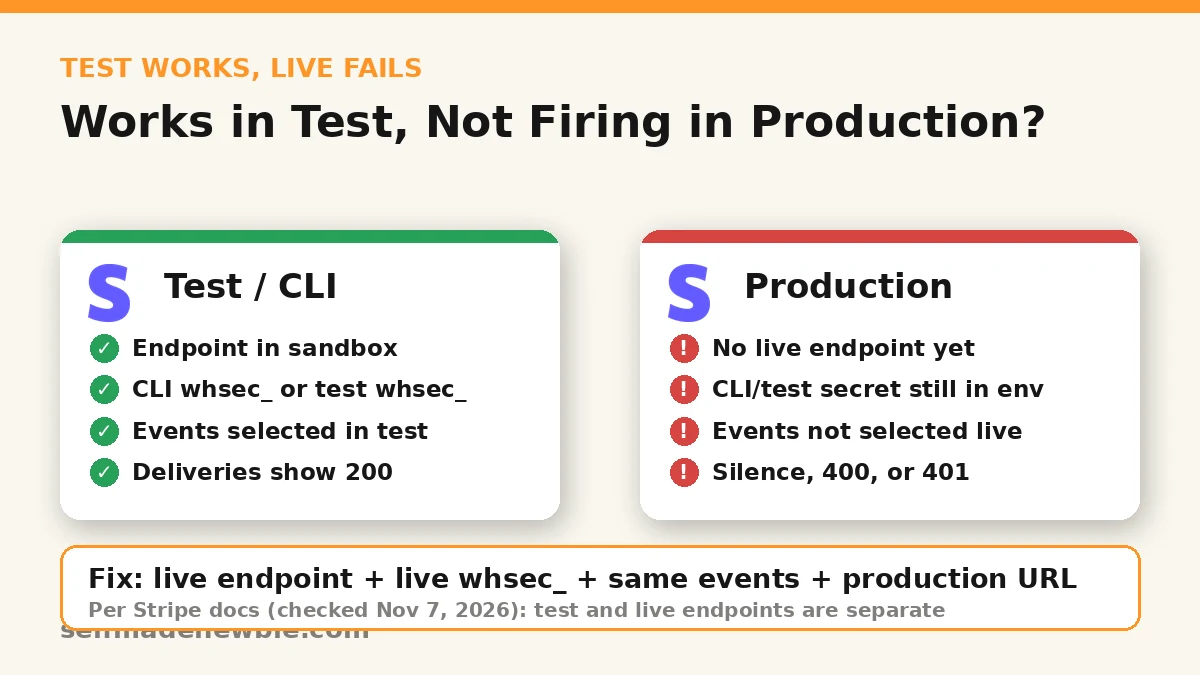
Per Stripe’s webhooks docs (checked Nov 7, 2026), Stripe generates a unique signing secret for each endpoint, and the secret is different for test and live even if the URL is the same. Stripe’s endpoint troubleshooting also warns that the stripe listen CLI secret is not the Dashboard endpoint secret. Stripe’s go-live checklist says to register production webhooks and confirm the live endpoint behaves like the test one.
Test works / production fails decision table (match the symptom to the mode mismatch, then apply the fix):
| Symptom | Mode mismatch | Fix |
|---|---|---|
| Real payment succeeds, zero live deliveries | Only a sandbox/test endpoint exists, or events were never selected on the live one | In live mode, create (or open) the live endpoint, select the same event types as test |
| Live deliveries show 400 / signature failed | Production still has the test whsec_ or the CLI stripe listen secret | Reveal the live endpoint’s secret, set STRIPE_WEBHOOK_SECRET, redeploy on Vercel |
| Test Checkout works, live Checkout uses wrong price or fails | Still on sk_test_ / test price IDs in production env | Swap to sk_live_ (or rk_live_) and recreate live prices (sandbox objects are not usable live) |
| Live deliveries show 401 / 403 | URL is a protected preview, or Supabase verify_jwt is on | Use the production domain (Vercel Standard Protection leaves it open), or a bypass query param; set verify_jwt = false for the webhook function |
| Live deliveries show 404 | Endpoint still points at a preview URL, old builder URL, or undeployed path | Copy the real production HTTPS URL into the live endpoint settings |
Works with stripe listen, fails after deploy | CLI secret left in production config | Replace it with the Dashboard live endpoint’s whsec_ |
Go-live webhook checklist (run this once before you take real payments):
- Toggle Stripe Dashboard to live mode. Create an event destination (or open the existing live endpoint) with your production HTTPS URL.
- Select the same event types your handler uses (for most vibe-coded apps:
checkout.session.completed, subscription update/delete, andinvoice.paidif you need renewals). Events are not copied from the test endpoint. - Reveal the live endpoint’s
whsec_signing secret. Put it in production asSTRIPE_WEBHOOK_SECRET. Do not reuse the CLI secret fromstripe listen. - Swap the secret API key to
sk_live_(or a restrictedrk_live_key) and use live price IDs. Sandbox products and prices are not usable in live mode. - Confirm the URL is the production domain, not a Vercel preview or generated deployment URL. If the host is protected, use a Protection Bypass for Automation query param, or host the webhook on an unprotected production domain. On Supabase, set
verify_jwt = falsefor that function only and keep the signature check. - Redeploy after env changes on Vercel (new deployments pick up env vars). Supabase Edge Function secrets apply without a redeploy, but redeploy if you changed
config.toml. - Run one real live payment (then refund it). In Workbench > Webhooks > Event deliveries, confirm a Delivered 2xx and that your app unlocked access. Also fix related go-live traps like OAuth still pointing at localhost and env vars missing after deploy.
Want live Stripe payments and webhooks set up on your accounts? That mode-mismatch mess (test secret in production, preview URL, no live endpoint) is exactly what we fix. Launch Mango‘s Own and Secure ($199 one-off) moves your Lovable, Bolt, v0 or Cursor app onto your own GitHub, Supabase and Vercel accounts, then sets up live Stripe payments and webhooks, fixes sign-in and redirects, locks down Supabase RLS, removes exposed API keys and hands you a security report, with a custom domain included. Positioning: your app, on your accounts, safe for real users. Own Your App ($79) covers the move without the security pass. Money back if it isn’t live on your accounts. Run the free app check »
How Stripe Webhooks Work (and Why They Break After Deploy)
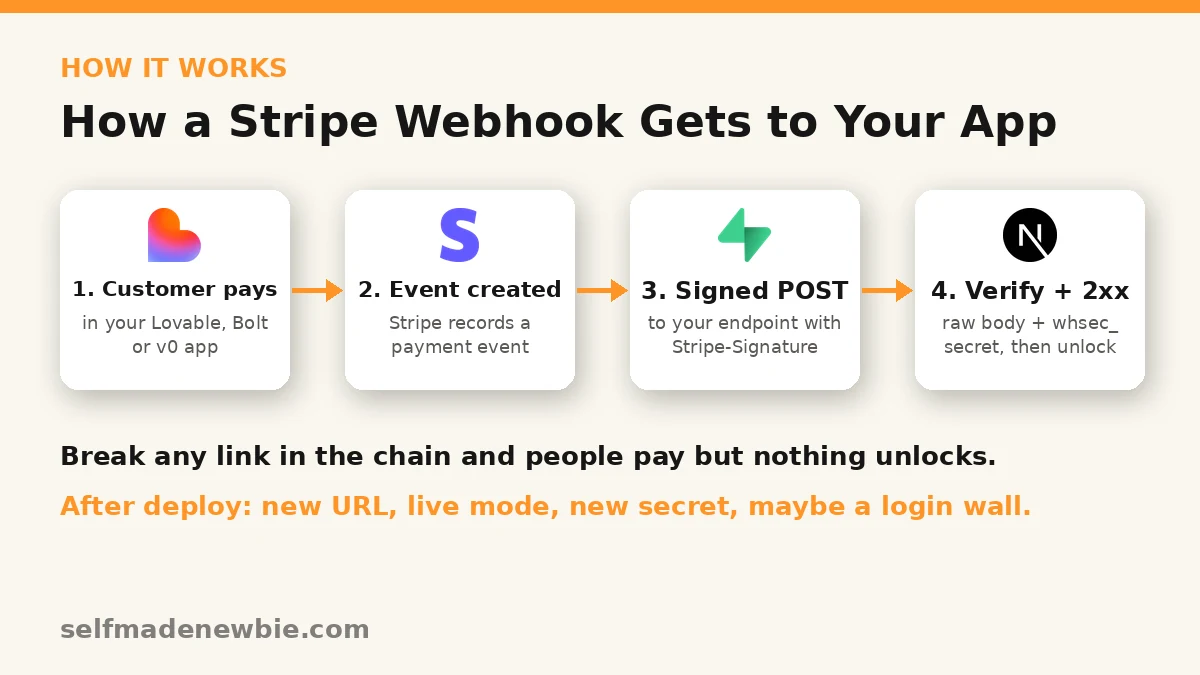
A webhook is Stripe calling your app. When something happens in your account, like a checkout finishing or a subscription renewing, Stripe creates an event and sends it as an HTTPS POST request to a URL you gave it. Your code checks that the request really came from Stripe, does its job (unlock the plan, save the order), and answers with a 2xx status code so Stripe knows it arrived.
This matters more than most builders expect. Stripe’s fulfillment guide says you can’t rely on your checkout success page alone, because there’s no guarantee the customer ever loads it. They can pay and lose their connection a second later. Webhooks are required if you sell subscriptions or accept payment methods where success comes later. So if your webhook is broken, people can pay you and get nothing.
Every request carries a Stripe-Signature header. Your code uses a signing secret that starts with whsec_ to check it. Per Stripe’s webhooks docs, that check only passes if you use the exact raw body Stripe sent and the secret for that exact endpoint.
That’s why webhooks so often break right after deploy. In the builder’s preview or on your laptop, everything lines up. In production, the URL is different, the mode is different (live instead of test), the secret is different, and your host might sit behind a login. Any one of those breaks the chain.
Step 1: Check Event Deliveries in the Stripe Dashboard
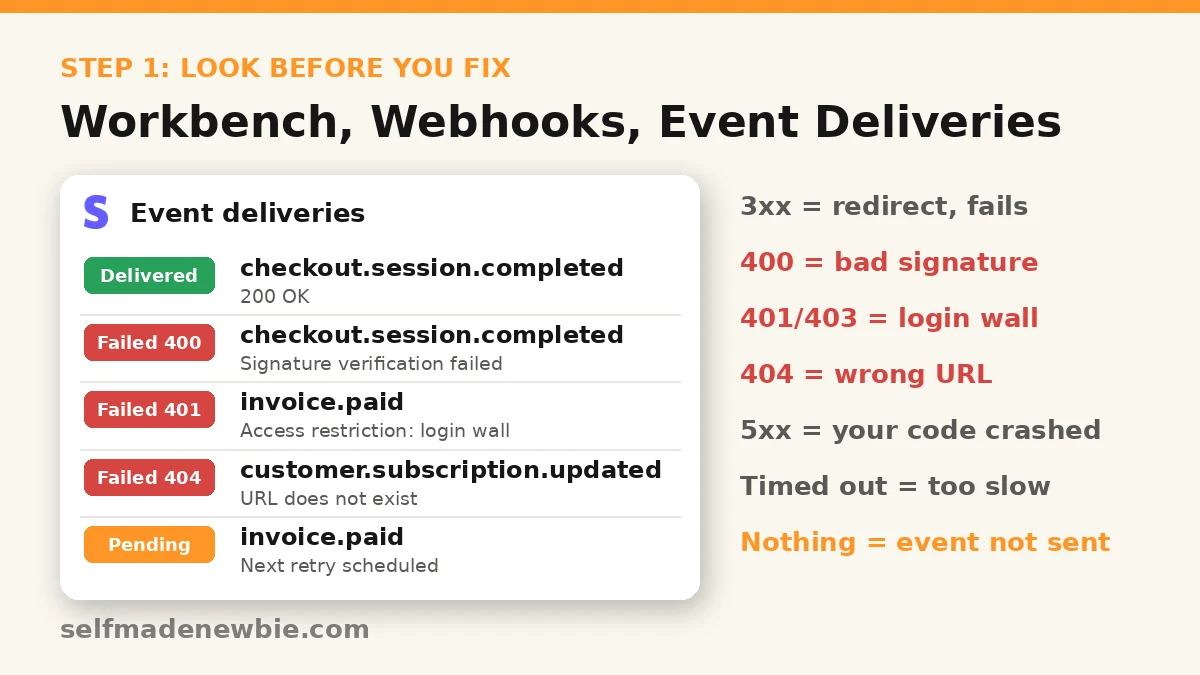
Before you change any code, look at what Stripe actually saw. Per the Stripe webhooks docs, open Workbench, go to the Webhooks tab, pick your endpoint and open Event deliveries. Each event shows as Delivered, Pending or Failed. Click one to see the HTTP status code your server returned and when Stripe will try again.
First, make sure you’re looking at the right mode. Your sandbox (test) and live accounts have separate endpoints and separate delivery lists, so a perfect test endpoint tells you nothing about the live one.
Then match the status to the cause. This is Stripe’s own list, plus what it usually means in a Lovable, Bolt, v0 or Cursor app:
| Stripe shows | Stripe says | What to check |
|---|---|---|
| Unable to connect | The host can’t be reached | Is the URL public, spelled right and on HTTPS? |
| 302 / 3xx | Redirects count as failures | Use the final URL the redirect lands on (www vs no-www, trailing slash) |
| 400 | Your server rejected the request | Usually signature verification failed (next section) |
| 401 / 403 / 405 | Access restrictions | A login wall in front of the endpoint, or a route that doesn’t accept POST |
| 404 | The URL doesn’t exist | Wrong path, preview URL, or the function was never deployed |
| 5xx | Your server errored | Your app crashed: read your logs |
| TLS error | The secure connection failed | Stripe needs TLS v1.2 or newer |
| Timed out | Your server took too long | Answer first, do the slow work after |
If there are no deliveries at all for a payment that went through, Stripe never tried. Skip ahead to the events section. That’s a setup problem, not a code problem.
Fix “Stripe Webhook Signature Verification Failed”
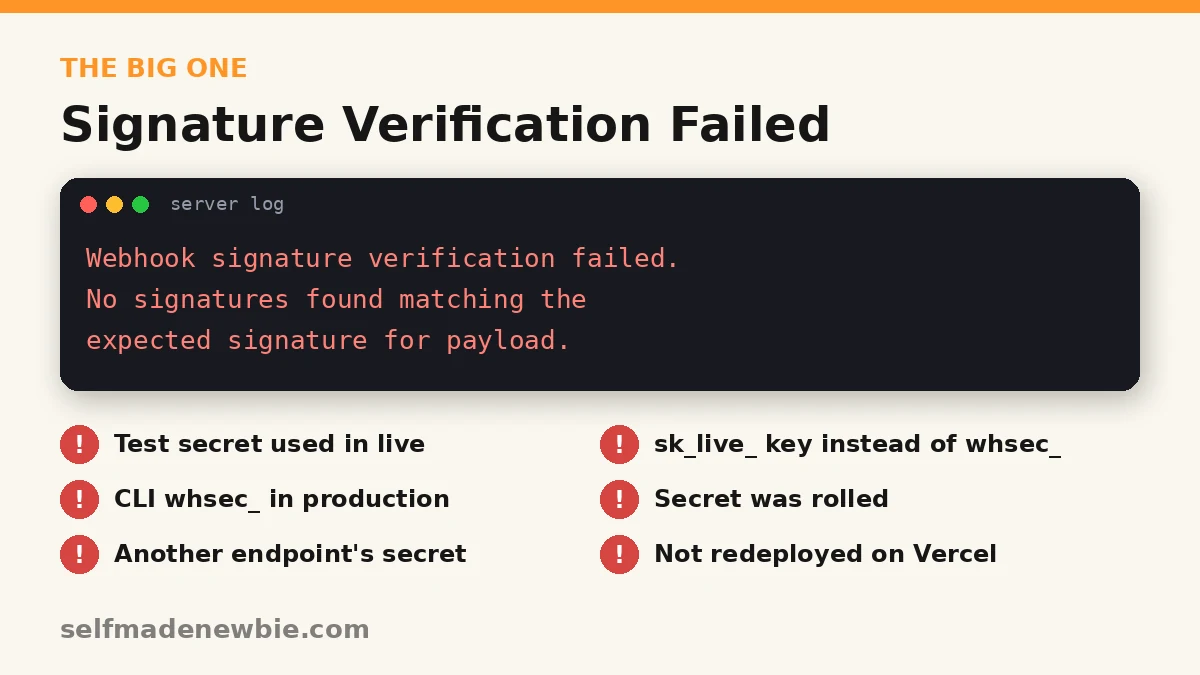
This is the big one. The error looks like this: Webhook signature verification failed. Err: No signatures found matching the expected signature for payload. Stripe’s troubleshooting docs say the most common cause is simply the wrong signing secret.
Here’s what trips people up. Stripe makes a unique secret for each endpoint. If you use the same URL in test and live mode, the secret is different in each one. And if you tested with the Stripe CLI, its secret is different again. All of them start with whsec_, so they look the same at a glance. Check these:
- Test secret in production. You copied the sandbox endpoint’s secret, but live payments hit the live endpoint. Copy the live one.
- CLI secret in production. The
whsec_thatstripe listenprinted only works for events the CLI forwards. Your Dashboard endpoint has its own. - Wrong endpoint’s secret. Multiple endpoints each have their own secret. Open the exact endpoint the failed events went to and click Reveal secret.
- An API key instead. The
sk_live_key and thewhsec_secret are different things. Per Stripe’s API keys docs, signing secrets aren’t API keys. Each endpoint gets its own, under Webhooks. - A rolled secret. If someone used Roll secret, the old one stops working (Stripe lets you delay that for up to 24 hours). Update your env var.
- An old deployment. On Vercel, per the environment variables docs, changes only apply to new deployments. Redeploy after you add or change
STRIPE_WEBHOOK_SECRET. Supabase is the opposite: per its secrets docs, functions pick up new secrets right away, no redeploy needed.
A quick way to check: log the first few characters of the secret your code is actually using and compare them with the one in Stripe. Stripe suggests exactly this. Just don’t log the whole thing.
Two rarer causes. Stripe’s libraries reject events older than 5 minutes by default, so a server clock that’s way off will fail every check (Stripe recommends keeping it synced with NTP). And if the Stripe-Signature header gets stripped by a proxy, there’s nothing to verify. The header looks like t=...,v1=....
If the secret is right and it still fails, it’s almost certainly the body. That’s next.
Keep the Raw Body: Next.js, Supabase Edge Functions and Express
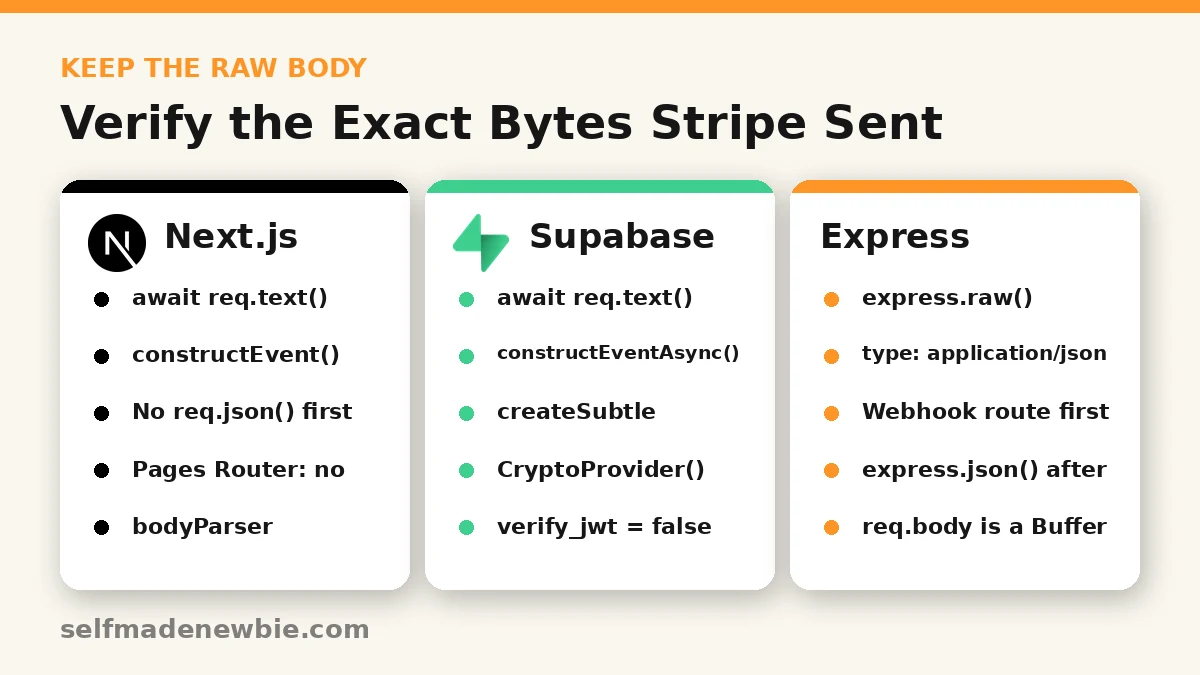
Stripe signs the exact bytes it sends. Its docs are blunt about it: don’t manipulate the raw body, because any change makes verification fail. That includes parsing it as JSON and turning it back into a string, which reorders keys or changes whitespace. It is a common mistake in generated code:
// This breaks signature verification:
// the body was parsed and turned back into a different string
const json = await req.json();
stripe.webhooks.constructEvent(JSON.stringify(json), signature, secret);
Next.js App Router (route.ts)
Read the body with await req.text() and pass that string straight in. The Next.js route handler docs use the same request.text() pattern for webhooks and note that, unlike the old Pages Router, you don’t need to touch bodyParser. This is adapted from Stripe’s own Next.js example:
// app/api/webhooks/stripe/route.ts
import Stripe from 'stripe';
import { NextResponse } from 'next/server';

const stripe = new Stripe(process.env.STRIPE_SECRET_KEY as string);

export async function POST(req: Request) {
  const signature = req.headers.get('stripe-signature') as string;
  const body = await req.text(); // the raw body, never req.json()

  let event: Stripe.Event;
  try {
    event = stripe.webhooks.constructEvent(
      body,
      signature,
      process.env.STRIPE_WEBHOOK_SECRET as string
    );
  } catch (err) {
    const message = err instanceof Error ? err.message : 'Unknown error';
    console.log(`Webhook Error: ${message}`);
    return NextResponse.json({ message: `Webhook Error: ${message}` }, { status: 400 });
  }

  if (event.type === 'checkout.session.completed') {
    const session = event.data.object as Stripe.Checkout.Session;
    // unlock the order for session.id here, and keep it quick
  }

  return NextResponse.json({ message: 'Received' }, { status: 200 });
}
Still on the Pages Router (pages/api)? Stripe’s docs say to disable bodyParser for that route and read the raw buffer instead.
Supabase Edge Functions (Deno)
Lovable and Bolt apps usually handle webhooks in a Supabase Edge Function. Two things matter here: read the body with req.text(), and use constructEventAsync with Stripe.createSubtleCryptoProvider(), because Deno has no synchronous Node crypto. This is the webhook example from Supabase’s Edge Functions auth docs:
// supabase/functions/stripe-webhook/index.ts
import { withSupabase } from 'npm:@supabase/server@1'
import Stripe from 'npm:stripe'

const stripe = new Stripe(Deno.env.get('STRIPE_SECRET_KEY')!)

// Deno has no synchronous Node crypto, so use Stripe's SubtleCryptoProvider.
// The synchronous constructEvent() throws
// "SubtleCryptoProvider cannot be used in a synchronous context" here.
const cryptoProvider = Stripe.createSubtleCryptoProvider()

export default {
  fetch: withSupabase({ auth: 'none' }, async (req, ctx) => {
    const signature = req.headers.get('stripe-signature') ?? ''
    const body = await req.text()

    let event
    try {
      event = await stripe.webhooks.constructEventAsync(
        body,
        signature,
        Deno.env.get('STRIPE_WEBHOOK_SECRET')!,
        undefined,
        cryptoProvider
      )
    } catch (err) {
      console.error('Stripe signature verification failed:', err)
      return new Response('bad signature', { status: 400 })
    }

    // your business logic, ctx.supabaseAdmin is available for database work
    return Response.json({ received: true })
  }),
}
If your function uses the older Deno.serve(async (req) => { ... }) style, the same two rules apply. Supabase’s Stripe webhooks example follows the same pattern.
Express
The classic Express bug is a global app.use(express.json()) that parses the body before your webhook route sees it. Stripe’s docs say express.json() has to come after the webhook route, and the webhook route uses express.raw({ type: 'application/json' }), which per the Express docs gives you the body as a Buffer. Adapted from Stripe’s Express example:
const express = require('express');
const Stripe = require('stripe');
const stripe = new Stripe(process.env.STRIPE_SECRET_KEY);
const app = express();

// 1. The webhook route comes first and gets the raw body
app.post('/webhook', express.raw({ type: 'application/json' }), (req, res) => {
  const sig = req.headers['stripe-signature'];
  let event;
  try {
    event = stripe.webhooks.constructEvent(req.body, sig, process.env.STRIPE_WEBHOOK_SECRET);
  } catch (err) {
    return res.status(400).send(`Webhook Error: ${err.message}`);
  }
  // handle event.type here
  res.json({ received: true });
});

// 2. The JSON parser for every other route comes after it
app.use(express.json());
Stripe Webhook 401 or 404: Wrong URL, Preview URL or a Login Wall
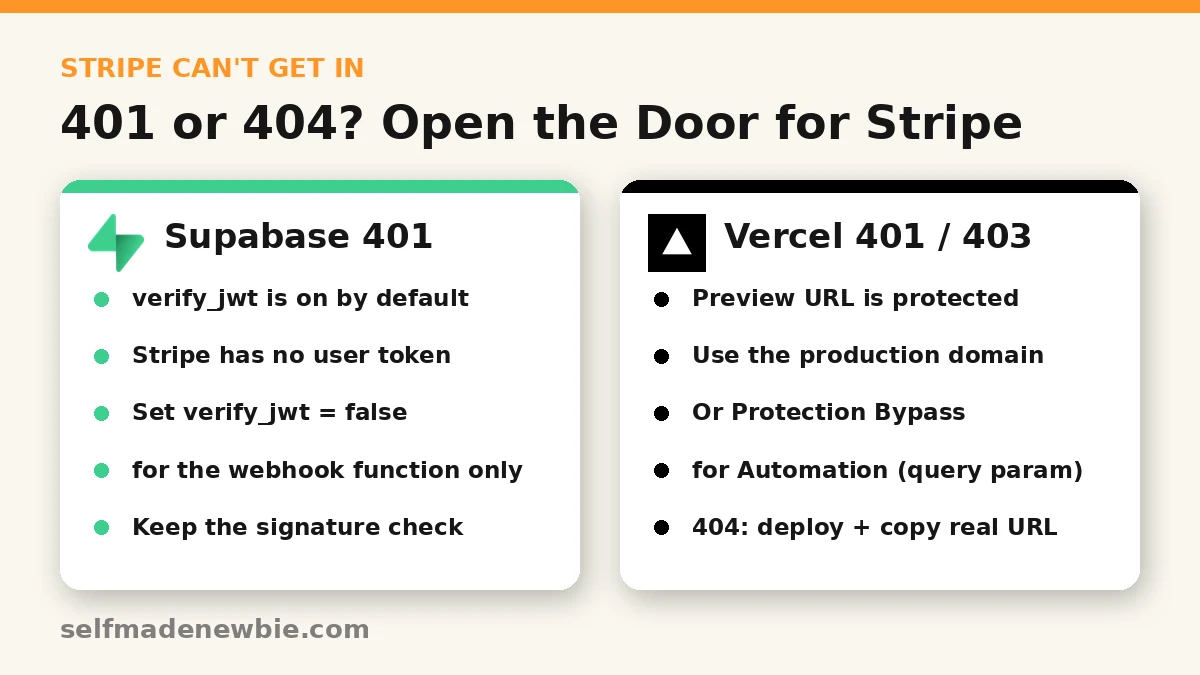
Stripe needs a public HTTPS URL it can POST to with no login. A 401, 403 or 404 means it can’t get in or can’t find the door.
Supabase: turn off verify_jwt for the webhook function
Per Supabase’s auth headers docs, verify_jwt is on by default. The platform checks every request for a valid user token before your code runs, and returns a 401 if there isn’t one. Stripe doesn’t have your users’ tokens, so every delivery gets rejected and your logs stay empty. Supabase’s function configuration docs use Stripe webhooks as the exact example of a function that needs it off:
# supabase/config.toml
[functions.stripe-webhook]
verify_jwt = false
Then set your secrets and deploy (or redeploy) the function. Per the secrets docs, names can’t start with SUPABASE_:
supabase secrets set STRIPE_SECRET_KEY=sk_live_...
supabase secrets set STRIPE_WEBHOOK_SECRET=whsec_...
supabase secrets list
supabase functions deploy stripe-webhook
Supabase warns that this lets anyone call the function without a token, which is why the signature check in your code is not optional. It’s the only thing standing between your database and a fake “payment succeeded” event.
Vercel: production domain, or a bypass for previews
Per Vercel’s Deployment Protection docs, the recommended Standard Protection protects every deployment except your production domains. So if you pasted a preview URL or a long generated deployment URL into Stripe, Stripe hits a login page. Use your production domain for the live endpoint.
If you really need Stripe to reach a protected preview, Vercel’s bypass docs offer Protection Bypass for Automation. It gives you a secret you add as a query parameter, which Vercel says is required for webhook URLs, since services like Stripe can’t set custom headers:
# Endpoint URL to paste into Stripe for a protected preview
https://my-app-git-feature-team.vercel.app/api/webhooks/stripe?x-vercel-protection-bypass=YOUR_BYPASS_SECRET
404: the URL or the function is wrong
Per Supabase’s status code docs, a 404 means the function doesn’t exist or the path is wrong. Check it was actually deployed. Per the deploy docs, the live URL is https://[PROJECT_ID].supabase.co/functions/v1/<name>. On Next.js, the path must match your route.ts folder exactly, and your hosting needs to serve it (my guide to the Vercel 404 on refresh covers routing issues on Vercel).
If you moved your app off the builder onto your own Supabase project or domain, the old webhook URL still points at the old backend. You’ll need a new endpoint with the new URL, and a new whsec_ secret to go with it.
Stripe Webhook Not Firing? Check the Events (and the Payload Type)
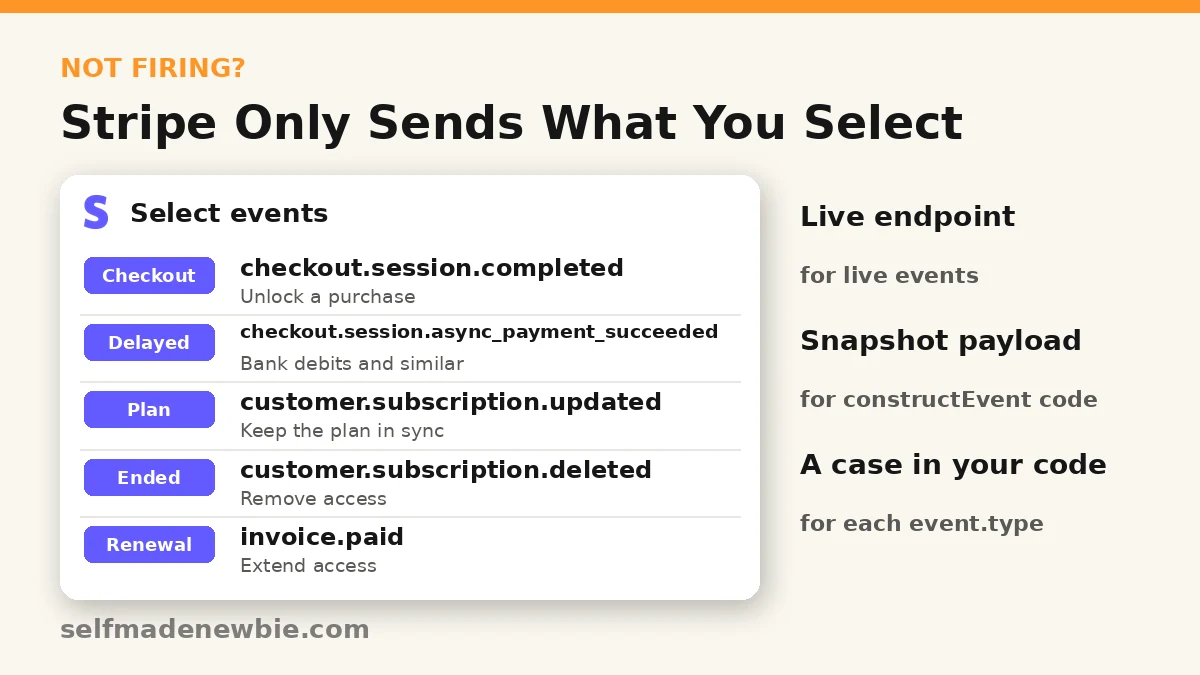
If Stripe shows no deliveries at all, it isn’t sending anything. Stripe only sends the event types you picked when you created the endpoint, so a payment can succeed and your app never hears about it.
Per the Stripe webhooks docs, you create an endpoint in Workbench under Webhooks: click Create an event destination, select Your account, choose the payload format, select the event types, pick Webhook endpoint and enter the URL. Stripe recommends only picking the events your app handles. For a typical vibe-coded app, that’s usually some of these:
| Event | When it fires | Typical use |
|---|---|---|
checkout.session.completed | A customer finishes Stripe Checkout | Unlock a purchase or start a plan |
checkout.session.async_payment_succeeded | A delayed payment (like a bank debit) finally succeeds | Unlock after the money actually arrives |
customer.subscription.updated | A plan changes, renews or goes past due | Keep the user’s plan in sync |
customer.subscription.deleted | A subscription ends | Remove access |
invoice.paid | A subscription invoice is paid | Extend access for another period |
Three more things to check while you’re in there:
- The mode. An endpoint in your sandbox never receives live events, and the other way round. Stripe’s go-live checklist says to make sure you’ve registered your production webhooks and that the live endpoint works exactly like the test one.
- The payload type. Stripe now asks you to pick Thin (marked recommended) or Snapshot when you create the destination. Per its events docs, snapshot events carry the full event with a copy of the object, while thin events carry only IDs and need a follow-up API call. The code in this guide (and most generated code) calls
constructEventand readsevent.data.object, which is the snapshot format, and events likecheckout.session.completedare in Stripe’s snapshot catalog. So match the destination to your code. - Your code ignores it. If the event arrives with a 200 but nothing happens, check your handler actually has a case for that
event.type.
Stripe Test vs Live: The Webhook Secret You Forgot to Swap
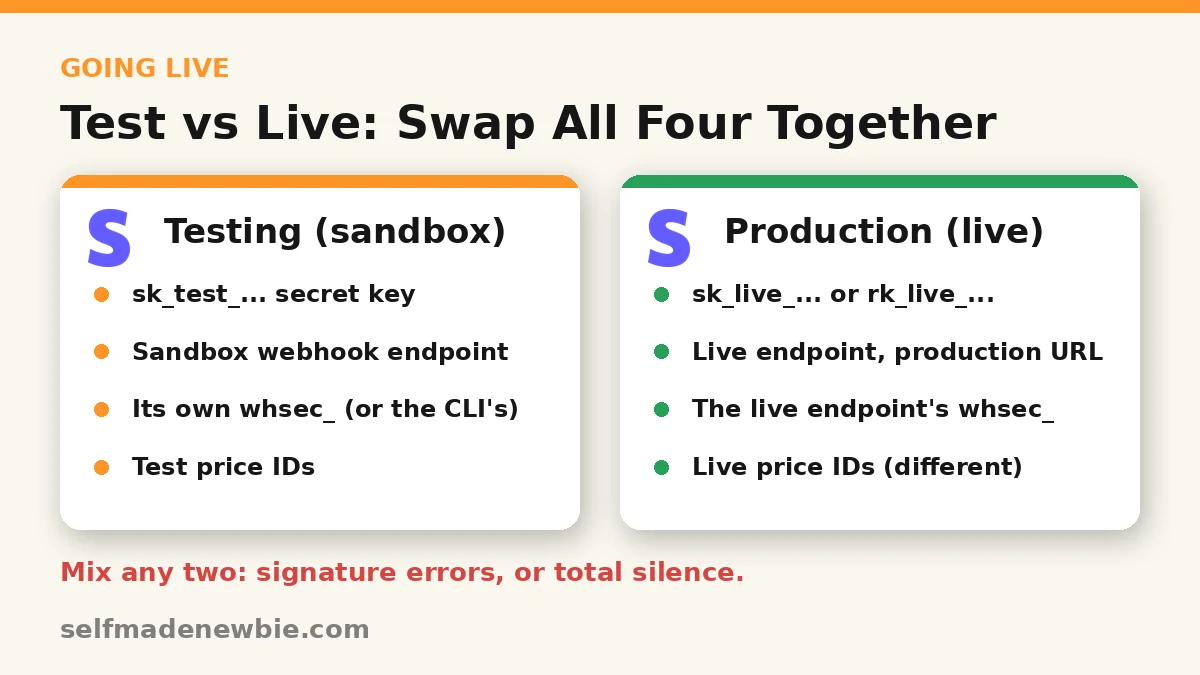
Going live is where most Stripe webhooks break, because it’s not one switch. It’s four values that all have to change together. Per Stripe’s keys docs, sandbox keys start with sk_test_ and live keys with sk_live_.
| Setting | In testing | In production |
|---|---|---|
| Secret key | sk_test_... | sk_live_... (or a restricted rk_live_... key) |
| Webhook endpoint | Sandbox endpoint (or the Stripe CLI) | A separate live endpoint on your production URL |
| Signing secret | The sandbox endpoint’s whsec_ (or the CLI’s) | The live endpoint’s own whsec_ |
| Price IDs | Test prices | Live prices, which have different IDs |
Mix any two and things fail in confusing ways. A live key with a test secret gives you signature errors. A test endpoint with live payments gives you silence. Stripe’s go-live checklist also reminds you that objects made in a sandbox, like products and prices, don’t work in live mode.
Keep both the secret key and the webhook secret on the server only. In Next.js, that means no NEXT_PUBLIC_ prefix. My Supabase RLS guide covers why secret keys in the browser are such a big deal.
Test Your Stripe Webhook with the Stripe CLI
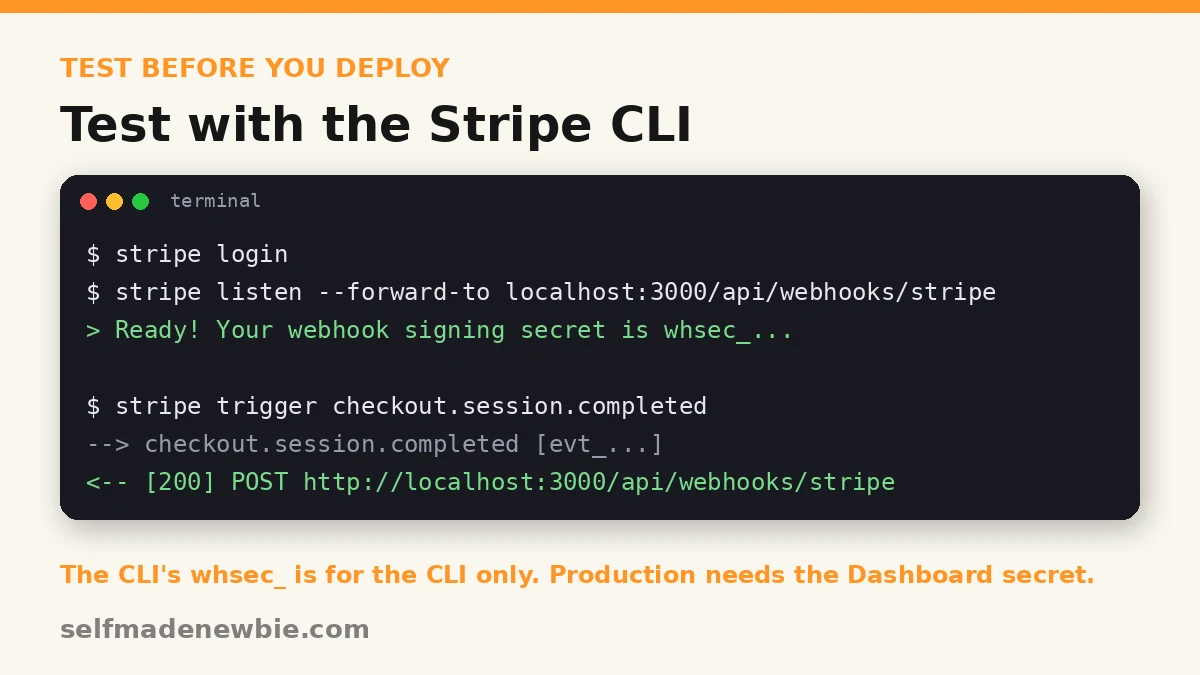
You don’t need to deploy to test a webhook. The Stripe CLI can forward events straight to your laptop. Log in, start listening, then fire a test event from a second terminal:
stripe login

# Terminal 1: forward events to your local route
stripe listen --forward-to localhost:3000/api/webhooks/stripe
# Ready! Your webhook signing secret is whsec_...  (put this one in .env.local)

# Terminal 2: fire a test event
stripe trigger checkout.session.completed
Per the stripe listen docs, you don’t need a Dashboard endpoint for this, and the whsec_ it prints stays the same between restarts. Remember: that secret is only for the CLI. Your deployed app needs the Dashboard endpoint’s secret.
Per the stripe trigger docs, triggering creates real objects in your sandbox and can fire related events too, so don’t be surprised by extra deliveries. A few more useful commands:
# Supabase Edge Function running locally
stripe listen --forward-to http://127.0.0.1:54321/functions/v1/stripe-webhook

# Only the events your app handles
stripe listen --events=checkout.session.completed,customer.subscription.updated --forward-to localhost:3000/api/webhooks/stripe

# Resend a real event to a Dashboard endpoint (events from the last 30 days)
stripe events resend evt_123 --webhook-endpoint=we_123
For a full end-to-end check, run a real test checkout with Stripe’s test card 4242 4242 4242 4242, then confirm the delivery shows up as Delivered and your app actually unlocked the purchase.
Return a 2xx Fast, Handle Retries and Stop Duplicate Events
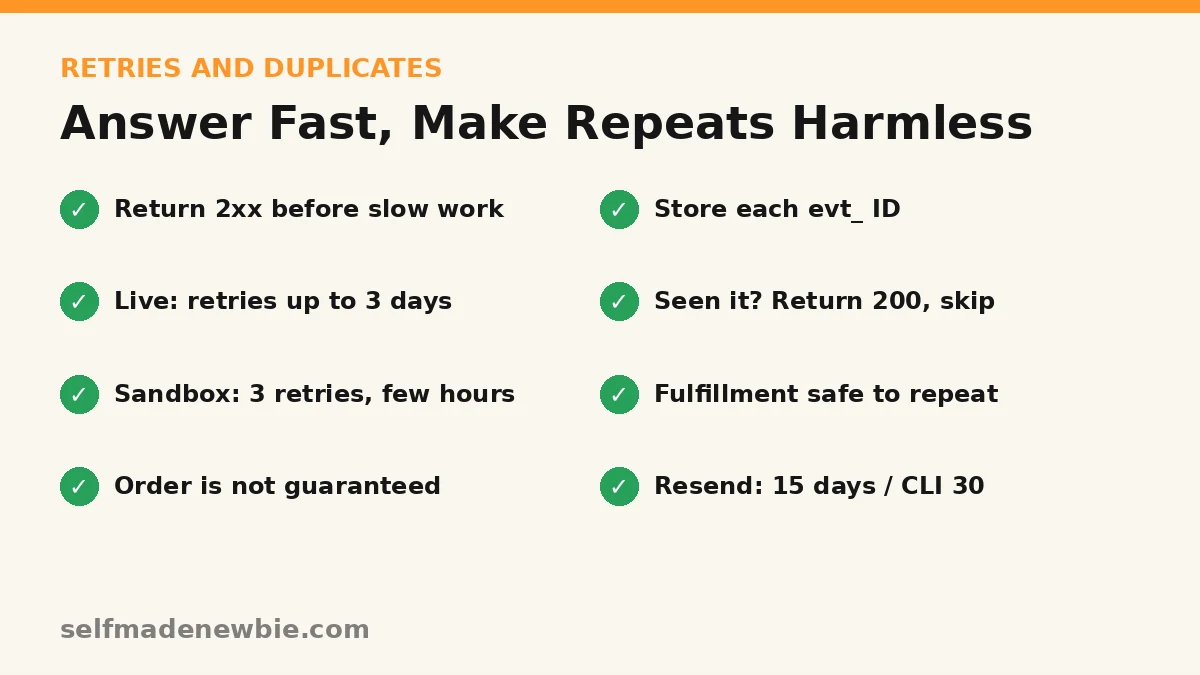
Your handler can verify everything perfectly and still cause trouble if it’s slow or not ready for repeats. Here’s how Stripe behaves, per its webhooks docs:
- It wants a 2xx quickly. Return success before doing anything heavy. Slow handlers time out, and a timeout counts as a failure.
- It retries. In live mode, Stripe keeps trying for up to three days with growing gaps. In a sandbox, it retries three times over a few hours.
- You can resend by hand. From the Dashboard for events up to 15 days old, or with
stripe events resendup to 30 days. A manual resend doesn’t cancel the scheduled retries. - Order isn’t guaranteed. A subscription update can arrive before the checkout event. Don’t assume a sequence.
- Duplicates happen. The same event can arrive more than once. Stripe’s fulfillment guide says your fulfillment code must handle being called several times, even at the same time, for the same Checkout Session.
The fix is to remember which events you’ve already handled. Stripe suggests logging each event ID and skipping ones you’ve seen. In a Supabase app, a tiny table does it:
create table public.stripe_events (
  id text primary key,            -- the evt_... id from Stripe
  type text not null,
  received_at timestamptz not null default now()
);

-- RLS on with no policies: only your server (service role) can write here
alter table public.stripe_events enable row level security;
Then insert the event ID right after the signature check. If the insert fails because the ID already exists, it’s a repeat, so say 200 and stop. For slow work, Supabase’s background tasks docs let you hand it to EdgeRuntime.waitUntil() and answer straight away:
// inside the handler, right after the signature check
const { error } = await ctx.supabaseAdmin
  .from('stripe_events')
  .insert({ id: event.id, type: event.type })

if (error?.code === '23505') {
  // seen this event before: answer 200 so Stripe stops retrying
  return Response.json({ received: true, duplicate: true })
}

// hand slow work to the background and answer right away
EdgeRuntime.waitUntil(fulfillOrder(event))
return Response.json({ received: true })
One soft spot with this pattern: if your fulfillment fails after the ID is stored, the retry gets skipped. Delete the row (or use a status column) when the work fails, and log the error, so a retry can try again. Stripe also notes that it occasionally sends two separate events for the same thing, so for purchases it’s worth checking whether that Checkout Session was already fulfilled too.
Missed events while your webhook was down? Stripe’s undelivered events guide shows how to list events from the last 30 days that never got delivered and process them. If one arrives that you already handled, return 200 so Stripe stops retrying.
Lovable and Bolt Stripe Webhooks: What They Set Up for You
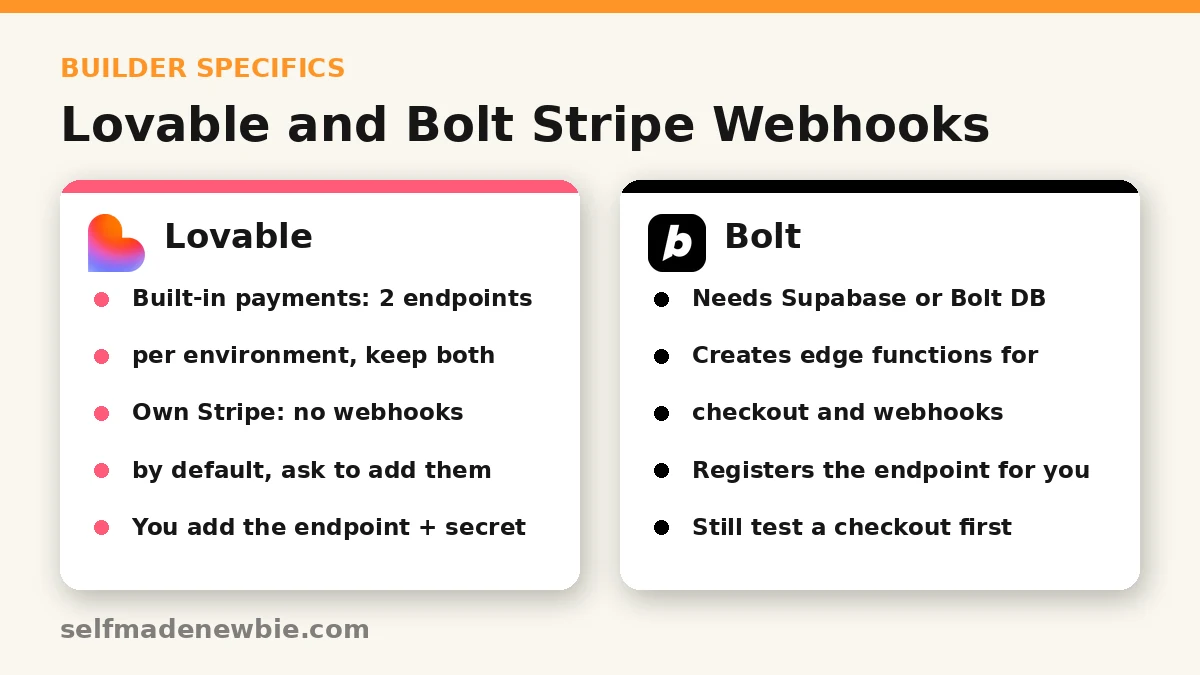
Builders handle Stripe differently, and it changes where you look when something breaks.
Lovable
Per Lovable’s payments docs, built-in payments manage the keys, webhooks and test and live environments for you. Lovable registers two webhook endpoints per environment: one delivers events to your app, and one lets Lovable watch that deliveries work. They look like duplicates, but they aren’t. Lovable says not to delete or disable either one: if your app’s endpoint goes, purchases still succeed but features never unlock. A duplicate you added that points at the same URL can cause signature failures, though, and removing it can fix delivery. If every delivery in one environment fails with “Invalid webhook signature”, Lovable suggests asking it to rotate that environment’s webhook secret.
If you connected your own Stripe account instead, Lovable’s Stripe integration docs say the integration doesn’t use webhooks by default. Your app checks payment status with Stripe directly. If you ask Lovable for webhooks, it writes the function, and you finish the setup in Stripe: create the event destination pointing at the function’s URL, select the events, and give Lovable the signing secret. Lovable also notes that price IDs differ between test and live, and that with a live key, payments made from the preview are real.
Bolt
Per Bolt’s Stripe docs, its Stripe integration needs a Supabase or Bolt database with sign-in, and Bolt creates Supabase edge functions for checkout, webhook processing and subscriptions. Bolt says it handles webhook endpoint registration and signature verification for you, so you don’t add the endpoint in Stripe by hand. Its testing checklist still tells you to verify that webhooks are processed correctly, so run a test checkout before going live.
The catch for both: everything above assumes your app stays inside the builder. Once you move it to your own Supabase, GitHub and Vercel accounts (my guide on how to deploy a Lovable app covers that), the endpoints, secrets and URLs are yours to manage, with every fix in this guide.
Stripe Webhook Troubleshooting Table
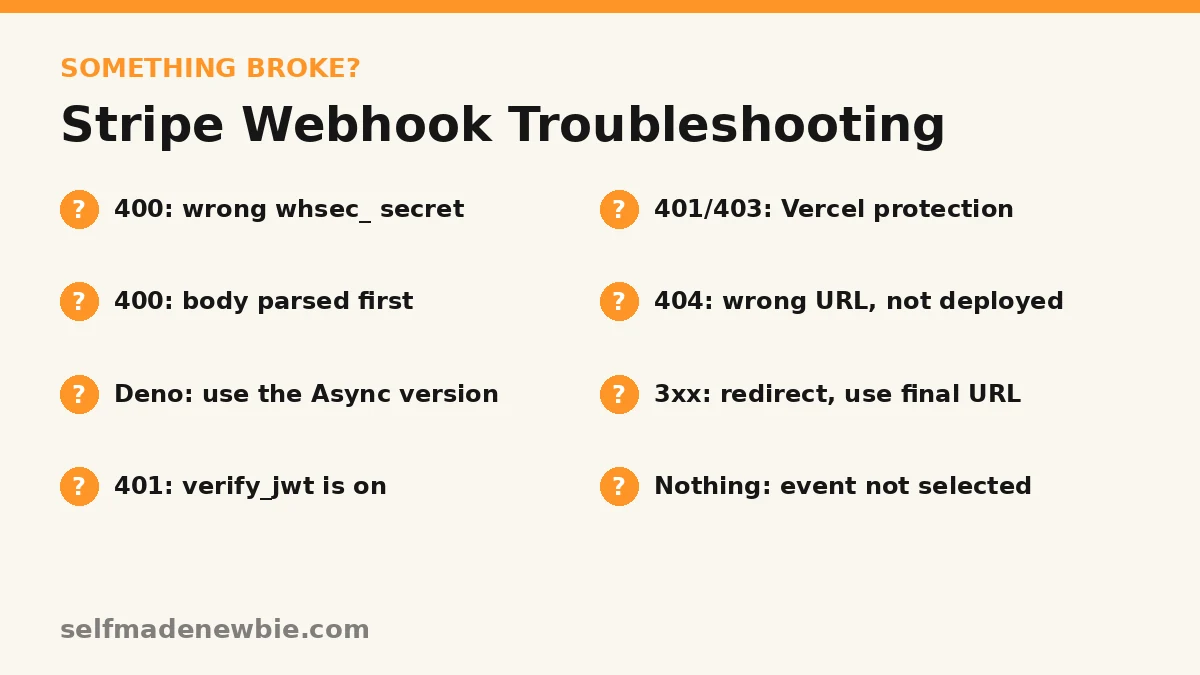
Bookmark this one. Find your symptom, check the cause, apply the fix:
| Symptom | Likely cause | Fix |
|---|---|---|
| “No signatures found matching the expected signature” | Wrong whsec_ for this endpoint or mode | Reveal the secret on the exact endpoint, update the env var, redeploy on Vercel |
| Signature fails with the right secret | Body was parsed or changed first | Use req.text(), express.raw or a raw buffer |
| “SubtleCryptoProvider cannot be used in a synchronous context” | Sync constructEvent on Deno | Use constructEventAsync with createSubtleCryptoProvider() |
| 401 from Supabase | verify_jwt is on | Set verify_jwt = false for the webhook function and redeploy |
| 401 or 403 from Vercel | Preview or deployment URL behind Deployment Protection | Use the production domain, or add the bypass secret |
| 404 | Wrong path or function not deployed | Deploy, then copy the real URL into Stripe |
| 302 or other 3xx | Redirect (www, https, trailing slash) | Use the final URL the redirect lands on |
| 500 | Your code crashed | Check Supabase Invocations and Logs, or your host’s logs |
| Timed out | Slow work before the response | Return 2xx first, do the work in the background |
| No deliveries at all | Event not selected, or wrong mode | Add the event types on the live endpoint |
| Works locally, fails live | CLI or test secret in production | Use the live endpoint’s own secret |
| Same order unlocked twice | Retries or duplicate events | Store event IDs and make fulfillment safe to repeat |
For 500s on Supabase, the logging docs point you to Functions, then your function, then the Invocations tab (requests, responses and status codes) and the Logs tab (your console.log output). Supabase’s status code docs also list 503 (the function failed to start), 504 (timeout) and 546 (resource limit). If you want an extra layer, Stripe publishes the IP addresses webhooks come from, though the signature check is still the main protection.
Not sure which of these your app has? Our free 2-minute app check at Launch Mango flags lock-in and security risks, plus likely deploy issues, and tells you what it takes to fix them.
Stripe Webhook FAQ
Why does my Stripe webhook work locally but not in production?
Usually a mode mismatch: the Stripe CLI’s whsec_, or a sandbox endpoint’s secret, is still in production, or there is no live endpoint with the right events on your production URL. Live events never hit a test endpoint. See Works in test, not firing in production? above for the decision table and the 7-step go-live checklist.
Is the webhook signing secret the same as my Stripe secret key?
No. The secret key (sk_test_ or sk_live_) lets your server call Stripe. The signing secret (whsec_) lets your server check that a webhook really came from Stripe. Each endpoint has its own.
Do test and live mode use the same webhook secret?
No. Stripe makes a unique secret for each endpoint, and even the same URL gets a different secret in test and live mode.
Why does Stripe say my webhook failed when my code ran?
Stripe only counts a fast 2xx as success. If your code finished but answered with a 3xx redirect, an error, or too slowly, Stripe marks it failed and retries. Return 2xx first and do slow work afterwards.
How long does Stripe retry a failed webhook?
In live mode, up to three days with growing gaps. In a sandbox, three times over a few hours. You can also resend from the Dashboard (up to 15 days) or the CLI (up to 30 days).
Should I turn off verify_jwt for my Supabase webhook function?
Yes, for that one function. Stripe can’t send your users’ tokens, so with verify_jwt on, every delivery gets a 401. Turning it off makes the function public, so always verify the Stripe signature in your code.
Why am I getting the same Stripe event twice?
Retries and occasional duplicate deliveries are normal. Store each event ID, skip ones you’ve already handled, and answer 200 to repeats so Stripe stops sending them.
Final Thoughts: Make Sure Paying Customers Actually Get Access
When a Stripe webhook is not working, start with Event deliveries and let the status code point you to the fix. Most of the time it’s the signing secret for the wrong endpoint or mode, a body that got parsed, or a URL Stripe can’t reach. Fix those, return a 2xx fast, and make repeats harmless, and your payments will hold up with real customers.
If payments are one of several things that feel shaky now that real users are coming, you’re not alone. Broken webhooks usually show up alongside sign-in that redirects to localhost, tables without Supabase RLS, and keys in the frontend. You can work through them yourself (my DIY vs done-for-you breakdown shows what that really takes), or hand them off. Either way, my guide on how to launch your vibe-coded app lists everything to check before launch.
Handing it off is what we do at Launch Mango. Own Your App ($79 one-off) moves your Lovable, Bolt, v0 or Cursor app onto your own GitHub, Supabase and Vercel accounts, live at a real URL with a plain-English handover report, usually in 1 to 2 days, and your money back if it isn’t live on your accounts. Own and Secure ($199 one-off) adds the parts that keep real users safe: live Stripe payments and webhooks, sign-in and redirects fixed, Supabase RLS and database permissions locked down, exposed API keys removed from the frontend, a security report and a custom domain.
Want the full picture first? Read my Launch Mango review or compare it with the best app launch services. Or just run the free 2-minute app check and see what your app needs.
Your app, on your accounts, safe for real users. Get your payments working, then go get customers.