Lovable Hosting Alternatives (2026): Where to Host Your Lovable App and How to Move It
You built something real in Lovable, and it’s live on a lovable.app address. Now you want your own domain, lower costs, or simply your app on accounts you control. So you start looking for Lovable hosting alternatives, and you quickly find out the answer depends on one thing most people never check: which stack Lovable built your app on.
I’ll keep this practical. Below you’ll find the hosts that actually work for Lovable apps, what each costs today, a decision table for picking one, and the exact steps to move your app without breaking sign-in, payments or your database. If you’d rather not touch any of it, I’ll also show you who can do the move for you.
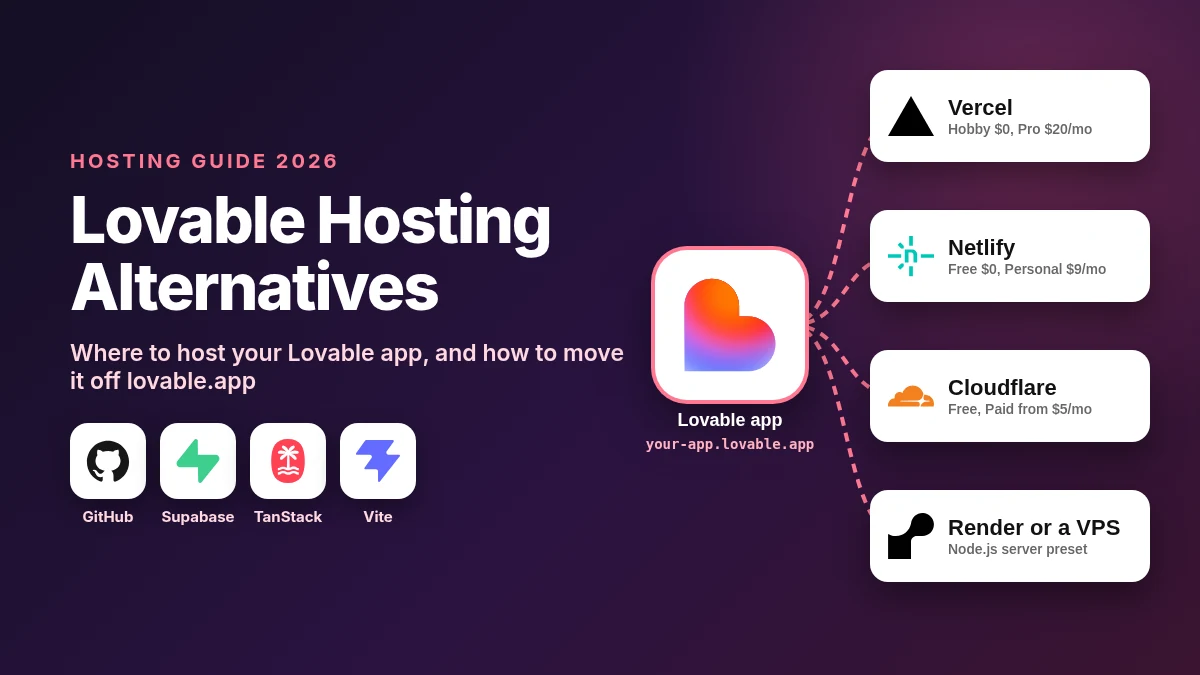
Quick answer: Vercel is the easiest Lovable hosting alternative for most people, Netlify and Cloudflare are strong free or cheap options, and Render or your own server works for TanStack Start apps through Nitro’s Node.js preset. Keep your built-in backend at first, move the frontend, then move the database later if you want full ownership.
| If you want… | Pick | Why |
|---|---|---|
| The smoothest move for a TanStack Start app | Vercel | Nitro detects it with no setup and Vercel needs no output directory setting |
| A free plan you can use commercially | Netlify or Cloudflare | Netlify Free allows custom domains with SSL; Cloudflare Workers Free gives 100,000 requests a day |
| Your own server or a container | Render or a VPS | Build with the Node.js server preset and run one Node.js 22 process |
| To stay put but use your own domain | Lovable Pro ($25/month) | Custom domains need a paid Lovable plan |
| Everything on your accounts without the work | Launch Mango | We move your code, database and env vars onto your accounts for a flat $79 |
Want out of lovable.app without the migration homework? Launch Mango moves your Lovable app onto your own GitHub, Supabase and Vercel accounts, live at a real URL with a plain-English handover report. Own Your App is $79 one-off, usually 1 to 2 days, money back if it isn’t live on your accounts. Not sure what your app needs? Run the free 2-minute app check.
What Are the Best Lovable Hosting Alternatives?
The best Lovable hosting alternatives in 2026 are Vercel, Netlify and Cloudflare, because Lovable’s own docs say Nitro detects all three on its own for TanStack Start apps. Render and your own server work too through the Node.js server preset. Older React + Vite apps run on almost any static host with an index.html fallback.
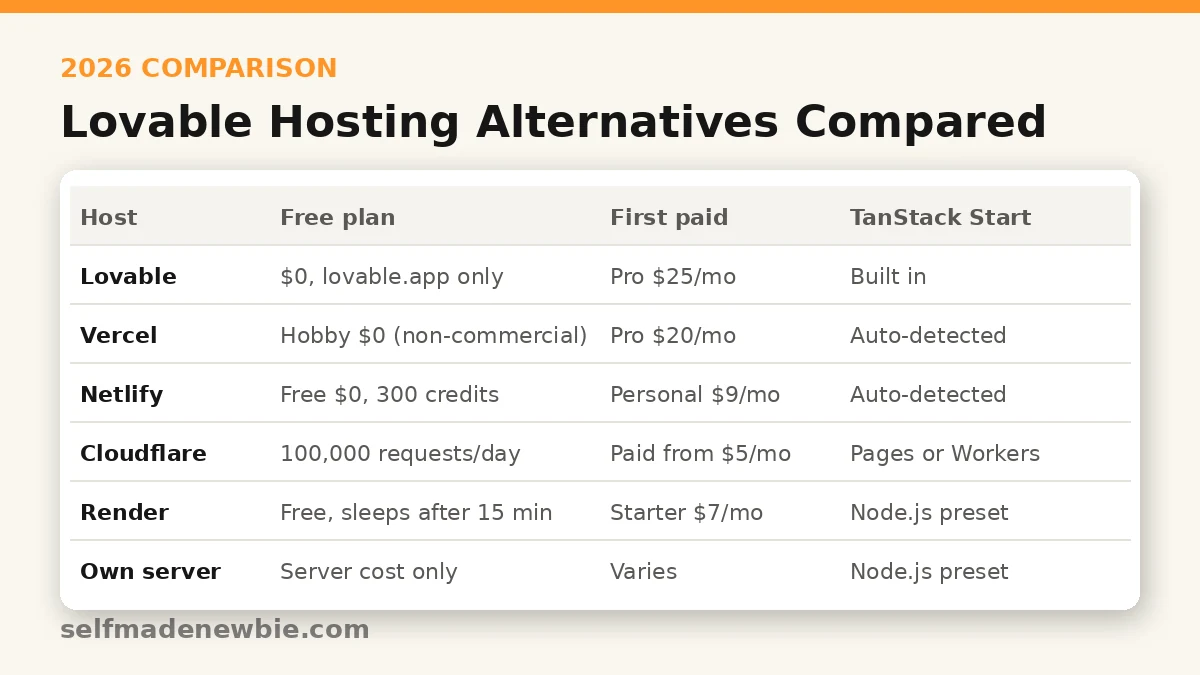
Here is how they compare on the things that matter for a small app. Prices are the official list prices I checked on October 25, 2026.
| Host | Free plan | First paid plan | Runs TanStack Start? | Watch out for |
|---|---|---|---|---|
| Lovable (lovable.app) | $0, up to 5 lovable.app domains | Pro $25/month for custom domains | Yes, built in | Free plan TanStack apps are capped at 1,000 server requests per project per 10 seconds |
| Vercel | Hobby $0 | Pro $20/month (includes $20 usage credit) | Yes, auto-detected | Hobby is for personal, non-commercial use only |
| Netlify | Free $0, 300 credits a month | Personal $9/month, Pro $20/month | Yes, auto-detected | Hit the credit limit and all projects on the account pause until next cycle |
| Cloudflare | Workers Free: 100,000 requests a day | Workers Paid from $5/month | Yes (Pages via Nitro, Workers via the Cloudflare Vite plugin) | 10 ms CPU per request on the free plan |
| Render | Free web service $0 | Starter $7/month (512 MB) | Yes, Node.js server preset | Free services spin down after 15 minutes idle and take about a minute to wake |
| Your own server | Server cost only | Varies by provider | Yes, Node.js server preset | You handle HTTPS, updates, logs and uptime |
Sources: Lovable pricing, Lovable hosting docs, Vercel pricing, Netlify pricing, Cloudflare Workers pricing, Render pricing and Render free instances.
Why Move Your App Off Lovable Hosting?
Most people move off Lovable hosting for four reasons: a custom domain without paying for Pro, control over their own accounts, room to grow past free plan limits, and no lock-in if they ever leave Lovable. To be fair, Lovable hosting is solid. Lovable itself recommends staying unless something specific pushes you out.
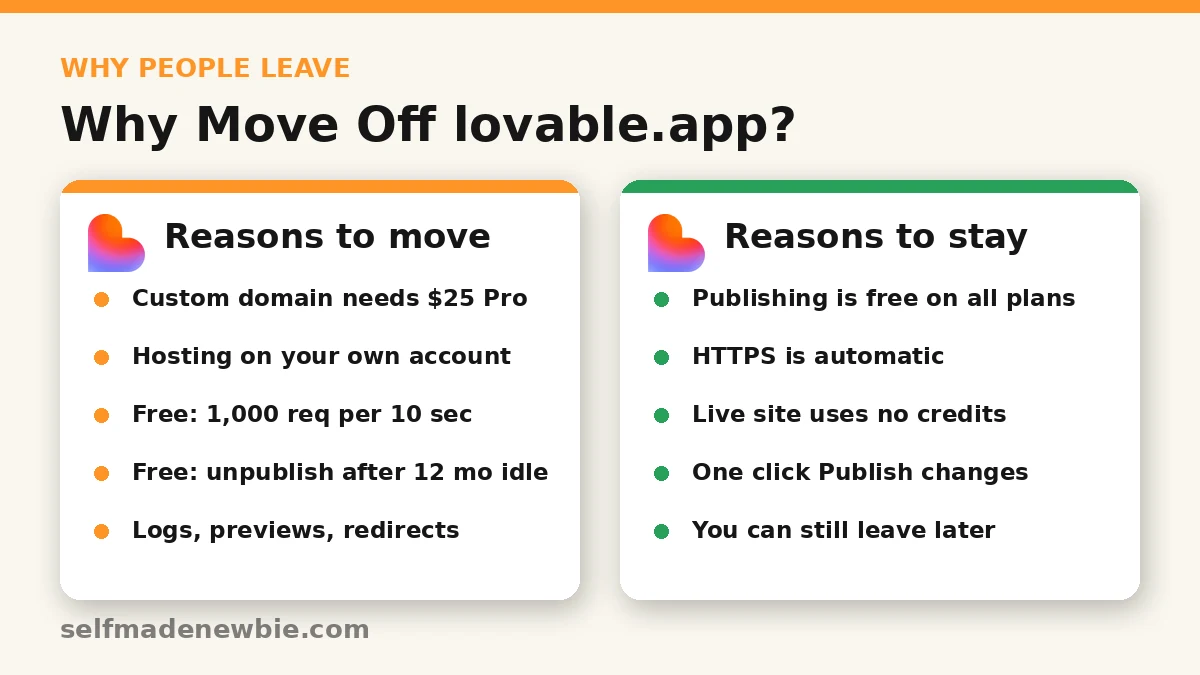
Let me be honest about the good side first. Publishing to lovable.app is free on every plan, HTTPS is included, and according to the Lovable hosting docs, a live site doesn’t use credits on its own. Only backend and app activity draws on credits. For a side project or a prototype, that’s hard to beat.
The reasons to leave usually look like this:
- Custom domains cost $25 a month. Lovable’s Free plan only gives you lovable.app addresses. Your own domain needs Pro or higher, while Netlify’s and Cloudflare’s free plans let you connect one.
- Ownership. On lovable.app, your hosting lives on Lovable’s account. If you hire a developer, sell the app, or switch tools, you want the code, hosting and database on accounts in your name.
- Free plan limits. Lovable’s docs say Free plan TanStack Start apps are limited to 1,000 server requests per project every 10 seconds, after which visitors see “App temporarily unavailable”. The publish docs also say Free projects can be unpublished after 12 months with no visits and no owner logins.
- Control. Your own host gives you logs, preview deployments, redirects and the option to put a firewall or CDN in front of the app.
If none of that bothers you, staying is a perfectly good choice. Lovable’s own ownership guide says it wants you to stay “by choice, never by necessity”, and that exporting your code or data is always an option later.
Do You Need Lovable Pro for a Custom Domain?
Yes, if you keep your app on Lovable hosting. A Lovable custom domain needs a paid plan, starting with Pro at $25 a month. If you host the same app on Netlify, Cloudflare or Vercel instead, you can connect your domain there, and Netlify’s and Cloudflare’s free plans include custom domains with SSL.
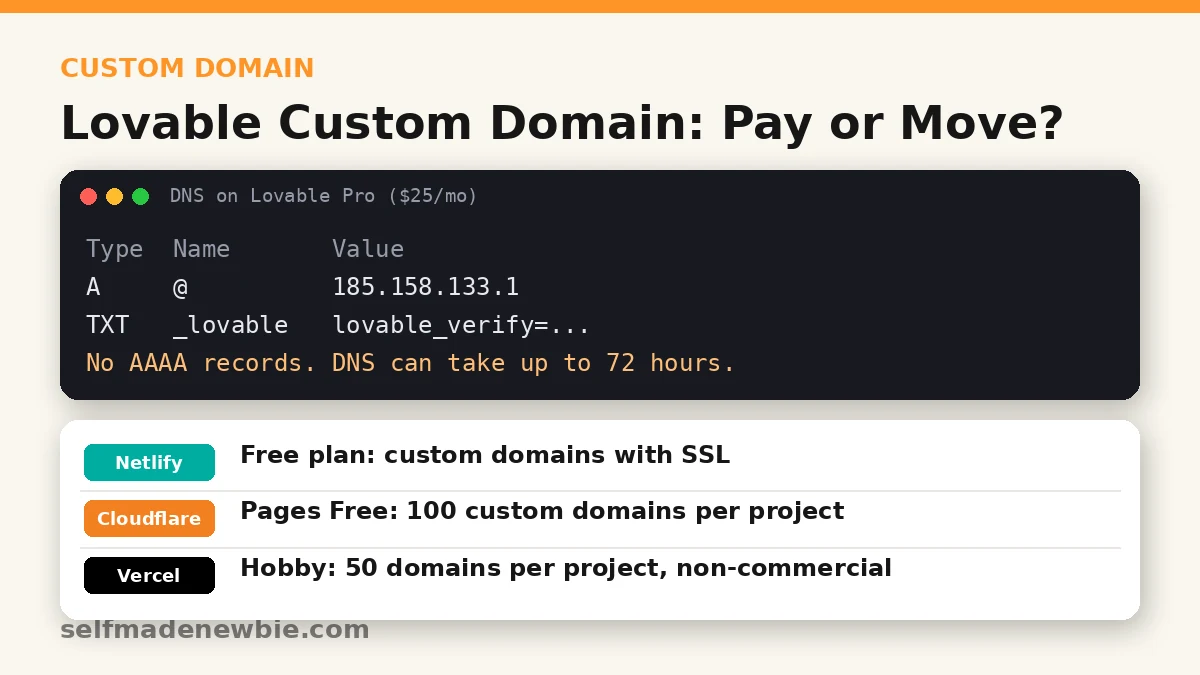
On Lovable, connecting a domain is simple. The custom domain docs have you add an A record pointing to 185.158.133.1 plus a TXT record at _lovable with a lovable_verify=... value. DNS can take up to 72 hours to settle, and Lovable says not to add AAAA records.
Off Lovable, the domain step moves to your new host. Netlify’s Free plan lists custom domains with SSL, Cloudflare Pages allows 100 custom domains per project on its free plan, and Vercel’s Hobby plan allows 50 domains per project (just remember Hobby is non-commercial). You point your DNS at the new host instead of Lovable’s IP.
| Where the app runs | Custom domain cost | Source |
|---|---|---|
| Lovable hosting | Pro $25/month or higher (yearly billing gives 2 months free) | Lovable pricing |
| Netlify Free | $0 plan, custom domains with SSL included | Netlify pricing |
| Cloudflare Pages Free | $0 plan, up to 100 custom domains per project | Cloudflare Pages limits |
| Vercel Hobby | $0 plan, 50 domains per project, non-commercial only | Vercel Hobby plan |
One thing people miss: you still pay your domain registrar for the domain itself on every option. The table above is only about what the host charges to connect it.
Is Your Lovable App TanStack Start or React + Vite?
Open package.json in Lovable’s Code tab. If it lists @tanstack/react-start, your app is TanStack Start, which Lovable uses for projects created from May 13, 2026, and it needs a host that runs server code. If not, it’s an older React + Vite app that builds to static files in a dist folder.
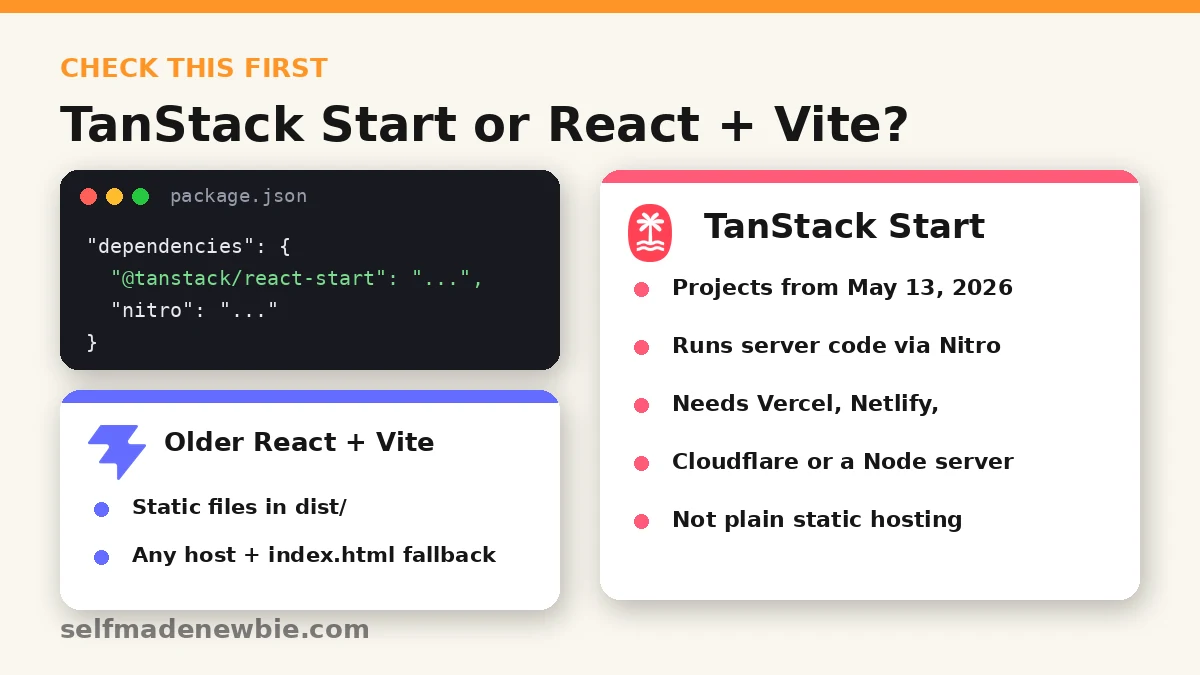
This is the most important check in the whole guide, and almost nobody does it first. According to Lovable’s external hosting docs, the two stacks need different kinds of hosts:
| TanStack Start (projects from May 13, 2026) | Older React + Vite | |
|---|---|---|
| How to spot it | @tanstack/react-start in package.json | No TanStack Start dependency, a plain Vite build |
| What the build produces | A server app packaged by Nitro | Static files in dist/ |
| Host it needs | A platform that runs server code (Vercel, Netlify, Cloudflare, Node.js server) | Any static host or CDN |
| Can it run on object storage or a plain CDN? | No | Yes, with an index.html fallback |
| Classic gotcha | Missing nitro package or env vars at build time | 404 when you refresh a page |
You can also ask Lovable in chat which stack your project uses. If your app is older React + Vite and you want to switch, Lovable has an upgrade guide for TanStack Start, but you don’t need to upgrade just to host somewhere else.
Which Host Should You Pick for Your Lovable App?
Pick Vercel if you want the least setup and can pay $20 a month for commercial use. Pick Netlify or Cloudflare if you want a free plan that allows a business site. Pick Render or your own server if you want one Node.js process you fully control. Use the decision table below to match your stack.
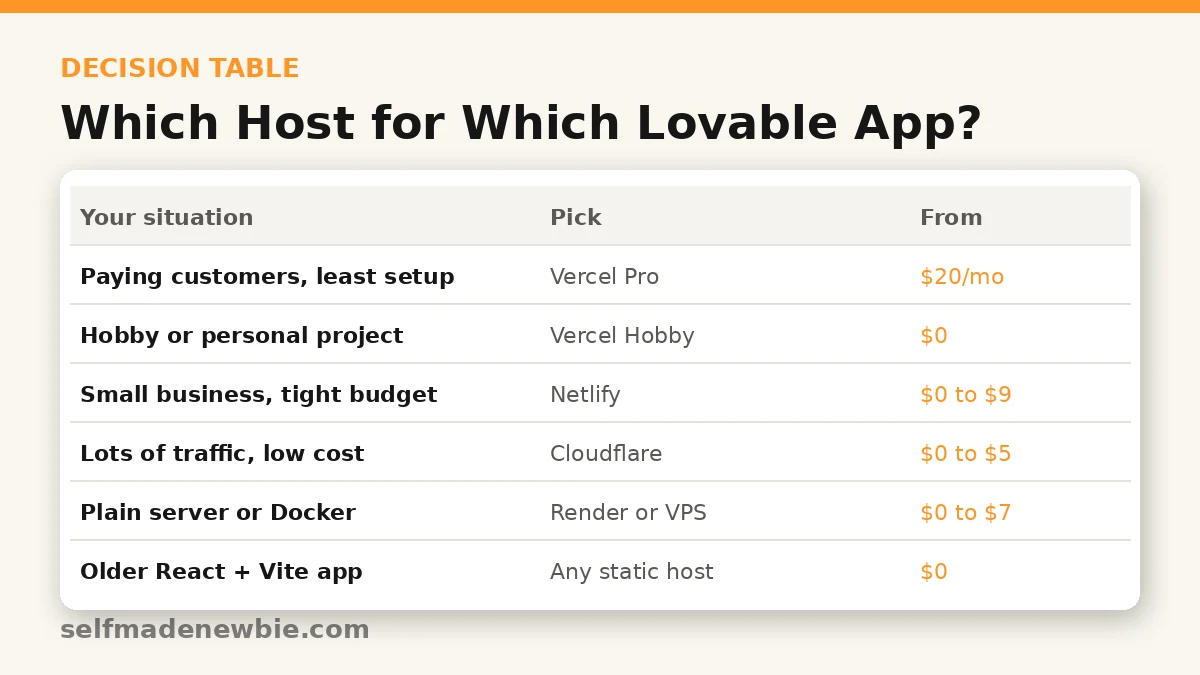
This is the table I wish I’d had the first time I moved a Lovable app. It combines the official build settings from Lovable’s docs with each host’s current free plan rules.
| Your situation | Best fit | Build settings | Monthly cost to start |
|---|---|---|---|
| TanStack Start app, paying customers, want the least setup | Vercel Pro | npm run build, Node.js 22, no output directory | $20 |
| TanStack Start app, hobby or personal project | Vercel Hobby | npm run build, Node.js 22, no output directory | $0 |
| TanStack Start app, small business, tight budget | Netlify Free or Personal | npm run build, Node.js 22, publish directory dist | $0 to $9 |
| TanStack Start app, lots of traffic, low cost | Cloudflare | Pages: npm run build, output dist; Workers: Cloudflare Vite plugin | $0 to $5 |
| TanStack Start app, want a plain server or Docker | Render or a VPS | NITRO_PRESET=node-server npm run build | $0 to $7 on Render |
| Older React + Vite app | Any of the above, or any static host | npm run build, serve dist with an index.html fallback | $0 on most free plans |
A small tip from experience: if you’re not sure your app will make money yet, start on Netlify Free or Cloudflare. Moving between these hosts later is easy because the build settings are nearly identical. If you already have paying users, Vercel Pro is the calm, boring choice, and boring is good here. For more on Vercel itself, see my guide on how to deploy a Lovable app.
How Do You Host a Lovable App on Vercel?
Connect your Lovable GitHub repository to Vercel, keep the build command npm run build with Node.js 22, add your Supabase environment variables, and deploy. Vercel detects TanStack Start through Nitro, so no output directory is needed. Use Pro at $20 a month if the app takes payments, because Hobby is non-commercial.
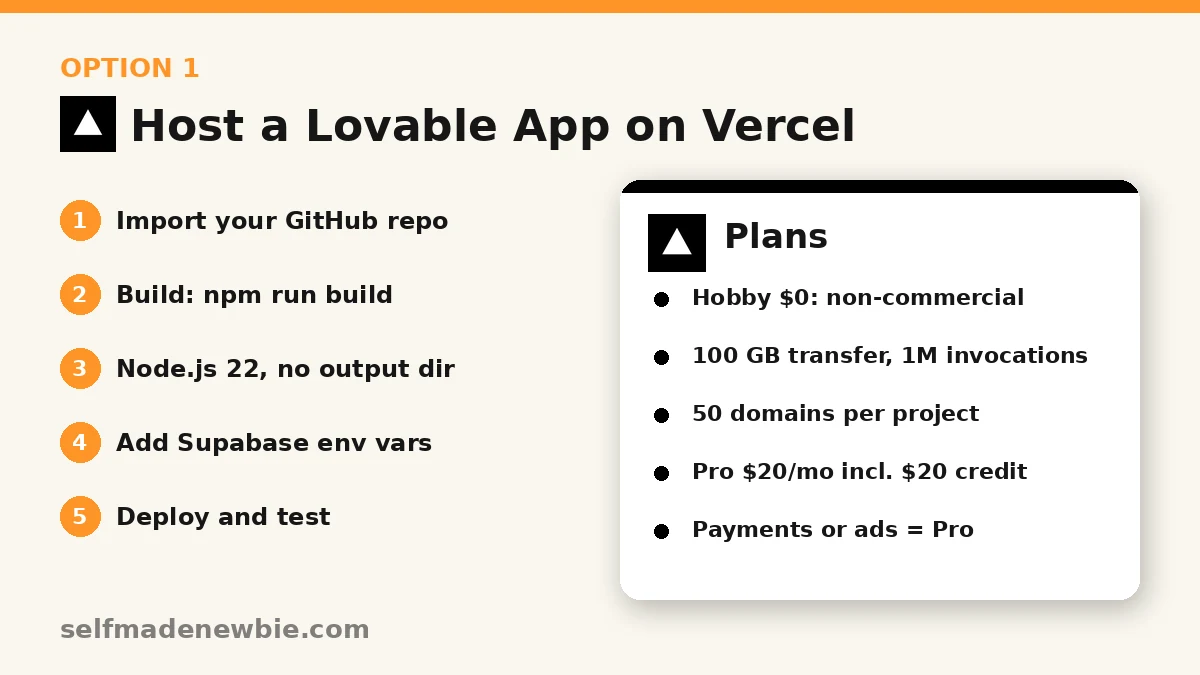
- In Vercel, choose Add New, Project and import the repository Lovable created on your GitHub.
- Leave the framework detection alone. Lovable’s docs say Vercel picks the right Nitro preset by itself, and Vercel supports TanStack Start directly.
- Set Node.js to 22 and the build command to
npm run build. - Add the environment variables from the next section, then deploy.
- Older React + Vite app? Add a rewrite to index.html in vercel.json, or you’ll hit the Vercel 404 on refresh problem.
On cost, Vercel’s Hobby plan is free and includes 100 GB of Fast Data Transfer, 1 million function invocations and 50 domains per project. The catch is the fair use guidelines: Hobby is for personal, non-commercial use, and Vercel counts taking payments, running ads or selling as commercial. Pro is $20 a month and includes $20 of usage credit.
How Do You Host a Lovable App on Netlify?
Import your Lovable repository into Netlify, set the build command to npm run build, the publish directory to dist and Node.js to 22, then add your environment variables. Netlify’s Free plan costs $0 with 300 credits a month and custom domains with SSL, so it’s a good free option for a small business app.
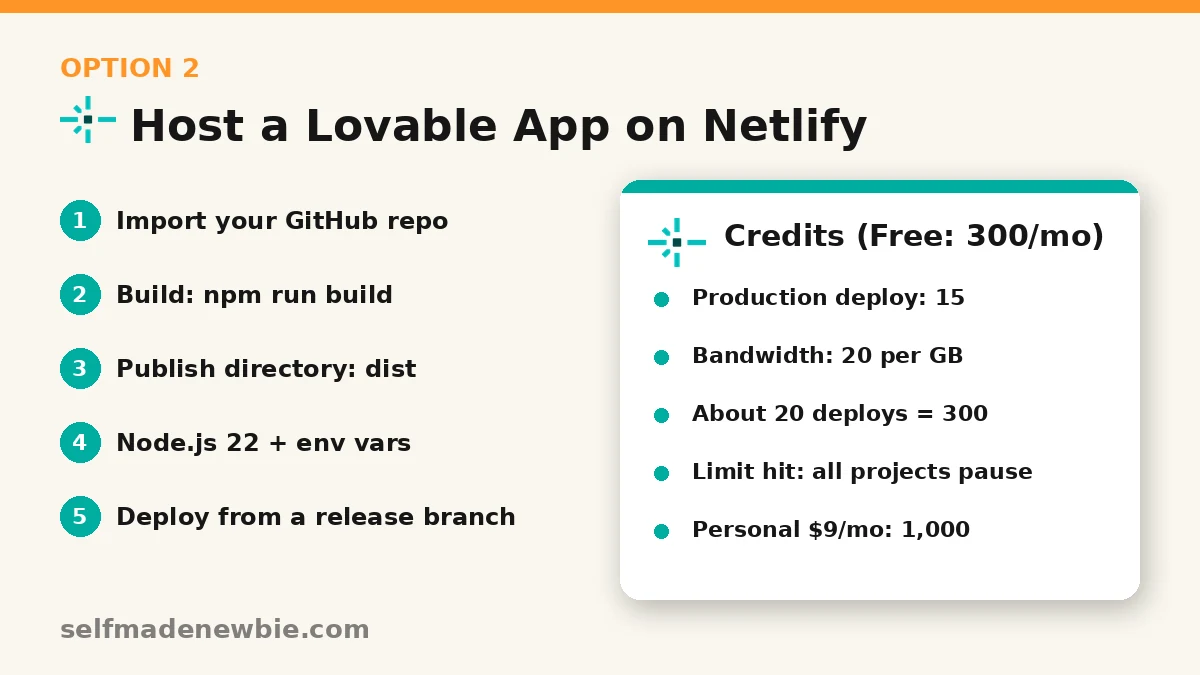
Netlify has full TanStack Start support, including server rendering and server functions, which it runs as serverless functions. For an older React + Vite app, add a _redirects file with a rewrite to index.html so page refreshes work.
The thing to understand is Netlify’s credit system. According to Netlify pricing, every production deploy costs 15 credits, bandwidth costs 20 credits per GB, and the Free plan gives you 300 credits a month. That means about 20 production deploys alone would use the whole free allowance. Since Lovable pushes to GitHub every time you edit, connect Netlify to a separate release branch instead of the branch Lovable syncs.
The other soft spot: if a project reaches its limit, Netlify pauses it until the next billing cycle, and if one project exceeds its limits, all projects on your account pause. Personal at $9 a month (1,000 credits) is a cheap safety net once real users show up.
Can You Host a Lovable App on Cloudflare?
Yes. Lovable’s docs say Nitro detects Cloudflare Pages by itself, so npm run build with a dist output directory works. Cloudflare’s own TanStack Start guide uses Workers with the Cloudflare Vite plugin instead. Workers Free includes 100,000 requests a day, static asset requests are free, and Workers Paid starts at $5 a month.
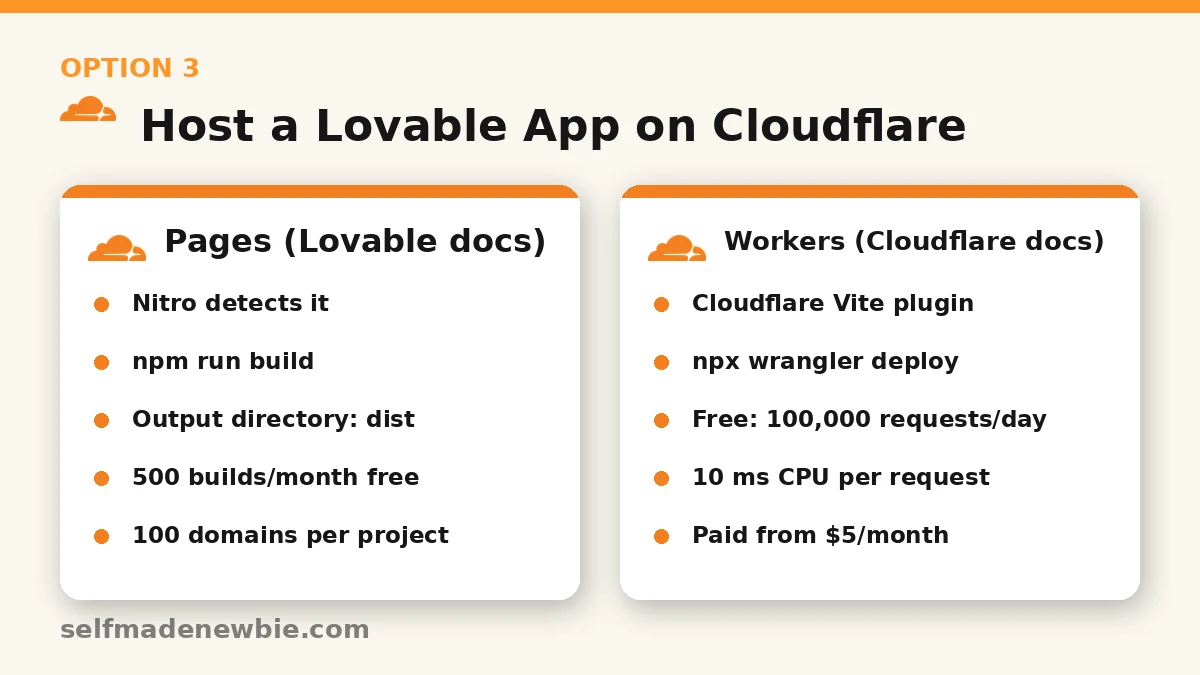
Cloudflare is the cheapest option once traffic grows. The Workers pricing page lists 100,000 requests a day and 10 ms of CPU time per request on the free plan, free and unlimited static asset requests, and no egress charges. The paid plan starts at $5 a month with 10 million requests included. On Cloudflare Pages, the free plan gives you 500 builds a month and 100 custom domains per project.
The soft con is setup. Lovable’s docs point you to Cloudflare Pages with the Nitro preset, while Cloudflare recommends Workers with its own Vite plugin and Wrangler, which means changing your vite config. If you’re not comfortable editing build files, Vercel and Netlify will both feel easier. And watch the 10 ms CPU limit on the free plan if your server functions do heavy work.
Can You Self-Host a Lovable App on Render or Your Own Server?
Yes. For a TanStack Start app, build with NITRO_PRESET=node-server npm run build and start node .output/server/index.mjs on Node.js 22. It listens on port 3000. That works on Render, a VPS or a Docker container. Older React + Vite apps only need a web server like Nginx that falls back to index.html.
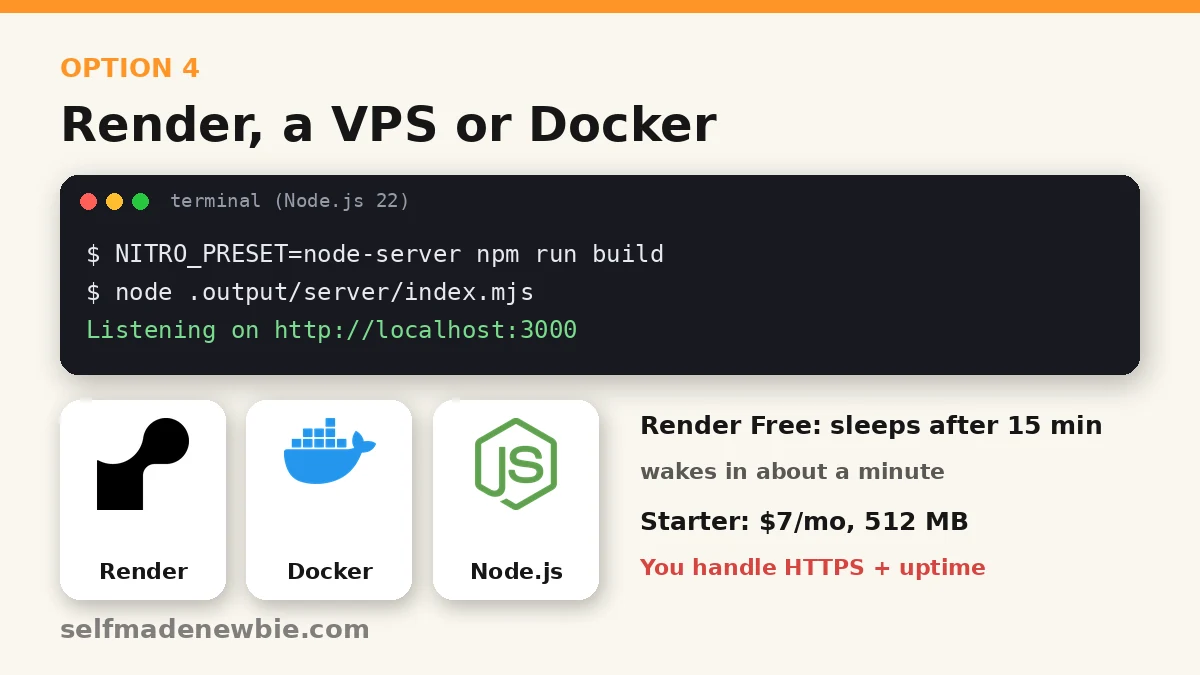
These are the exact commands from Lovable’s external hosting docs:
# Any host that runs Node.js 22 (Render, a VPS, a Docker container)
NITRO_PRESET=node-server npm run build
node .output/server/index.mjs   # listens on port 3000, change with PORT
Set the browser values before the build, because they’re baked in at build time, and set the server values where the app runs. Then put HTTPS in front of it with your reverse proxy. Lovable’s docs also warn not to use the Nginx try_files fallback for TanStack Start apps, since the server handles routing itself.
Render is the easiest way to try this. Its free web services cost nothing but spin down after 15 minutes without traffic and take about a minute to wake up, which is fine for a demo and annoying for customers. Paid instances on Render start at $7 a month for 512 MB of RAM. A VPS gives you the most control, but you also own updates, security patches and uptime.
How Do You Export a Lovable App to GitHub?
Connect GitHub in Lovable and let it create a repository on your account. Git sync is available on every Lovable plan, including Free, and it’s two-way, so edits in Lovable push to GitHub and pushes to the active branch sync back. Paid plans can also download the code as a zip, but sync is better.
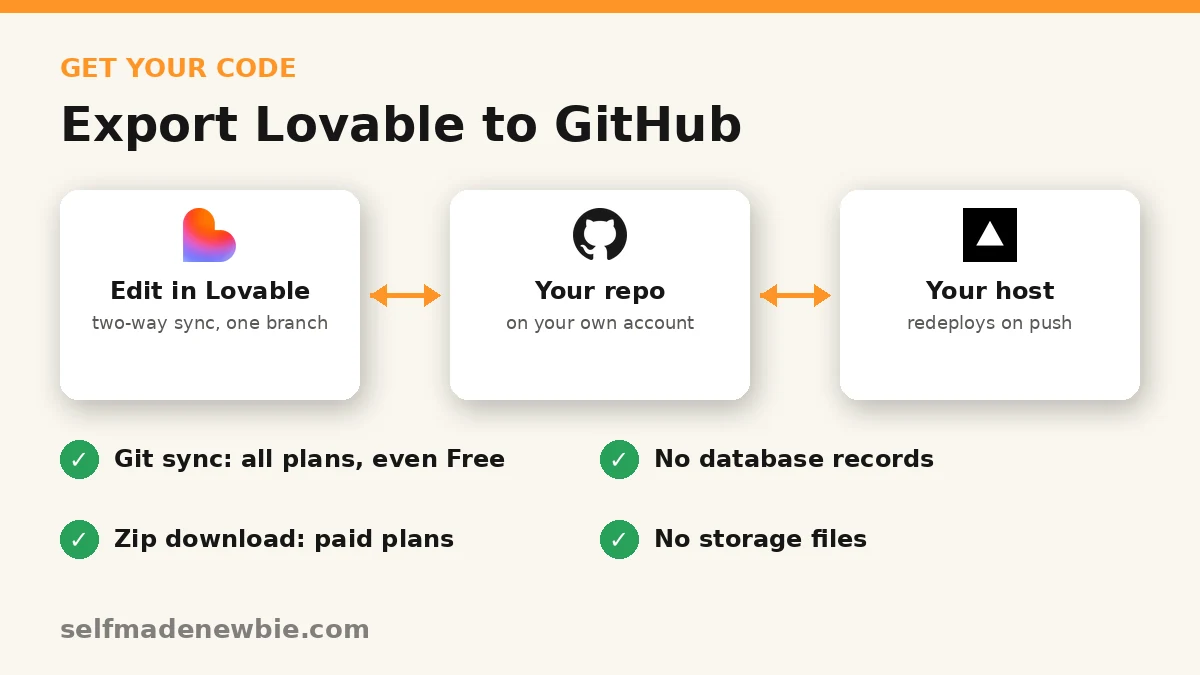
According to Lovable’s GitHub integration docs, Lovable syncs one branch at a time, and the Lovable GitHub app can create and update repositories in the account or organization you choose. Pick your own account, not a client’s or a friend’s, because whoever owns that GitHub account effectively owns the code.
Two things the export does not include, per the external hosting docs: your database records and your storage files. Code moves through GitHub, data moves separately. That surprises a lot of people the first time.
A nice side effect: since Git sync works on the Free plan, you can keep editing in Lovable on Free and host on Netlify or Cloudflare with your own domain. You lose Pro’s monthly credits and features, but you don’t need Pro just for the domain.
How Do You Move a Lovable App Off Lovable Hosting, Step by Step?
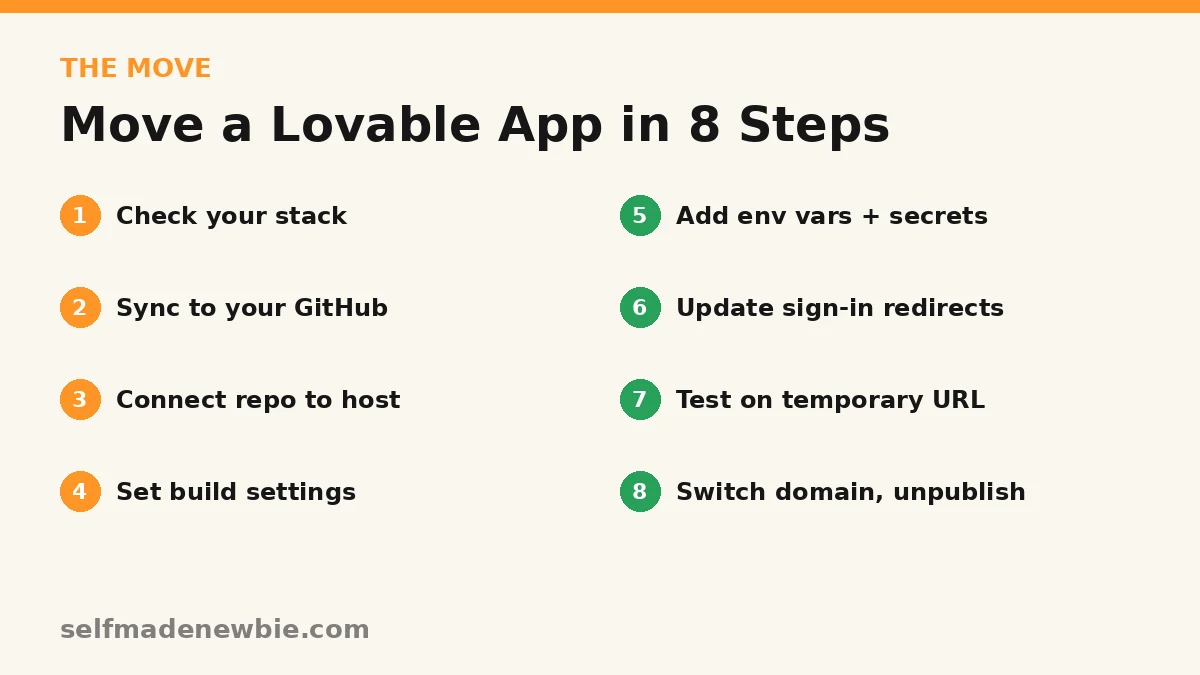
Check your stack, sync the code to GitHub, connect the repository to your new host, set the build settings and environment variables, update sign-in redirect URLs, and test on the host’s temporary URL. Only then point your domain at the new host. Your lovable.app site keeps serving the last published version until you unpublish it.
- Check your stack. TanStack Start or older React + Vite, as explained above.
- Sync to GitHub on your own account.
- Connect the repository to Vercel, Netlify, Cloudflare or Render. Consider deploying from a release branch you merge into, not the branch Lovable edits.
- Set the build:
npm run build, Node.js 22, outputdiston Netlify and Cloudflare Pages. - Add environment variables (below) and any secrets your server functions read.
- Update sign-in redirect URLs in your auth provider for the new domain.
- Test on the temporary URL: sign up, log in, refresh a nested page, run a payment, open a server-rendered page.
- Switch the domain to the new host, then unpublish the lovable.app site so you don’t have two live copies.
These are the variables Lovable’s docs list for an app on the built-in backend. Copy the real values from the .env file in your repository:
# Browser values (embedded at build time)
VITE_SUPABASE_URL=https://your-project-ref.supabase.co
VITE_SUPABASE_PUBLISHABLE_KEY=your-publishable-key

# Server values (TanStack Start apps)
SUPABASE_URL=https://your-project-ref.supabase.co
SUPABASE_PUBLISHABLE_KEY=your-publishable-key

# Plus any secrets your server functions read (Stripe, email and so on).
# Those are not in the repository, so add them by hand.
Step 6 is the one that bites. If you forget it, logins bounce back to localhost or the old lovable.app address, which is exactly the problem in my guide to the OAuth redirect to localhost error. Also note the Publish button in Lovable only publishes to Lovable hosting. Your new host updates when you push to the connected branch.
Do You Need to Move Your Supabase Backend Too?
No, not right away. Lovable’s docs say your built-in backend can keep running while you host the frontend elsewhere. For full ownership, you can later move it to your own Supabase project, which means running migrations, restoring a database export, re-adding secrets and storage files, and redeploying edge functions. Users keep passwords but must sign in again.
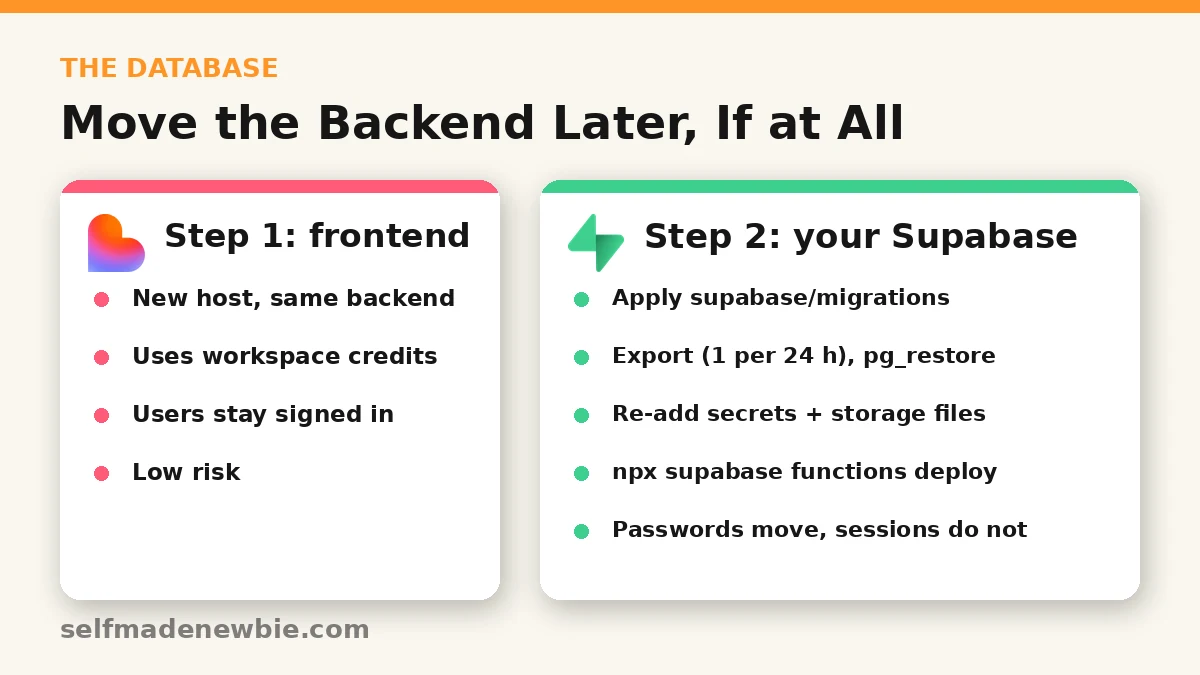
Moving only the frontend is the low-risk first step. Your app keeps talking to the same backend, and backend usage keeps drawing on your Lovable workspace credits. If you want the database in your own name too, Lovable’s migration guide supports managed or self-hosted Supabase as the destination. The short version:
- Create a Supabase project and apply the migrations from your repository (supabase/migrations).
- Export the database from Lovable (one export every 24 hours). The backup docs say it’s a compressed PostgreSQL archive you load with
pg_restore, including user accounts and password hashes. - Reconfigure sign-in providers, copy storage files by hand, and re-add your secrets.
- Deploy edge functions with
npx supabase functions deploy, test, then switch the app’s variables to the new project.
Two soft warnings. Your users’ passwords move over, but their sessions don’t, so everyone signs in again once. And Lovable’s docs note that app connectors and AI features keep running through Lovable until you replace them. On cost, Supabase pricing has a Free plan with 50,000 monthly active users and a 500 MB database, but free projects pause after a week of inactivity and you get 2 active projects. Pro starts at $25 a month. Once it’s yours, check your tables with my Supabase RLS guide.
Lovable Hosting Alternatives FAQ
Is Lovable hosting free?
Yes. Publishing to a lovable.app address is free on every plan, including Free, and a live site doesn’t use credits on its own. Backend and app activity use credits, and custom domains need a paid plan starting with Pro at $25 a month.
Can I keep editing in Lovable after I host my app somewhere else?
Yes. GitHub sync is two-way, so you keep editing in Lovable and your new host redeploys when changes reach the connected branch. Just remember the Publish button only updates the lovable.app site, not your new host.
Will my lovable.app site go offline when I move?
No. Lovable keeps serving the last published version on lovable.app until you unpublish it. Test the new host first, switch your domain, then unpublish so visitors don’t land on an outdated copy.
Does moving my hosting cancel my Lovable subscription?
No. Lovable’s docs say exporting your code or changing your domain does not cancel your subscription. If you no longer need paid features, change or cancel the plan yourself in Lovable’s settings.
Can I host a Lovable app on a static host like GitHub Pages?
Only an older React + Vite app, with a fallback that serves index.html for every route. Lovable apps created from May 13, 2026 use TanStack Start, which needs a host that runs server code, so plain static hosting won’t work.
Do my users have to sign in again after a move?
Only if you move the backend. Moving just the frontend keeps the same backend, so sessions continue. Moving the database to your own Supabase project brings over password hashes but not sessions, so everyone signs in once more.
Should You Move Your Lovable App Yourself or Hand It Off?
Do it yourself if your app is small, you’re comfortable with GitHub and environment variables, and you can test sign-in and payments carefully. Hand it off if real users or payments depend on it. Either way, the goal is the same: your code, hosting and database on accounts in your name, not Lovable’s.

Leaving lovable.app isn’t hard once you know your stack. Vercel is the easiest, Netlify and Cloudflare are the cheapest, and Render or your own server gives you the most control. Move the frontend first, keep the backend where it is, and only move the database once everything works. My DIY vs done-for-you breakdown shows what the do-it-yourself route really takes, and my guide on how to launch your vibe-coded app covers everything to check before real users arrive. If payments break after the move, my Stripe webhook fix walks through it.
Handing it off is what we do at Launch Mango. Own Your App ($79 one-off) moves your Lovable, Bolt, v0 or Cursor app onto your own GitHub, Supabase and Vercel accounts, live at a real URL with a plain-English handover report, usually in 1 to 2 days, and your money back if it isn’t live on your accounts. Own and Secure ($199 one-off) adds the parts that keep real users safe: sign-in and redirects fixed, Supabase RLS and permissions locked down, exposed API keys removed from the frontend, live Stripe payments and webhooks, a security report and a custom domain included.
Want to see how locked in your app is first? Run the free 2-minute app check. Or read my Launch Mango review, compare it with the best app launch services, or start with my simpler checklist to launch a vibe-coded app.
Your app, on your accounts, safe for real users. Get off lovable.app on your terms, then go get customers.