
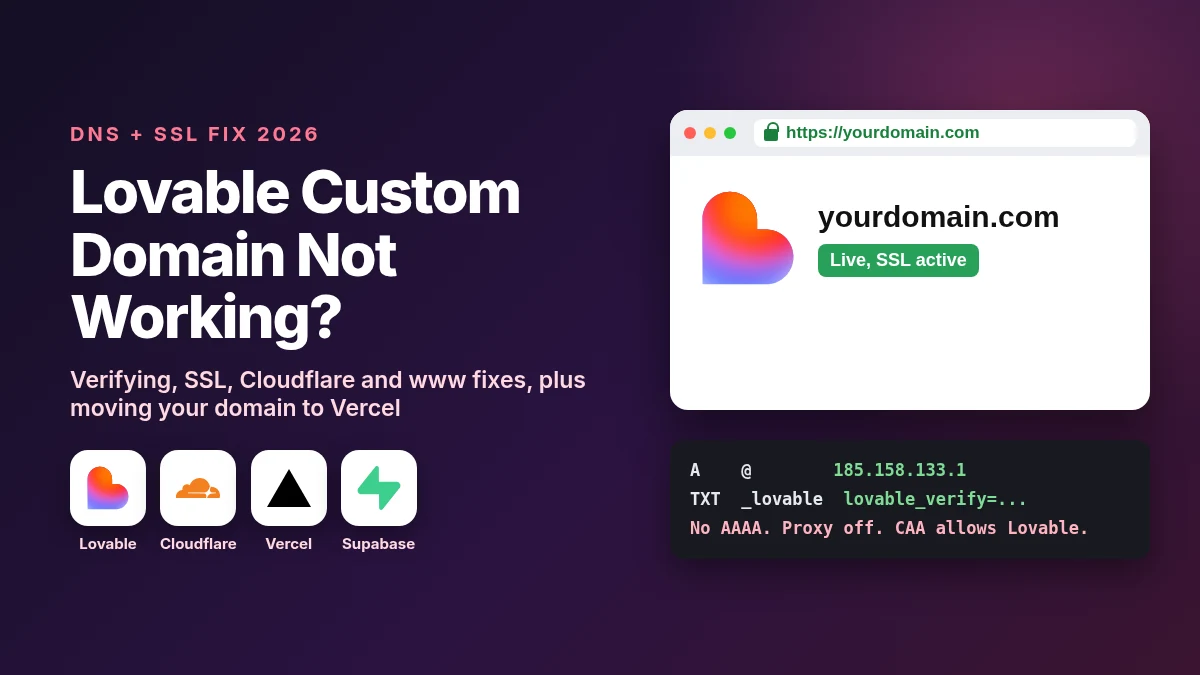
Lovable Custom Domain Not Working? DNS and SSL Fix (2026)
You bought a domain, pasted a couple of DNS records into your registrar, and waited. And waited. Now your Lovable custom domain is stuck on Verifying, shows a scary security warning, or still loads your old website. Sound familiar? You’re in good company. Custom domains are the step where most Lovable launches stall, and it’s almost never Lovable being broken.
This guide goes much deeper than the short custom domain section in my post on Lovable hosting alternatives. You’ll get the exact records Lovable expects, what every domain status means, a DNS cheat sheet, a symptom to fix table, the Cloudflare and www traps, and how to move the domain to your own Vercel project if you’re leaving lovable.app.
Quick answer: If your Lovable custom domain is not working, check four things in this order. You need a paid plan (Pro starts at $25 a month). Your DNS needs one A record to 185.158.133.1 plus the _lovable TXT record. Remove any AAAA and old records. Turn off the Cloudflare proxy, and make sure CAA records allow Lovable’s certificate authorities.
| If you see… | Most likely cause | Fix |
|---|---|---|
| Verifying for hours | Wrong or missing A or TXT record, or the A record is proxied | A record to 185.158.133.1, full lovable_verify value at _lovable, proxy off |
| Unable to verify | Records still wrong or still propagating after 1 hour | Fix the records, then click Check status (DNS can take up to 72 hours) |
| Security warning, status Setting up | SSL certificate is still being issued | Wait for Live, do not reinstall anything |
| Stalled or Failed | Certificate could not be issued, often because of CAA records | Allow pki.goog, letsencrypt.org and ssl.com in CAA, then click Retry |
| Your old website loads | Leftover A, AAAA or CNAME records from the old host | Delete old records so only Lovable’s remain |
| Cloudflare error 1001 or 1003 | Cloudflare proxy (orange cloud) is on | Set the records to DNS only, or use Lovable’s proxy option |
| Sign-in fails on the new domain | Auth redirect URLs do not include the domain yet | Add the domain to your auth redirect URLs |
Want your domain, sign-in and payments sorted on accounts you own? Launch Mango moves your Lovable app onto your own GitHub, Supabase and Vercel accounts and makes it safe for real users. Own and Secure is $199 one-off and includes your custom domain, sign-in and redirects, Supabase RLS, exposed keys and live Stripe webhooks, with money back if it isn’t live on your accounts. Not sure what your app needs? Run the free 2-minute app check.
Do You Need a Paid Lovable Plan for a Custom Domain?
Yes. Lovable’s subscription plans page lists custom domains for Pro, Business and Enterprise, not Free. Pro starts at $25 a month for 100 credits, or $250 a year. Publishing to a lovable.app address stays free on every plan, and domains you already connected keep working if you later downgrade or cancel.
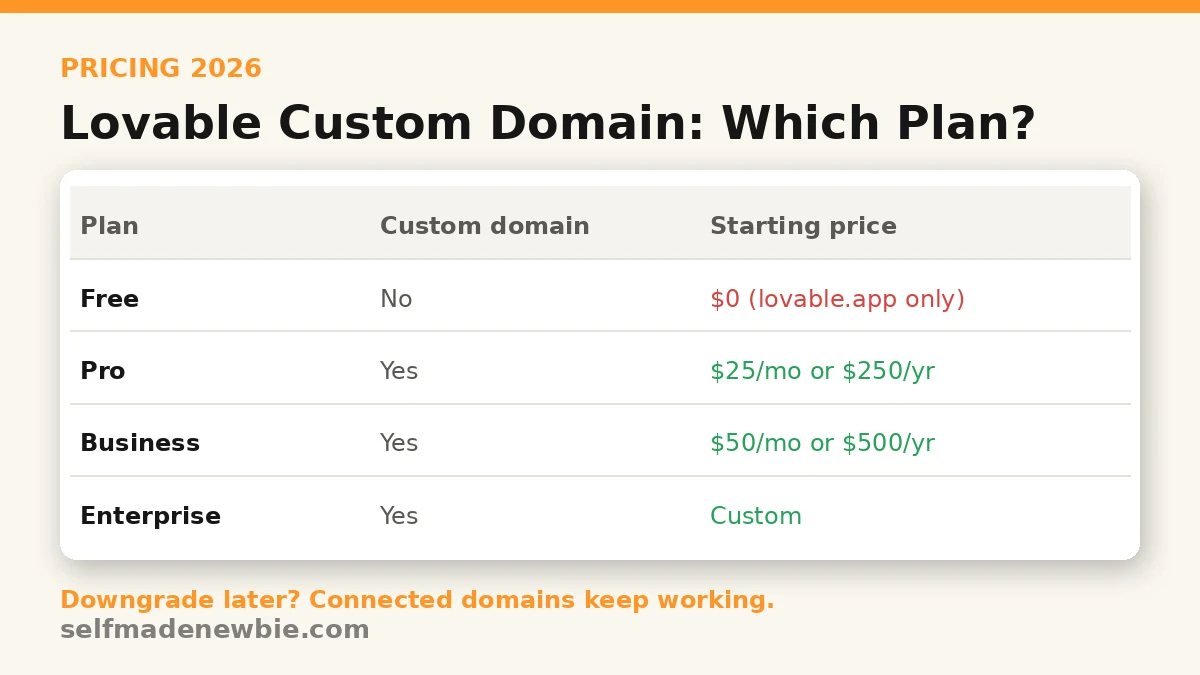
Here is what each plan gives you for domains, based on Lovable’s own docs:
| Plan | Custom domain? | Starting price | Notes |
|---|---|---|---|
| Free | No | $0 | Publish to your-app.lovable.app only |
| Pro | Yes | $25/month (100 credits) or $250/year | Annual billing gives 2 months free |
| Business | Yes | $50/month (100 credits) or $500/year | Adds branded lovable.app URLs for the workspace |
| Enterprise | Yes | Custom | Can also set one workspace publishing domain |
Sources: Lovable subscription plans, Lovable hosting docs and Lovable custom domain docs. The domain itself is a separate cost. If you buy it through Lovable, it’s billed apart from your subscription and renews on its own. If you buy it at a registrar like Namecheap or Cloudflare, you pay them directly.
Two details people miss. After a downgrade to Free, your connected domains keep serving your app, but you can’t connect a new domain until you upgrade again. And there’s no way to remove the your-app.lovable.app address itself, so the fix is to set your custom domain as the primary domain, which I cover below.
How Do You Connect a Custom Domain to Lovable?
Publish your project, open Project, Settings, Domains, and choose Connect existing domain. Enter the domain, pick Root domain or Subdomain, then let Entri update your DNS automatically or copy the A and TXT records into your registrar by hand. Click Done and wait for the status to reach Live.
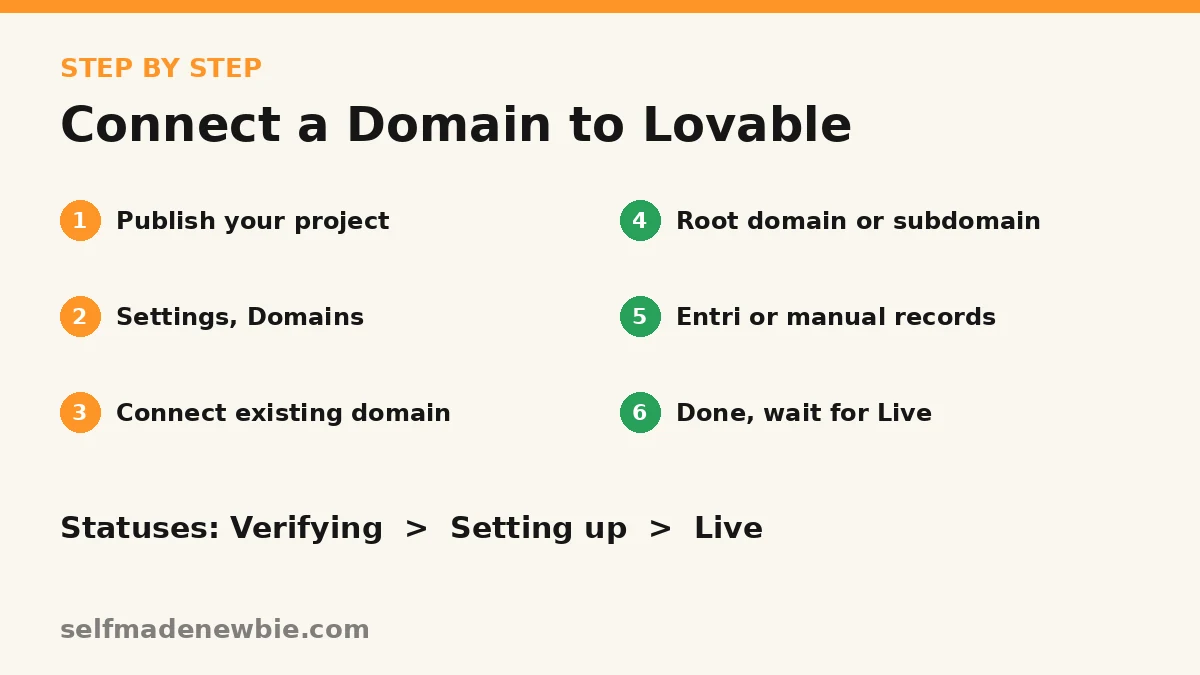
- Publish first. You can set up a domain any time, but it only serves your site after the project is published. A verified domain on an unpublished project shows Ready.
- Go to Project, Settings, Domains (or Publish, Add domain) and click Connect domain under Connect existing domain.
- Enter
yourdomain.comor a subdomain likeapp.yourdomain.comand click Continue. - Choose Root domain or Subdomain. For a root domain, the Redirect www to root option is on by default, so Lovable connects
www.yourdomain.comtoo. - Pick automatic setup with Entri (log in to your provider and approve) or manual setup (copy the records yourself).
- Click Done, then wait for verification and the SSL certificate. The status moves through Verifying and Setting up to Live.
Don’t own a domain yet? Lovable also lets you buy one inside Lovable, and then it creates the DNS records and certificate for you, usually within minutes. According to Lovable’s launch on a custom domain guide, that path has no DNS work at all. The trade-off is that the domain lives in your Lovable workspace, so if you plan to leave Lovable later, a registrar you control directly is the cleaner choice.
What DNS Records Does a Lovable Custom Domain Need?
A Lovable custom domain needs an A record pointing to Lovable’s IP 185.158.133.1 and a TXT record at _lovable (or _lovable.prefix for a subdomain) with a value starting lovable_verify=. Remove any AAAA records. Behind Cloudflare’s proxy, Lovable gives you a CNAME to your lovable.app address instead and skips the TXT record.
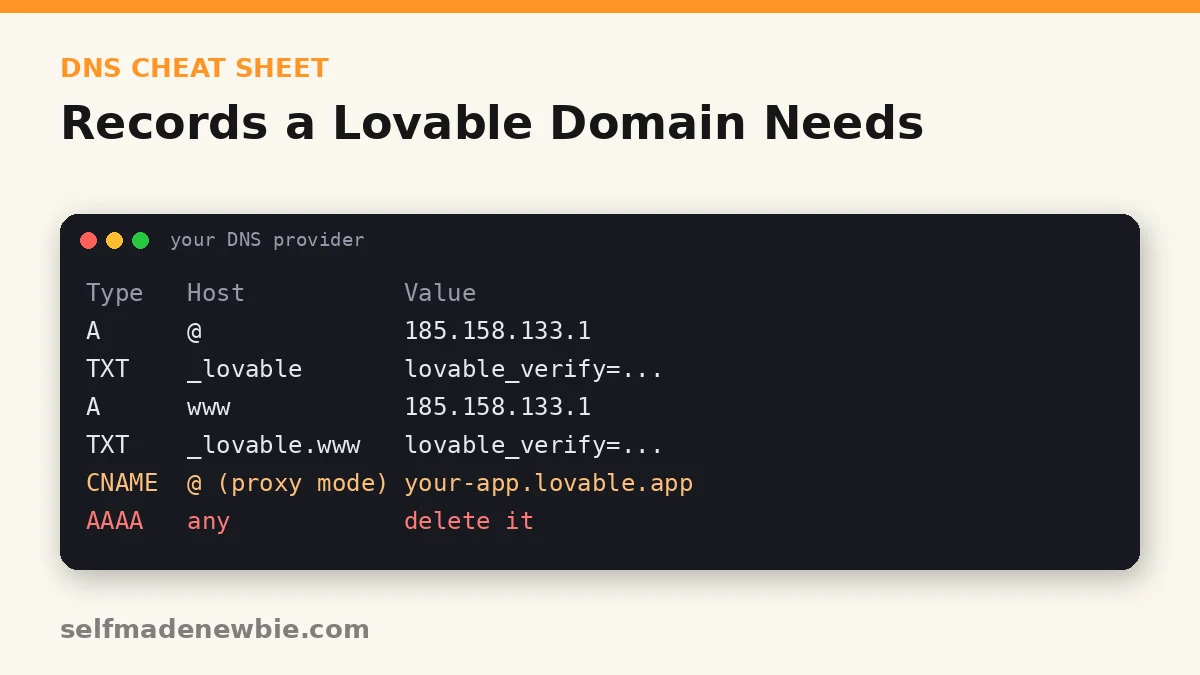
This is the cheat sheet I wish Lovable put on one page. Copy the exact values Lovable shows you in Project, Settings, Domains, because your TXT value is unique to your project.
| What you are connecting | Type | Host / Name | Value | Notes |
|---|---|---|---|---|
| Root domain (yourdomain.com) | A | @, blank, or yourdomain.com | 185.158.133.1 | Route 53 needs blank or the domain name |
| Root domain verification | TXT | _lovable | lovable_verify=... | Paste the full value, nothing trimmed |
| www (with the redirect option on) | A | www | 185.158.133.1 | Listed as its own domain, click Complete setup on it too |
| www verification | TXT | _lovable.www | lovable_verify=... | Separate value from the root domain |
| Subdomain (app.yourdomain.com) | A | app | 185.158.133.1 | Each subdomain is connected on its own |
| Subdomain verification | TXT | _lovable.app | lovable_verify=... | Host is _lovable.<prefix> |
| Proxy mode (Cloudflare or similar) | CNAME | @ or subdomain | your-app.lovable.app | Replaces the A record, no TXT needed |
| Any host | AAAA | any | delete it | AAAA records interfere with routing |
| If you use CAA records | CAA | @ | 0 issue "letsencrypt.org" | Also allow pki.goog and ssl.com |
Sources: Lovable custom domain docs for the A, TXT, CNAME, AAAA and CAA rules. Lovable documents the _lovable.<prefix> pattern for subdomains, so I applied the same pattern to www. Always use the exact host and value Lovable shows you if they differ from this table.
One reassuring note from Lovable’s docs: if you spot 185.158.133.1 in your DNS and don’t recognize it, that’s Lovable’s server, not a leftover from your previous host. Don’t delete it.
Why Is Your Lovable Domain Stuck on Verifying?
A Lovable domain stays on Verifying when the A or TXT record is missing, mistyped, or still propagating. It also stays there if the A record is proxied through Cloudflare or points at a CDN. After one hour the status changes to Unable to verify. Fix the records, then click Check status.
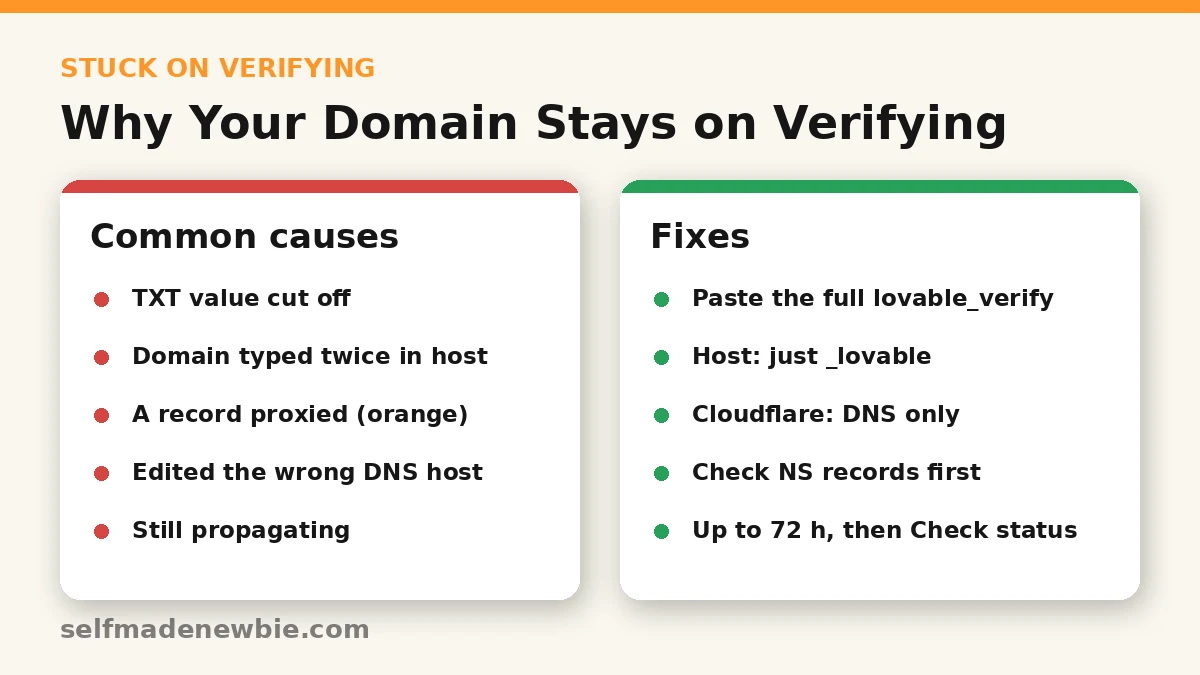
Lovable’s domain docs are clear that the records must stay exactly as given until verification finishes. The usual mistakes I see:
- The TXT value got cut off. Some registrars truncate long values or add quotes. Lovable specifically says to check the full TXT value.
- The host field has the domain twice. Many registrars add your domain automatically, so typing
_lovable.yourdomain.comcan create_lovable.yourdomain.com.yourdomain.com. Type just_lovable. - The A record is proxied. On Cloudflare, an orange cloud on the A record keeps the domain in Verifying. Switch it to DNS only.
- You edited the wrong DNS provider. If your domain’s nameservers point to Cloudflare, records added at your registrar do nothing. Check the NS records first.
- It just needs time. DNS can take up to 72 hours to propagate, though most changes are live within a few hours.
If it still won’t budge, ask Lovable in the project chat about the domain. Its docs say it reports which records it expects, whether it can see them, and whether the project is published. Removing and re-adding the domain is the last resort, not the first.
Why Is Your Lovable Custom Domain SSL Not Working?
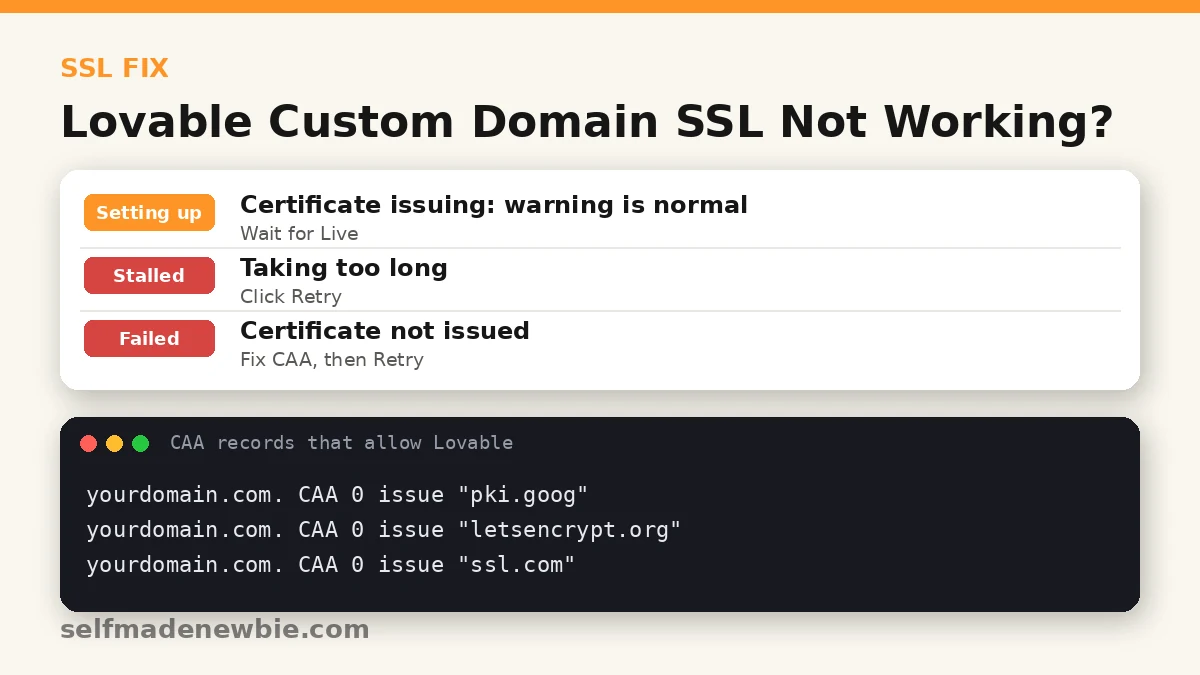
During Setting up, Lovable is still issuing your certificate, so a browser security warning is normal. Wait for Live. If the status turns Stalled or Failed, the usual cause is CAA records that block Lovable’s certificate authorities. Allow pki.goog, letsencrypt.org and ssl.com, then click Retry. You never install a certificate yourself.
Lovable issues and serves its own certificate for every connected domain. Its docs say you don’t need to buy, upload or reissue an SSL certificate from your registrar, and any certificate you bought from Namecheap or GoDaddy isn’t used by Lovable’s hosting. All Lovable domains use TLS 1.2 or newer.
CAA records are the hidden SSL killer. They list which certificate authorities may issue certificates for your domain, and per Let’s Encrypt’s CAA docs, you allow a CA by putting its domain in an issue record, and multiple records add up. Lovable recommends allowing all three of its authorities:
yourdomain.com.  CAA  0 issue "pki.goog"
yourdomain.com.  CAA  0 issue "letsencrypt.org"
yourdomain.com.  CAA  0 issue "ssl.com"
If your provider uses separate fields, enter flag 0, tag issue and the issuer domain without quotes. Check the parent domain too: app.example.com inherits CAA records from example.com unless it has its own. After the change takes effect, click Retry next to the domain. If a certificate still hasn’t appeared after 72 hours, Lovable says to contact support.
Does the Cloudflare Proxy Break a Lovable Custom Domain?
It can. With Cloudflare’s orange cloud on, Lovable can’t verify your A record, and you may see Cloudflare error 1001 or 1003. The simple fix is DNS only (gray cloud). If you want Cloudflare in front, turn on Lovable’s Uses Cloudflare or similar proxy option, which uses a CNAME instead of the A record.
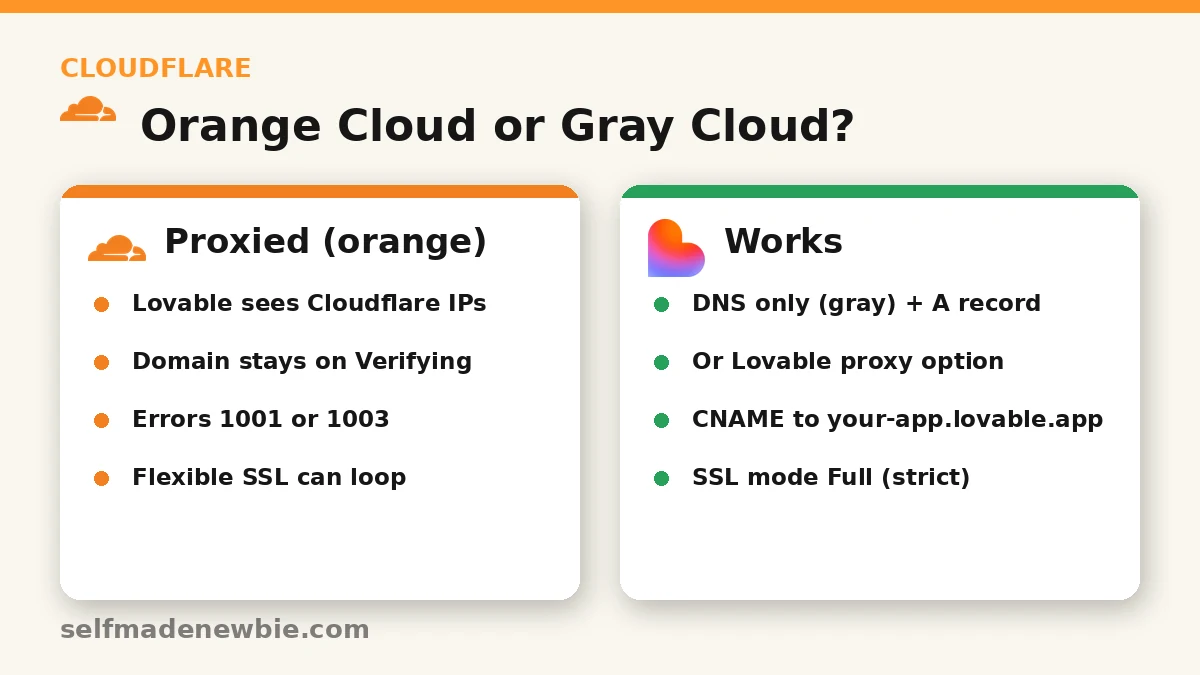
Cloudflare’s proxy status docs explain the difference. A proxied record (orange cloud) answers DNS with Cloudflare’s own IP addresses, so anyone checking your A record, including Lovable, sees Cloudflare instead of 185.158.133.1. A DNS only record (gray cloud) returns your real value. Only A, AAAA and CNAME records can be proxied, so your TXT record is never the problem here.
| Your goal | Cloudflare setting | Lovable setting |
|---|---|---|
| Just make the domain work | A and www records set to DNS only (gray cloud) | Normal connect, A + TXT records |
| Keep Cloudflare caching or firewall in front | CNAME to your-app.lovable.app, proxied | Advanced, Uses Cloudflare or similar proxy |
| Root domain on a CNAME | CNAME flattening lets a CNAME sit at the root | Proxy option, one CNAME per domain |
In proxy mode you take responsibility for the Cloudflare side, and Lovable says it doesn’t validate or monitor it. Cloudflare’s CNAME flattening is what lets that CNAME sit on the root domain. If you then hit a too many redirects error, Cloudflare’s redirect loop guide points to the SSL/TLS mode: Flexible talks to the origin over plain HTTP, which loops when the origin redirects to HTTPS. The SSL modes page recommends Full (strict) when the origin has a valid certificate.
Should You Use www or the Root Domain for Your Lovable App?
Either works on Lovable. Connect the root domain and leave the www redirect option on, so both addresses reach your app. Then set the one you prefer as primary. Every other connected domain, including your-app.lovable.app, redirects to the primary with a 302 temporary redirect. Lovable does not offer 301 redirects between project domains.
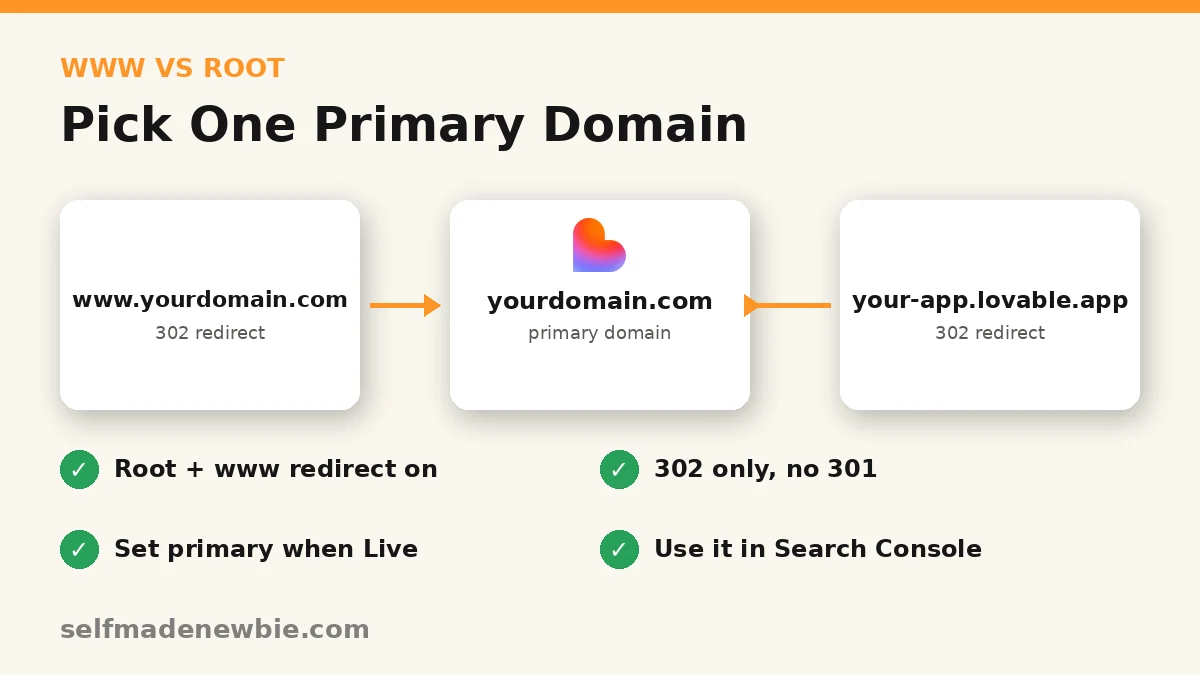
Per the Lovable docs, the first custom domain you add becomes the primary automatically (for domains added after October 29, 2025). You can change it any time from the three dots menu next to a Live domain, and the domain has to be Live before you can make it primary.
- Pick one address and stick to it. Use it in your marketing, your sitemap and Google Search Console.
- www shows Not connected? You turned the redirect option off. Click Connect next to www after the root is Live.
- Bought the domain through Lovable? Both the root and www are set up automatically and listed separately.
- Worried about SEO and the 302? Lovable uses temporary redirects so primary domains stay reversible. If you need full control over redirects, that’s one more reason people move the app to their own host.
Vercel, for comparison, recommends www as the main address and prompts you to add it when you add a root domain, according to its add a domain docs. There, you add both domains and pick which one redirects to the other.
Why Does Your Domain Still Show Your Old Website?
Your DNS still has A, AAAA or CNAME records from your previous host, so some visitors are sent there instead of Lovable. Delete every old record for the host you’re connecting until only Lovable’s A record and TXT record remain. Then clear your browser cache or try an incognito window, and give DNS a few hours.
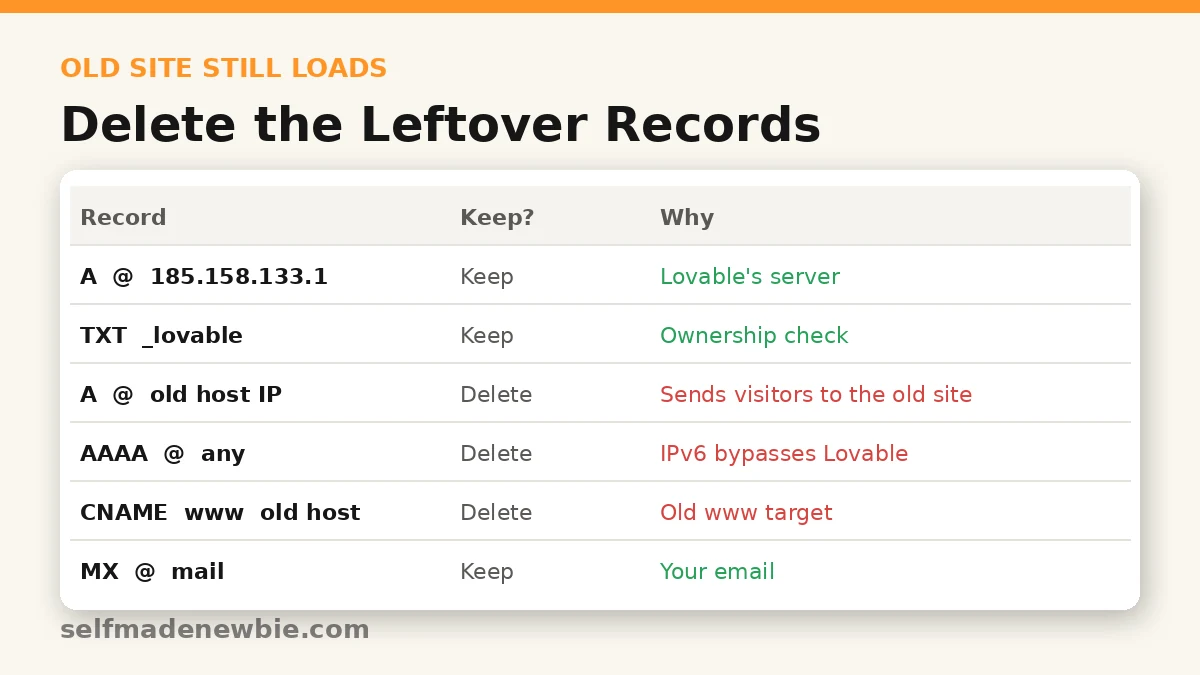
AAAA records are the sneaky one. They point your domain to an IPv6 address, and Lovable’s docs say they can route traffic past Lovable entirely, which is why some people see the new app on Wi-Fi and the old site on their phone. Lovable asks for no AAAA records at all on the domain you’re connecting.
Two later statuses also look like this problem:
| Status | What it means | What to do |
|---|---|---|
| Offline | The domain was Live, but its DNS records are no longer valid | Click Recover and re-add the records Lovable shows |
| Connection issue | Lovable may no longer be able to serve the domain, for example it moved to another host or is still connected to another project | Disconnect it if you moved it on purpose, otherwise follow the warning or contact support |
| Check failed | Lovable could not complete its check | Click Check status, and do not change DNS based on this alone |
| Removed | The domain was added to another project or never verified | Click Reconnect |
Source: the status table in Lovable’s custom domain docs. If you connected the same domain to a second project in another workspace, the first project keeps serving it until you disconnect it there.
Why Does Sign-In Break After You Add a Custom Domain?
Your auth settings don’t list the new domain as an allowed redirect yet. On Lovable’s built-in backend, the domain is added automatically once it goes Live. If you use your own Supabase project, add the domain to its Site URL and redirect URLs yourself. Google sign-in with your own credentials needs it in Google Cloud too.
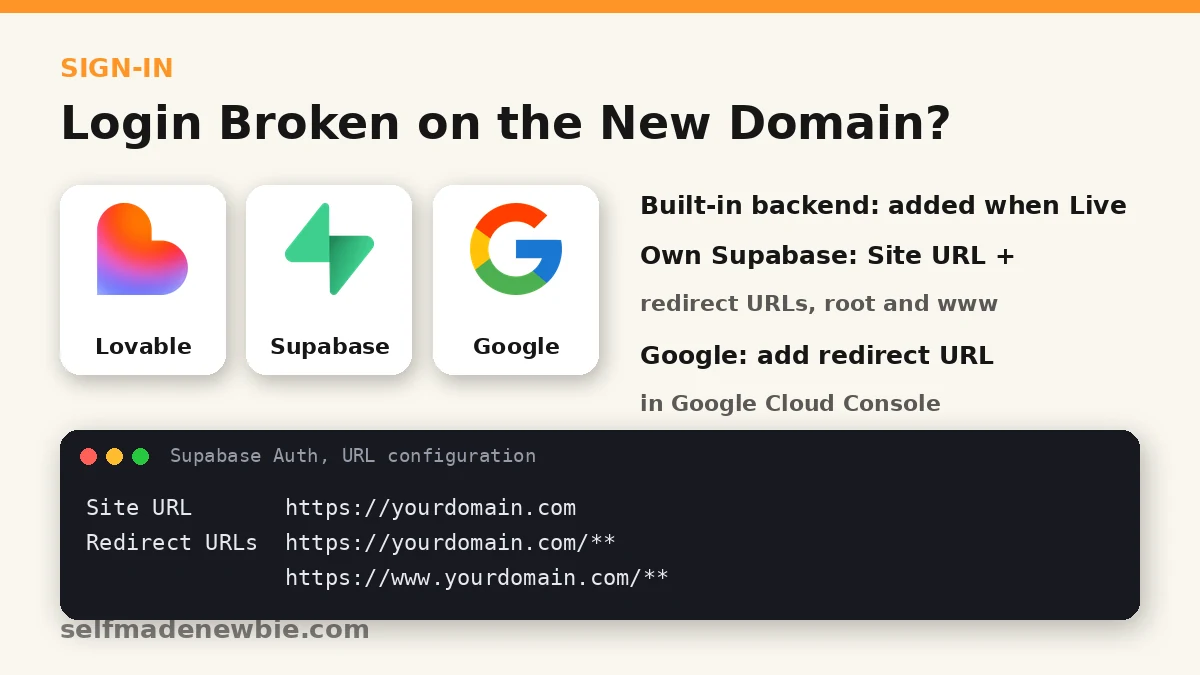
- Built-in backend: if login still fails after Live, ask Lovable in chat to add your domain to the auth redirect URLs, or add it under More, Users, Settings, Advanced.
- Your own Supabase project: set the Site URL to
https://yourdomain.comand add the domain to the redirect allow list, including www if you use both. - Google sign-in with your own OAuth client: add the new redirect URL in Google Cloud Console, then select it in Lovable.
This is exactly the problem in my guide to the OAuth redirect to localhost error, which walks through the Supabase and Google screens step by step. The short version: every address a user can sign in from has to be on the allow list, and that includes the www and root versions separately.
What Is the Fastest Way to Diagnose a Lovable Domain Problem?
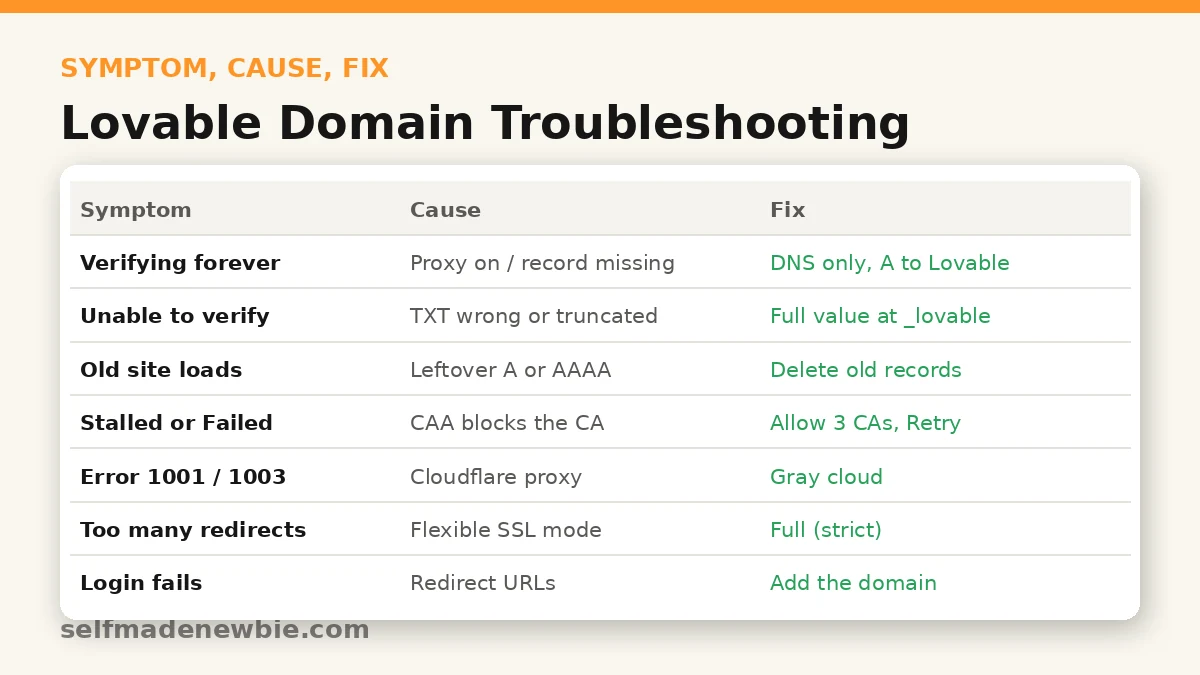
Start with the status in Project, Settings, Domains, then run five dig commands to see what the internet actually sees: the A record, any AAAA records, the _lovable TXT value, CAA records and nameservers. Compare them with the symptom table below. Most problems become obvious within two minutes once you can see the real records.
Run these in a terminal on Mac or Linux (Windows users can use an online DNS checker like the one Lovable links to). Replace yourdomain.com with your domain:
# Where does the domain point? (Lovable root domain should show 185.158.133.1)
dig A yourdomain.com +short

# Any IPv6 records left over? This should print nothing for Lovable.
dig AAAA yourdomain.com +short

# Is the verification record there with the full value?
dig TXT _lovable.yourdomain.com +short

# Any CAA records that could block the SSL certificate?
dig CAA yourdomain.com +short

# Which DNS provider is actually in charge?
dig NS yourdomain.com +short
Then match what you see to this table. I built it from every status and troubleshooting note in the Lovable docs, plus the Cloudflare and Vercel pages, so it covers the problems people actually hit:
| Symptom | What dig shows | Cause | Fix |
|---|---|---|---|
| Verifying, never moves | A shows a Cloudflare IP or nothing | Proxy on, or record missing | DNS only, A to 185.158.133.1 |
| Unable to verify | TXT empty or shorter than Lovable’s value | TXT on wrong host or truncated | Host _lovable, paste the full value |
| Records look right, still nothing | NS shows a different provider | Editing DNS at the wrong company | Edit records where the NS points |
| Old site on some devices | AAAA returns an address | Leftover IPv6 record | Delete all AAAA records |
| Old site everywhere | A shows a different IP, or a CNAME | Old host records still active | Delete old A and CNAME records |
| Setting up, browser warning | Records correct | Certificate still issuing | Wait for Live |
| Stalled or Failed | CAA lists other CAs only | CAA blocks Lovable’s CAs | Allow pki.goog, letsencrypt.org, ssl.com, Retry |
| Error 1001 or 1003 | A shows a Cloudflare IP | Cloudflare proxy | Gray cloud, or Lovable proxy option |
| Too many redirects (proxy mode) | CNAME proxied | Cloudflare SSL mode Flexible | Full (strict) |
| www not working, root works | No record for www | www not connected | Connect www, add its A and TXT |
| Login fails on new domain | Records fine | Redirect URLs missing the domain | Add the domain to auth settings |
| Ready, not Live | Records fine | Project not published | Click Publish |
How Do You Move Your Custom Domain to Your Own Vercel Project?
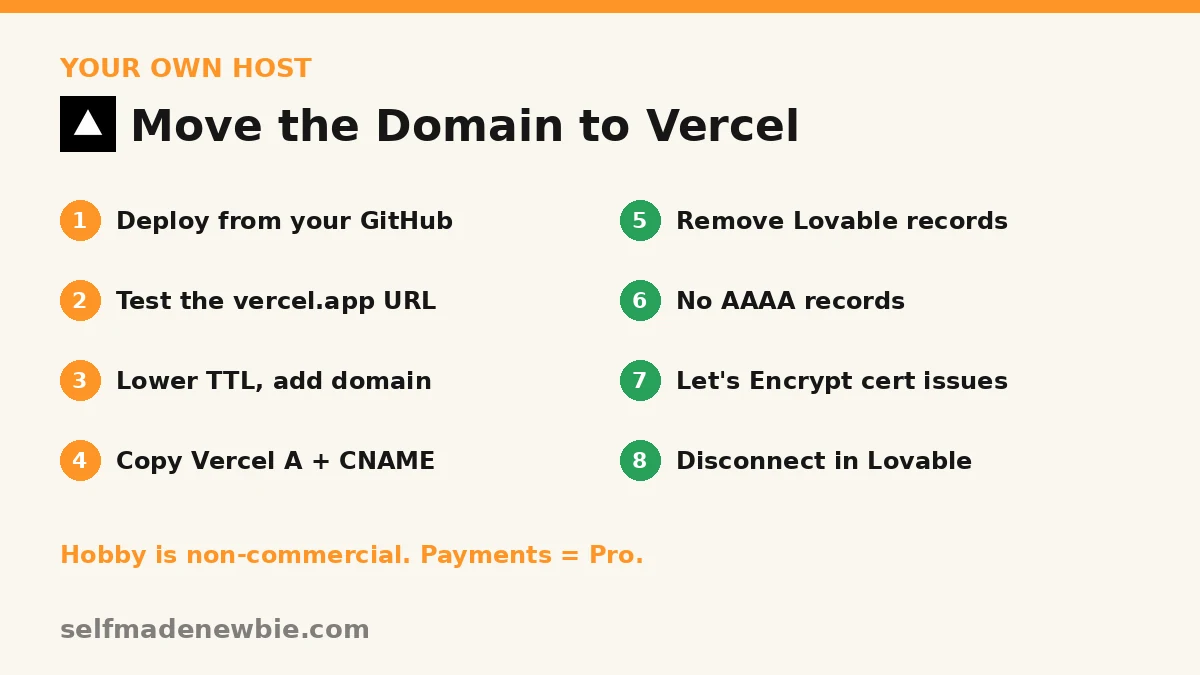
Deploy the app from your own GitHub repository to Vercel first and test it on the vercel.app URL. Then add the domain in Vercel’s project settings and copy the A record for the root and the CNAME for www that Vercel shows you. Replace Lovable’s records, wait for Vercel’s certificate, and disconnect the domain in Lovable.
This is the step that turns a Lovable app into an app you fully own. My guide to Lovable hosting alternatives covers choosing a host and moving the code, and my walkthrough on how to deploy a Lovable app covers the Vercel build settings. For the domain itself:
- Lower the TTL first. Vercel’s troubleshooting docs recommend dropping your current record’s TTL (for example to 60 seconds) and waiting for the old TTL to expire, so you can roll back fast.
- Add the domain in Vercel under your project’s Settings, Domains. Vercel will suggest adding www as well.
- Copy Vercel’s values, not a guide’s. Vercel uses an A record for the root and a CNAME for subdomains such as www, and its docs say the exact values are specific to your project and plan, for example a CNAME like
d1d4fc829fe7bc7c.vercel-dns-017.com. - Replace Lovable’s records. Remove the 185.158.133.1 A records and the _lovable TXT records, and keep MX records for email untouched.
- Skip AAAA. Vercel’s docs say it doesn’t support IPv6 yet for domains pointed from a third-party DNS provider.
- Let the certificate issue. Vercel requests a Let’s Encrypt certificate automatically once DNS resolves, and renews it 14 to 30 days before expiry. If you have CAA records, they must allow letsencrypt.org.
- Disconnect the domain in Lovable once Vercel shows it as valid, so Lovable stops flagging a Connection issue.
- Update sign-in and Stripe settings for the new host, then test sign-up, login and a payment.
Two soft warnings. Vercel’s Hobby plan is free with 50 domains per project, but it’s for personal, non-commercial use, so an app that takes payments belongs on Pro. And if you keep Cloudflare in front, Vercel’s domain troubleshooting docs say to use DNS only or route /.well-known/acme-challenge/* straight to Vercel, or certificate renewals can fail. Certificate details are in Vercel’s SSL docs.
Lovable Custom Domain FAQ
Can I use a custom domain on the Lovable Free plan?
No. Custom domains need a paid Lovable plan, starting with Pro at $25 a month. Publishing to a lovable.app address is free on every plan. If you host the app elsewhere, the custom domain is handled by that host instead.
How long does a Lovable custom domain take to go live?
Domains bought through Lovable usually go live within minutes, though it can take several hours. For a domain from another provider, most DNS changes work within a few hours, but Lovable says propagation can take up to 72 hours.
Can I connect a subdomain like app.mydomain.com to Lovable?
Yes. Choose Subdomain when connecting, enter the prefix, and add an A record for that prefix plus a TXT record at _lovable.prefix. Each subdomain is connected separately, and different subdomains can point to different Lovable projects.
Do I need to buy an SSL certificate for my Lovable domain?
No. Lovable issues and installs a free SSL certificate for every connected domain automatically. A certificate bought from your registrar is not used. If issuance fails, check that your CAA records allow pki.goog, letsencrypt.org and ssl.com.
What happens to my custom domain if I cancel Lovable Pro?
Connected domains keep serving your published app after a downgrade or cancellation, and your project stays published. You just can’t connect new domains until you upgrade again. Domains bought through Lovable keep renewing because they’re billed separately.
Can I remove the lovable.app address once my domain works?
No. Lovable doesn’t let you remove the your-app.lovable.app address. Set your custom domain as primary instead, and visitors to the lovable.app address are redirected to your domain with a 302 temporary redirect.
Should You Fix Your Lovable Domain Yourself or Hand It Off?
Fix it yourself if the app is small and the problem matches a row in the table above. Most domain issues come down to one wrong record. Hand it off if real users or payments depend on the app, or if you also want it on your own accounts instead of Lovable’s, with sign-in and payments checked.
A Lovable custom domain is usually one record away from working: the A record to 185.158.133.1, the full TXT value, no AAAA, no orange cloud, and CAA records that allow Lovable’s certificate authorities. Once it’s Live, set your primary domain and update your sign-in redirects. My guide on how to launch your vibe-coded app covers everything else to check before real users arrive, and my DIY vs done-for-you breakdown shows what the do-it-yourself route really costs in time.
Handing it off is what we do at Launch Mango. Own and Secure ($199 one-off) is the natural fit for this problem: everything in Own Your App, plus sign-in and redirects fixed, Supabase RLS and permissions locked down, exposed API keys removed from the frontend, live Stripe payments and webhooks, a security report and your custom domain included. Own Your App ($79 one-off) moves your Lovable, Bolt, v0 or Cursor app onto your own GitHub, Supabase and Vercel accounts, live at a real URL with a plain-English handover report, usually in 1 to 2 days. Either way, your money back if it isn’t live on your accounts.
Want to see how locked in your app is first? Run the free 2-minute app check. Or read my Launch Mango review and compare it with the other best app launch services.
Your app, on your accounts, safe for real users. Get your domain live, then go get customers.


