
Vercel 404 on Refresh? How to Fix It for Your Vibe-Coded App (2026)
Your app works perfectly. You click around, every page loads, you share the link. Then someone refreshes the page, or opens a link like yourapp.com/dashboard from an email, and gets a big ugly 404: NOT_FOUND.
If that sounds familiar, you’re not alone. The Vercel 404 on refresh problem (and its twin, the Netlify “Page not found” on reload) is one of the most common things that breaks when a Lovable, Bolt or Cursor app leaves the builder and lands on its own hosting. The good news: for most vibe-coded apps the fix is one small file.
In this guide I’ll show you why it happens in plain English, give you copy-paste fixes for Vercel, Netlify and Cloudflare, and flag the apps where you should not use the usual fix (Next.js apps from v0 and newer Lovable projects). Every fix and config file below comes from the official Vercel, Netlify, Cloudflare, React Router and Lovable docs, checked on October 21, 2026.
Here’s the quick fix:
| Your host | What to add | Where it goes |
|---|---|---|
| Vercel | A vercel.json rewrite that sends every path to /index.html | The root of your repo, next to package.json |
| Netlify | A _redirects file with /* /index.html 200 (or the same rule in netlify.toml) | public/_redirects in a Vite app, or netlify.toml at the repo root |
| Cloudflare Pages | Usually nothing. Pages serves your app for unknown paths if there is no top-level 404.html | Remove a stray 404.html if you have one |
| Next.js (v0) | No SPA rewrite. Next.js handles its own routes | Fix routing in next.config.js instead |
| Lovable TanStack Start (new projects) | No SPA rewrite. The host has to run the server part | Follow the TanStack Start hosting setup for your host |
Rather not touch config files? 404 on refresh is one of the gaps we fix when we move your app off the builder. Launch Mango‘s Own Your App ($79 one-off) puts your Lovable, Bolt, v0 or Cursor app on your own GitHub, Supabase and Vercel accounts, live at a real URL, with your money back if it isn’t live on your accounts. Run the free app check »
Why Your App Shows a 404 When You Refresh the Page
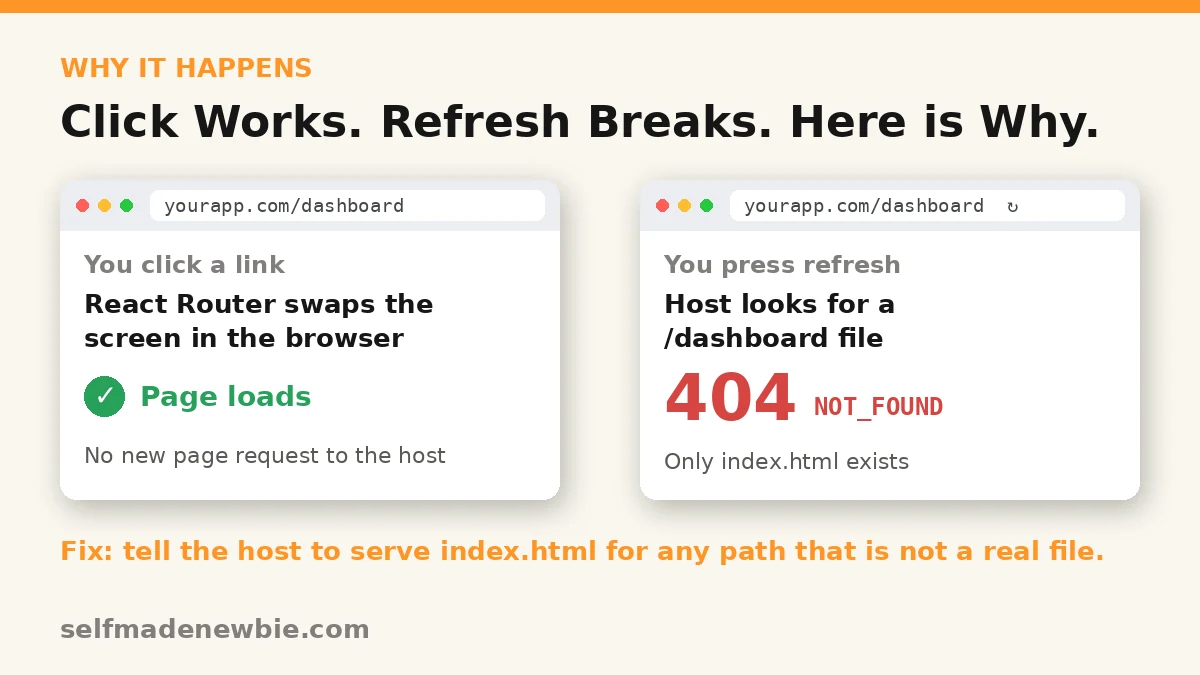
Most apps built with Lovable (older projects), Bolt and Cursor are single page apps (SPAs), usually built with Vite and React Router. When you build one, you get a single index.html file plus some JavaScript. There is no dashboard.html or settings.html. Every page lives inside that one file.
Here’s what happens:
- Clicking a link works. You land on
/, the host servesindex.html, and React Router takes over. When you click to/dashboard, the router just changes the address bar and swaps the screen. The browser never asks the host for a new page. - Refreshing breaks. A refresh (or a deep link from an email, a bookmark or a sign-in redirect) is a brand new request. The browser asks the host for
/dashboard. The host looks for that file, can’t find it, and returns a 404 before your JavaScript ever runs.
Vercel’s own knowledge base says it plainly: Vercel resolves every URL as a file path by default, and it can’t tell that your project is an SPA, so you have to add an SPA fallback yourself. The React Router docs say the same thing for any static host: you need to direct all URLs to index.html, and if you’re getting 404s at valid routes, it’s likely your host needs configuring.
So the fix is always the same idea: tell the host to serve index.html for any path that isn’t a real file, and let React Router handle the rest. That’s called a rewrite. Unlike a redirect, the URL in the address bar doesn’t change.