ViralDashboardAi Review (2026): Is the $147 Bundle Worth It?
You open Canva to make one graphic. Then ChatGPT to write the caption. Then the scheduler, which tells you the caption is 47 characters too long for X. Then you resize the image for Stories, rewrite the hashtags for LinkedIn, and realize it’s lunchtime and you’ve published exactly one post to one platform.
Now multiply that by every platform your customers use, every client you manage, and every day of the month. That’s how most small business pages go quiet by week three. It isn’t laziness. It’s five tabs, five logins, and five monthly bills, with you as the human copy-paste button holding it all together.
ViralDashboardAi promises to collapse that whole mess into one login. It’s an AI social media dashboard that plans a 30-day content calendar, writes captions, designs graphics, and publishes to 20 platforms, then pulls comments, DMs, and analytics into the same place, for a $147 one-time launch price. In this ViralDashboardAi review, we break down what you actually get, every upsell in the funnel, and whether it’s worth buying before the launch bundle disappears.
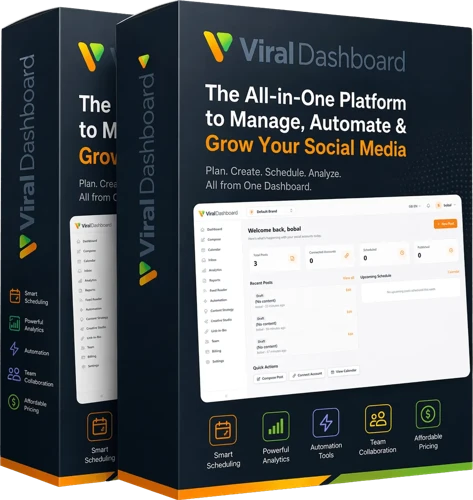
ViralDashboardAi
An all-in-one social media dashboard that plans 30 days of content, writes and designs your posts, and publishes to 20 platforms from one login. $147 one-time during launch week.
| Best For | Freelancers, small agencies, local businesses |
| Price | $147 one-time (launch week) |
| Discount | $339 value if bought separately |
| Promotion | $738 in launch bonuses, 14-day guarantee |
ViralDashboardAi Review: The Quick Verdict
ViralDashboardAi is an all-in-one, browser-based social media management tool with AI baked in. You describe a business, the AI builds a month of content as editable drafts, and you write, design, schedule, reply, and report from one dashboard instead of five.
On paper, the launch deal is strong. The All Access Bundle includes the core tool plus the PRO level of all five upgrades and an AI credit boost for $147 once, which the vendor values at $339 if bought separately. For context, that’s about what Hootsuite’s Standard plan costs for a month and a half. So the smart play is simple: grab it at launch pricing if it fits your workflow, test it inside the 14-day money-back window, and keep your receipt handy.
- Best for: freelancers, small agencies, local businesses, and affiliates juggling several social accounts
- Price: $147 one-time during launch week (vendor-stated value $339)
- Platforms: 20, including Facebook, Instagram, TikTok, LinkedIn, YouTube, X, Threads, and Google Business
- Guarantee: 14 days
- Launch: Monday, October 19, 2026 at 11:00 AM ET on JVZoo, launch pricing ends Sunday, October 25 at 11:59 PM ET
- Made by: Firas Alameh and Rahul Gupta (Webliska Technologies)
What Is ViralDashboardAi?
ViralDashboardAi (sold as Viral Dashboard on its own sales page, and listed on JVZoo as “ViralDashboard v5, All Access Bundle”) is an AI-powered social media command center. It connects to your accounts through official APIs and OAuth logins, so you never hand over passwords, and it tries to replace the usual stack of a scheduler, a design tool, an AI writer, a feed reader, and a link-in-bio page.
The pitch is that a social media agency’s month comes down to five jobs: planning, creating, publishing, engaging, and reporting. Most tools handle one or two of those. ViralDashboardAi wants to handle all five from one screen, and it adds a commercial license so you can sell that workflow to clients.
It sits in the same broad space as Hootsuite, Buffer, and AI content tools like Predis AI. The difference is the price model. Instead of a monthly plan, the launch offer is a one-time payment, which is the main reason people look at it.
It’s worth knowing what it is not, too. The vendor’s own JV document says it is not a video editor, not a traffic source, and not an email autoresponder. You bring the accounts and the offers. It runs the posting machine.
How ViralDashboardAi Works (5 Steps)
The sales page lays out the workflow in five steps. Here’s the plain-English version.
Step 1: Tell it about the business
You enter what the business does and who it serves, then add brand colors, fonts, logo, and voice once. The AI builds a 30-day content strategy and drops it into the calendar as editable drafts.
Step 2: Let AI write and design each post
Open any draft and the AI offers three caption options built on copywriting frameworks (HOOK, AIDA, WIIFM, and AMP). Need a graphic? The built-in Creative Studio opens with your brand kit applied, and a “Send to Composer” button drops the finished design straight into the post. No exporting, no re-uploading.
Step 3: Publish everywhere at once
You write once and the composer adapts character limits, image sizes, and hashtags for each network, with previews of how the post will look. Then you schedule it, with help from your own audience activity data to pick timing.
Step 4: Handle comments and pull the report
Comments and DMs from every connected account land in one unified inbox. Saved replies handle the repeat questions, and auto-moderation rules can hide spam or auto-reply on Facebook and Instagram. Analytics roll up across platforms so you can see what worked.
Step 5: Use it yourself or sell it as a service
Because a commercial license is included, you can run this workflow for paying clients, each one in its own brand workspace.
ViralDashboardAi Features
Here’s what the launch bundle includes, based on the official sales page and the vendor’s JV materials.
Publishing to 20 platforms
The composer supports Facebook, Instagram, X, LinkedIn, YouTube, TikTok, Pinterest, Threads, Bluesky, Mastodon, Reddit, Tumblr, Telegram, Google Business, Medium, WordPress, WooCommerce, Shopify, Vimeo, and VK. That list is genuinely wider than most budget schedulers, especially if you need Bluesky, Mastodon, Google Business, or store platforms in the same calendar.
Composer extras
- First-comment posting on supported networks, handy for hashtags or links
- Saved hashtag sets plus AI hashtag suggestions
- Saved account sets, so you stop ticking a dozen checkboxes every time
- UTM tracking, tags, and campaigns on every post
- Four content views: list, grid, calendar, and kanban
Content calendar
Month and week views with color-coded networks. Click an empty day to write a post, or drag a post to reschedule it.
Creative Studio
A design editor inside the dashboard with templates filtered by platform or style, brand kits, built-in Unsplash and Pexels stock search, and multi-size export for Instagram, Facebook, LinkedIn, X, and YouTube thumbnails.
AI captions and credits that never expire
The AI Co-Writer works in 40 languages, according to the sales page FAQ. Credits power AI captions and images, and the vendor says credits in the vault and the boost never expire. The JV document puts the bundle at 12,000 vault credits plus a 5,000-credit boost, though the sales page itself doesn’t list the numbers.
Done-for-you content library
AI Vault Starter includes a library covering 5 industries with 150 ready-written posts. Click “Add to my calendar” and a whole pack lands as editable drafts, which is great on weeks when your brain is running on fumes.
Unified inbox and auto-moderation
Every comment and DM, threaded on one screen, with saved replies, snooze, internal notes, assign, and tag. You can turn a public comment into a private DM on Facebook and Instagram, and set auto-moderation rules with a test mode and a kill switch.
Automation and feed reader
Evergreen recycling republishes your best posts on a schedule, and IF-THEN rules handle busywork with logs and a kill switch. The Feed Reader follows niche blogs and news, gives AI summaries, and turns any article into a drafted post in one click.
Analytics, listening, and reports
Analytics Advanced adds a cross-platform overview, per-platform tabs, post-level drill-downs, CSV export, and 90 days of history. Intelligence Insight adds social listening with sentiment on X, YouTube, Bluesky, and Mastodon, a competitor list, and PDF reports.
Link-in-bio pages with email capture
Hosted bio pages with links, video embeds, carousels, contact buttons, and email capture, in 11 themes. Traffic Grow adds more pages, a submissions dashboard with CSV export, click analytics, and QR codes for every page.
Teams and brands
Growth PRO gives you 25 connected social accounts, 5 brand workspaces, and 3 team seats with roles, plus approval workflows so a client signs off before anything goes live.
ViralDashboardAi Pricing, OTOs, and Upsells
Here’s the important part, because a few launch calendars list a “$47 front end.” That’s not what the official pages show. The sales page, the JV page, and the JVZoo listing all show the entry offer as the $147 All Access Bundle. Here’s the full launch funnel so nothing surprises you at checkout:
| Step | Offer | Price | What it adds |
|---|---|---|---|
| Front end | All Access Bundle | $147 one-time | Core tool, all five upgrades at PRO level, AI credit boost, commercial license |
| Order bump | Scale Pack | $47 | +5 brand workspaces and +15 social accounts (10 brands and 40 accounts total) |
| Upsell 1 | Megabundle MAX | $247 | MAX tier of everything: 2,000 posts a month, 50 accounts, 10 brands, 10 seats, bigger AI credit vault, Agency Launch Kit |
| Downsell | Megabundle MAX Lite | $147 | MAX-tier upgrades without the Agency Launch Kit and fast-action credits |
| Upsell 2 | DFY Setup | $197 | The team sets up your account: brand kit, 30-day calendar, designs, agency website, outreach scripts |
| Upsell 3 | Agency Silver or Gold | $97 or $197 | Client portal logins, per-client feature toggles, payment links, API and webhooks (10 or 25 client workspaces) |
Every launch-funnel offer is a one-time payment. The sales page FAQ says the only monthly option in the ecosystem is an optional White-Label add-on, priced separately because it includes hosting, domain, and email infrastructure.
What happens after launch week
According to the vendor’s JV document, when the cart closes on Sunday, October 25 at 11:59 PM ET, the bundle goes away and Viral Dashboard moves to a standard funnel: a $37 front end with every upgrade sold separately, adding up to $339 for the same stack.
Our take on the upsells
Start with the $147 All Access Bundle and skip everything else on day one. Five brands and 25 accounts is plenty for a solo marketer or a small client roster. Only look at the Scale Pack or Megabundle MAX once you actually hit the limits, and only after the product has proven itself during your refund window. The DFY Setup and Agency plans are for people already selling social media management, not for people still testing the software.
Who Is ViralDashboardAi For?
ViralDashboardAi makes the most sense if you see yourself here:
- Freelancers and small agencies who manage several brands and want separate workspaces, approvals, and client reports
- Local business owners who need steady posts on Facebook, Instagram, and Google Business without hiring someone
- Affiliates and marketers running content across multiple pages and niches
- Coaches and consultants who want a consistent presence without it eating the week
- Anyone tired of subscriptions who prefers a one-time tool and is willing to test it carefully
Who should skip it
- Teams that need enterprise reliability and support. If a missed post costs you a client, a proven subscription tool is the safer bet.
- People who can’t spare time in the first two weeks. The 14-day window is short, so if you can’t test it right away, wait.
- Video-first creators. It schedules and designs posts, but it’s not a video editor.
- Anyone who wants a free trial first. If you’d rather not pay upfront and rely on a refund window, choose a tool with a free plan or trial instead.
ViralDashboardAi Pros and Cons
Pros
- $147 one-time for the core tool plus every PRO-level upgrade during launch week
- 20 platforms in one composer, including Bluesky, Mastodon, Google Business, Shopify, and WooCommerce
- 30-day AI content plans and a done-for-you post library that kill the blank calendar
- Built-in Creative Studio, unified inbox, analytics, listening, and link-in-bio, all in one login
- AI credits that never expire, according to the vendor
- Commercial license included, plus 5 brand workspaces and 3 team seats
- Official APIs and OAuth, so you never share passwords
Cons
- Short 14-day guarantee. That’s tighter than many JVZoo launches, so plan your testing the day you buy.
- Upsell stack is long. Six more offers sit behind the front end. The bundle works on its own, so you can say no to all of them.
- Brand-new build. This version launches October 19, so there are no independent long-term reviews of it yet.
- Listening is limited to four networks (X, YouTube, Bluesky, and Mastodon), so it’s not a full Brand24 replacement.
ViralDashboardAi Alternatives
If the reviews make you nervous, these are solid options to compare.
Buffer
Buffer is the low-risk choice. It has a free plan with up to 10 scheduled posts per channel, and paid plans start at $5 a month per channel on Essentials (billed yearly), with a 14-day free trial. It’s simpler and has fewer AI and design features, but it’s dependable.
Hootsuite
Hootsuite is the heavyweight. The Standard plan is $99 per user per month billed annually for up to 10 social accounts, with a unified inbox, AI content help, and monitoring. It’s far more expensive, but it’s built for teams that can’t afford hiccups.
Predis AI
If your real bottleneck is creating posts rather than scheduling them, Predis AI generates captions, carousels, and video posts from a prompt and can schedule them too. Our Predis AI review covers it in detail.
If you want AI to run more of your social presence on its own, our Spira AI review looks at a different, more autopilot approach. And if your plan is short-form video rather than posts and graphics, our TwinClips AI review covers an AI twin tool that turns scripts into talking-head shorts.
Is ViralDashboardAi Worth It?
For budget-minded freelancers, small agencies, and business owners, ViralDashboardAi is worth trying during launch week, as long as you treat the first 14 days as a real test. The feature list is broad, the 20-platform support is genuinely useful, and $147 once is a fraction of what the equivalent subscription stack costs over a year.
The people who will get the most from it are the ones managing multiple brands or clients on a tight budget, who would otherwise pay for a scheduler, a design tool, and an AI writer separately. If that’s you, the math works, and the bundle finally puts the useful features in the front end instead of hiding them on upsell page four.
The honest asterisk is the company’s reputation. Earlier buyers report refund trouble, and that’s not something we can wave away. So go in with eyes open: connect your accounts, build a 30-day plan, schedule real posts, and check the inbox and analytics in your first week. If it earns its place, great. If not, ask for your refund early.
Tips to Get the Most Out of ViralDashboardAi
- Test everything in week one. Connect every platform you care about, publish a few real posts, and confirm analytics pull through.
- Set up your brand kit first. Colors, fonts, logo, and voice make every AI caption and design more on-brand.
- Edit the AI drafts. Treat the 30-day plan as a first draft, then add your own stories and offers.
- Use approval workflows for clients. Let clients sign off before anything publishes, so nobody gets surprised.
- Turn on evergreen recycling carefully. Recycle proven posts, but space them out so your feed doesn’t feel repetitive.
- Screenshot your purchase and limits. Save your receipt and a screenshot of what your plan includes, just in case you need support or a refund.
ViralDashboardAi FAQ
How much does ViralDashboardAi cost?
During launch week, the All Access Bundle is $147 one-time. Optional extras include a $47 Scale Pack, a $247 Megabundle MAX (or $147 Lite), a $197 DFY Setup, and Agency Silver or Gold at $97 or $197.
When does ViralDashboardAi launch?
The cart opens Monday, October 19, 2026 at 11:00 AM ET on JVZoo, with a live webinar at 10:00 AM ET. Launch pricing ends Sunday, October 25 at 11:59 PM ET.
Is ViralDashboardAi a one-time payment?
Yes. Every offer in the launch funnel is a one-time payment. The only monthly product mentioned is an optional White-Label add-on sold separately.
Does ViralDashboardAi have a refund policy?
Yes. The sales page offers a 14-day money-back guarantee, with refunds requested through support@viraldashboard.io. Request it early if you need it.
Is ViralDashboard legit?
Yes. It’s a real product from a real company, and the platform connects to your social accounts through official APIs. It also comes with a 14-day money-back guarantee, so you can try it without much risk.
Which platforms does ViralDashboardAi support?
Twenty: Facebook, Instagram, X, LinkedIn, YouTube, TikTok, Pinterest, Threads, Bluesky, Mastodon, Reddit, Tumblr, Telegram, Google Business, Medium, WordPress, WooCommerce, Shopify, Vimeo, and VK.
Can I use ViralDashboardAi for clients?
Yes. A commercial license is included, and Growth PRO gives you 5 brand workspaces to keep each client separate. Client portal logins and payment links require the Agency plans.
Conclusion
Running social media shouldn’t require five tools and a spare afternoon per post. ViralDashboardAi pulls planning, writing, design, publishing, inbox, and reporting into one dashboard across 20 platforms, and during launch week it does it for $147 once instead of another monthly bill.
It’s a feature-packed deal, so test it fast, keep your receipts, and use the 14-day guarantee if it doesn’t deliver. If you manage several brands or clients on a budget and you’re ready to put it through its paces this week, it’s one of the most complete one-time social media tools you can grab right now.