Timeline AI Review (2026): The AI Video Editor Agent for Long-Form YouTube
Long-form YouTube is where the real money is. A 15-minute video usually earns far more ad revenue per view than a Short, keeps viewers on your channel longer, and can pull clicks to your offers for years. The problem is the editing. One properly cut 15-minute video means hours of finding clips, timing every shot to the voice-over, adding captions and rendering, and that’s before you’ve even written the script.
Most AI video tools don’t fix that. They give you a slideshow of stock footage, or an 8-second AI clip, or a script and a “good luck.” You still end up in CapCut at midnight, dragging clips around.
Timeline AI says it handles the whole job. It’s an AI video editor agent that researches what’s already working on YouTube in your niche, writes and voices your script, then builds a fully edited 16:9 video up to 20 minutes long, scene by scene, and renders it in the cloud. In this Timeline AI review, I’ll cover what it does, what the $267 launch price includes, how the credits work, the real downsides, and who should grab it this week.
Quick note: this review is based on Timeline AI’s official sales page, JV page and JVZoo listing, all checked on October 20, 2026.
Timeline AI
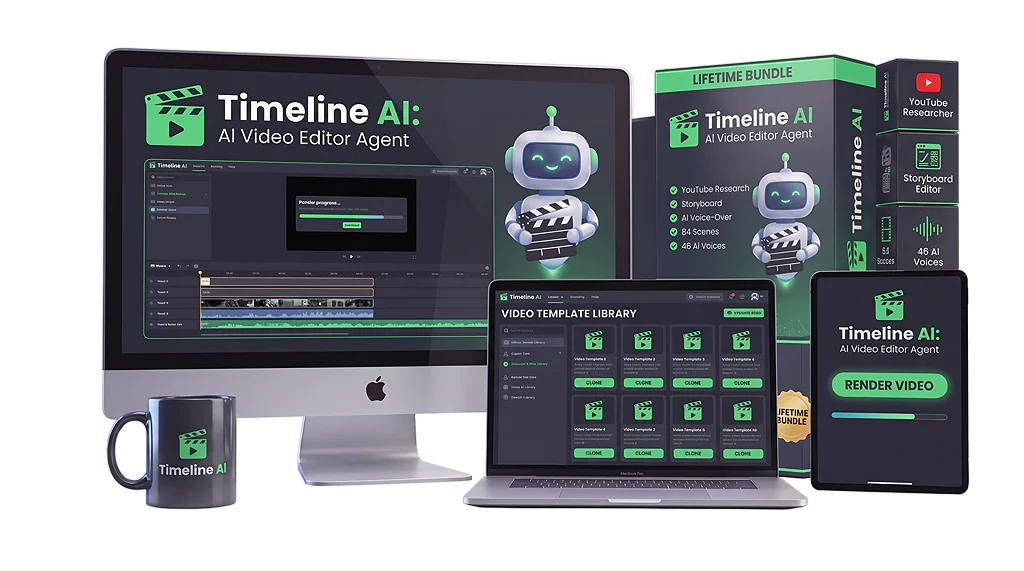
An AI video editor agent that researches what’s working on YouTube, writes and voices your script, then edits and renders a full 16:9 video up to 20 minutes long. $267 one-time during launch, 30-day guarantee.
| Best For | YouTubers, faceless channels and affiliates |
| Price | $267 one-time (launch price) |
| Discount | Regular price $397 |
| Promotion | 2,670 credits included, 30-day guarantee |
Timeline AI Review: The Quick Verdict
Timeline AI is a browser-based AI agent that turns one idea into a finished, edited long-form YouTube video. It researches the winning videos in your niche, writes the script, voices it with one of 46 AI voices, plans the chapters, then cuts a new shot every few seconds from 10 media types and renders the result with captions and a full YouTube kit.
The launch deal is strong. For $267 one-time you get the full tool, the YouTube Researcher and 2,670 credits to cover rendering, clip searches and research, with no monthly fee. The sales page shows a regular price of $397. The one thing to plan for is usage: once your included credits run out, each new video costs a little extra. If you want to publish long-form videos without hiring an editor, it’s one of the most complete tools to launch this year.
- Best for: YouTubers, faceless channel builders, affiliate marketers and freelancers who make videos for clients
- Price: $267 one-time during launch (regular price $397)
- Included credits: 2,670 for rendering, clip sourcing and research scans
- Output: edited 16:9 videos up to 20 minutes, 720p MP4 with SRT captions
- Guarantee: 30 days
- Launch window: Monday, October 19 to Friday, October 23, 2026 (midnight Eastern Time)
- Made by: Chris X and Rich Williams
What Is Timeline AI?
Timeline AI is a long-form AI video editor built for marketers, not professional editors. You type a topic (or paste your own script), hit Research, and the agent does the rest: research, script, voice-over, chapter plan, storyboard and render.
The big difference from most AI video tools is the editing. Instead of one stock clip per paragraph, Timeline AI builds a real timeline with 80+ scenes per video, a new shot every few seconds, each one timed to the exact words of your voice-over. Scenes come from 10 media types: animations, real YouTube clips, movie clips, stock video and photos, web images, AI images, AI video, website scroll-throughs and your own uploads.
Under the hood, it runs on several AI models. The sales page names Claude, GPT and Gemini for planning and writing, Nano Banana for thumbnails, 46 natural AI voices and cloud rendering. The sales page says that heavy lifting comes bundled in, so you don’t manage separate AI subscriptions. Your credits cover the usage.
How Timeline AI Works
Timeline AI breaks the process into three steps:
- Research. Type your topic. Timeline AI scans YouTube, ranks the videos genuinely outperforming your niche (by views per day and multiples of the niche median, not just big channels), and hands back the hooks, angles, titles and thumbnails they share, each one linked to the video it came from.
- Edit. It writes the brief and script, voices it, has three AI models pitch a chapter plan, then builds the storyboard: a new shot every few seconds, timed to your voice-over. You can swap any scene in one click and watch the result in a live player.
- Render. Hit Render. Chapters render in parallel in the cloud and come back as one finished 720p MP4 with SRT captions, plus a YouTube kit with your title, description with chapter timestamps, tags and thumbnail.
If one scene fails during a build, it doesn’t sink the whole video. The sales page shows a status like “83 of 84 ready, 1 needs you,” and you get an email when the render is done.
Timeline AI Key Features
YouTube Researcher
Pick 3 to 10 outperforming videos to beat, and Timeline AI reads their titles, descriptions, stats, thumbnails and transcripts, then shows you the patterns they all share. Every insight is cited back to the exact video, so you can check it yourself. The research then feeds straight into your title, thumbnail and brief.
Brief and Script Creator
The Brief is an editable plan with your angle, a 15-second hook, the audience and a 6 to 9 section outline. From there, the Script Creator handles 9 script types, including YouTube content, reviews, VSLs and webinars. You can edit section by section with one-click Punchier, Shorter, Longer and Split rewrites.
Voice-Over Studio With Multi-Take
You get 46 natural AI voices and a Voice Designer to tune speed, pitch, emotion, volume and language. You can record up to 3 takes of every section, lock the best ones, and re-record only the section with a typo instead of the whole voice-over.
Chapters From 3 AI Models
Claude, GPT and Gemini each pitch a chapter plan. You keep the ones you like and see every scene before you spend any credits on rendering.
Live Storyboard With 10 Media Types
Each chapter becomes a reel of scenes with a live player showing the real animations, clips, narration and sound effects. Every scene has several candidates, so you click one and it swaps in instantly. Tweaking an animation updates live, with no re-render.
Movie Clips on Demand
Describe a famous film moment, and Timeline AI finds and trims a verified 3 to 10 second clip. The vendor’s own test returned 3 out of 3 correct clips for 16 cents.
Titles, Thumbnails and a Feed Test
You get scored title options and AI thumbnails that can use your own face, product or screenshot. You can also drop your title and thumbnail into a realistic YouTube home feed next to the competition to pick the winner before you make the video.
One-Click Render, YouTube Kit and Commercial Rights
Rendering is one click, only changed chapters re-render, and you can clone any video into a v2 or v3. Full commercial rights are included, so you can make videos for clients or run a small video service.
Timeline AI Pricing, Credits and OTOs
As of October 20, 2026, the sales page lists Timeline AI at $267 one-time (shown as $397 crossed out), with a banner saying the price goes up at midnight. The JV page also says the launch price increases daily, so the earlier you buy, the less you pay.
Here’s what the $267 Complete Access bundle includes:
- Timeline AI Core: research to render, 84 scenes, 10 media types
- 46 AI voices with multi-take recording
- Live storyboard editor with one-click scene swaps
- The YouTube Researcher with cited, outperforming videos
- 2,670 Timeline credits for rendering, clips and research
- Full commercial rights and a 30-day money-back guarantee
How the credits work: there’s no monthly subscription, but the sales page describes the cost as “one-time $267 + crumbs per video.” The included 2,670 credits cover cloud rendering, clip sourcing and research scans. Once they’re used up, you pay small usage costs for new videos. The vendor lists sample run costs from live tests and provider list prices: about 16 cents for a movie clip search, under 2 cents for an animated scene, and $0.10 per 1,000 characters of voice-over. They’ll vary by video and provider pricing, but even several dollars per finished video is far below a freelance editor.
Upgrades (OTOs): JVZoo lists two optional upgrades in the funnel, Timeline AI UNLIMITED (listed at $127) and Timeline AI DFY (listed at $97). The sales page doesn’t detail them, so read what each one includes on the upgrade page before you add it. You don’t need either to use the core tool.
Who Timeline AI Is For (and Who Should Skip It)
Timeline AI is a great fit if you are:
- A YouTuber who wants more long-form uploads without spending days in an editor
- A faceless channel builder who needs edited, voiced videos on a schedule
- An affiliate marketer making product reviews, comparisons and tutorials for YouTube
- A freelancer or agency selling edited videos to local businesses (commercial rights are included)
- A course creator or coach who wants VSLs, webinar videos and explainers from a script
You can probably skip it if:
- You only make Shorts, Reels or TikToks. Timeline AI is built for horizontal long-form video. For vertical talking-head clips, see my TwinClips AI review.
- You need 4K, cinematic footage. Renders come out as 720p MP4.
- You love hand-editing every frame. A pro editor in Premiere or DaVinci will always have finer control.
Timeline AI Pros and Cons
Pros
- Edits real long-form video, up to 20 minutes with 80+ scenes, not a slideshow
- Research comes first, with every insight cited back to a real YouTube video
- 46 AI voices with multi-take, so one typo doesn’t cost you the whole voice-over
- 10 media types, including movie clips on demand and website scroll-throughs
- One-time launch price with 2,670 credits included and no monthly fee
- Full YouTube kit with title, description, chapters, tags, thumbnail and captions
- Commercial rights and a 30-day money-back guarantee
Cons (minor trade-offs)
- Credits run out eventually. After the included 2,670, new videos cost a small amount each. Budget a few cents to a few dollars per video.
- 720p output. That’s fine for most faceless and review channels, but it’s not 4K.
- AI voice and stock quality varies. Some scenes and voices will need a swap. The one-click scene swap and multi-take recording make that quick.
- You still need your own angle. Copying another channel’s hooks too closely can clash with YouTube’s rules on reused and repetitive content, so add your own take (more on that below).
- The price rises during launch. Waiting costs you more.
How to Use Timeline AI the Right Way on YouTube
Timeline AI’s research shows you what’s working. What you do with it decides whether your channel grows or gets stuck. A few rules keep you on the right side of YouTube:
- Use the research as inspiration, not a template. Learn from the hooks and angles, then write a video that says something new: your opinion, your test plan, your examples, your offer.
- Edit the script. The Script Creator’s one-click rewrites make it fast to add your own stories and facts. Videos with real, original value are what YouTube wants to monetize.
- Go easy on movie and YouTube clips. The vendor itself notes that film and YouTube footage can attract copyright claims, and Timeline AI warns you each time you use one. Short, relevant clips with commentary are safest.
- Check the output before you publish. The sales page reminds you that AI scripts, voices and images should be reviewed for quality and accuracy.
- Stay consistent. One strong, well-researched video a week will beat ten rushed ones.
Timeline AI vs Other AI Video Tools
Here’s how Timeline AI compares with the usual ways to make a long-form video:
| Option | What you get | Edits a full long-form video? | Cost model |
|---|---|---|---|
| Timeline AI | Research, script, 46 voices, 80+ scene storyboard, render and YouTube kit | Yes, up to 20 minutes | $267 one-time (launch) plus small per-video usage after 2,670 credits |
| Text-to-video slideshow tools | Stock footage matched to your script | Usually one clip per paragraph | Monthly subscription |
| AI clip generators | Short AI-generated clips | No, clips are a few seconds long | Monthly subscription or credits |
| ChatGPT or Claude alone | A script | No | Monthly subscription |
| A freelance editor | A hand-cut video | Yes | Per video, often days of turnaround |
Timeline AI’s edge is that it combines the research, the script, the voice and the edit in one place. If you also want to plan and schedule the social posts that promote your videos, my ViralDashboardAi review covers an all-in-one social media dashboard that pairs well with it.
Timeline AI Review FAQ
Is Timeline AI a one-time payment?
Yes. During launch, it’s $267 one-time with no monthly fee. The included 2,670 credits cover rendering, clips and research, and after that you pay small per-video usage costs.
How long can Timeline AI videos be?
Up to 20 minutes, in 16:9 YouTube format, with 80+ scenes from 10 media types.
What video quality does Timeline AI export?
Renders come back as a 720p MP4 with SRT captions, plus a YouTube kit with the title, description, chapter timestamps, tags and thumbnail.
Do I need separate AI subscriptions?
No. The sales page says the AI models (Claude, GPT, Gemini and Nano Banana) and the 46 voices come bundled in, and usage is paid for with your Timeline credits.
Can I use Timeline AI videos for clients?
Yes. Full commercial rights are included, so you can make videos for clients and keep what you charge.
Is there a money-back guarantee?
Yes, a 30-day money-back guarantee. The vendor says that if your first video doesn’t look like a production team made it, you can email them within 30 days for a full refund.
Is Timeline AI good for beginners?
Yes. It needs no coding and no editing skills, and it runs in your browser. You type a topic, review the plan and storyboard, and hit Render.
Verdict: Is Timeline AI Worth It?
Timeline AI gets a 4.5 out of 5 from me. It goes after the hardest, most time-consuming part of YouTube, editing long-form video, and it pairs that with research, scripting and voice-over in one tool. For a one-time $267 with 2,670 credits included, that’s a lot of production power, especially next to paying an editor per video.
It loses half a point for the trade-offs: 720p renders, usage costs once your credits run out, and the fact that you still need to bring your own angle to every video. Those are small next to what it saves you.
If you’ve been putting off long-form YouTube because of the editing, this is the week to start. The launch price goes up daily and the launch window closes on Friday, October 23, so lock in the lowest price while you can.