
Best TVs for Conference Rooms Compared (2026)
The best TVs for conference rooms in 2026 need a screen the back row can read, a picture that survives office lights, enough inputs for a laptop and a video bar, and a setup guests understand. This guide compares eight current Amazon picks, from an 85-inch Roku TV for big rooms to commercial Samsung displays and touchscreen smart boards.
Quick answer: For most conference rooms, the Samsung The Frame 65-inch LS03F (2025) is the best all-round pick: a matte, glare-resistant 4K QLED screen, four HDMI ports, 144Hz motion and a slim wall-flush design, sold and shipped by Amazon. Pick the Samsung QB65R if you want a commercial display with a 3-year onsite warranty, the COOLHOOD 65-inch Smart Board if your team needs touch and annotation, and the Roku 85-inch Select Series if you need the biggest screen for the least money.
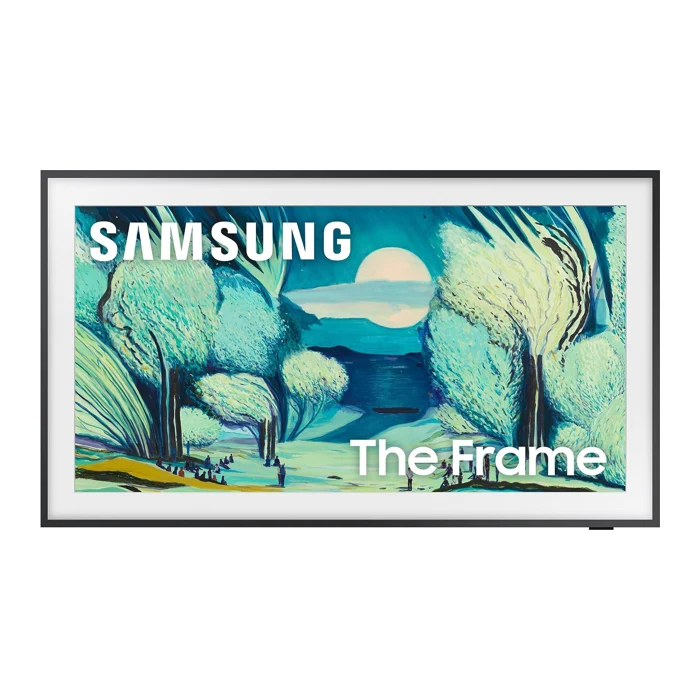
Samsung The Frame 65-inch LS03F (2025)
Matte, glare-resistant 4K QLED screen that mounts flush to the wall, with four HDMI ports, HDR10+, up to 144Hz and a single-wire hub for laptops, video bars and streaming boxes.
| Best For | Most meeting rooms, including client-facing ones |
| Price | $1,097.99 on Amazon (Nov 12, 2026) |
| Discount | List price $1,497.99 |
| Promotion | Sold and shipped by Amazon |
What are the best TVs for conference rooms in 2026?
The best TVs for conference rooms in 2026 are the Samsung The Frame 65-inch for most rooms, the Samsung QB65R and QE65T for commercial-grade reliability, the COOLHOOD and HORION smart boards for touch collaboration, the Toshiba G700 for bright rooms, and the Roku 85-inch Select Series for large rooms on a tight budget.
Prices, ratings and stock were checked on Amazon US on November 12, 2026, and change often.
| Display | Size and type | Key specs | Best for | Price (Nov 12, 2026) |
|---|---|---|---|---|
| Samsung The Frame LS03F (2025) | 65-inch 4K QLED TV | 4 HDMI, 144Hz, HDR10+, matte screen, Tizen | Most meeting rooms | $1,097.99 |
| Samsung QB65R | 65-inch 4K commercial display | 350 nits, 2 HDMI, Wi-Fi, 3-year onsite warranty | All-day business use | $1,199.99 |
| Samsung QE65T | 65-inch 4K commercial display | 300 nits, 2 HDMI, USB player, 16/7 rated | Budget commercial rooms | $969.29 |
| COOLHOOD 65-inch Smart Board | 65-inch 4K interactive touchscreen | Android 13, 20-point touch, 128GB, wireless sharing | Whiteboarding and hybrid teams | $1,499.99 |
| HORION 55-inch Smart Board | 55-inch 4K interactive touchscreen | Android 13, 40-point touch, dual 20W speakers | Huddle rooms that draw on screen | $999.00 |
| Toshiba G700 ArtVision (2026) | 65-inch 4K QLED Fire TV | Anti-glare screen, 165Hz, Dolby Vision IQ | Bright, window-heavy rooms | $997.96 |
| Roku Select Series (2026) | 85-inch 4K QLED Roku TV | 330 nits, HDR10+, AirPlay 2, Miracast | Large rooms on a budget | $479.00 |
| TouchWo 55-inch Touch Monitor | 55-inch 4K touchscreen monitor | 10-point touch over USB, 1 HDMI, VGA | PC-driven touch setups | $1,395.36 |
Which conference room TV is right for your room?
The right conference room TV depends on three things: how far away the back row sits, how much daylight hits the screen, and whether people only watch or also write on it. Watch-only rooms do best with a 65-inch or larger TV, while collaboration rooms should look at a touchscreen smart board instead.
Each pick lists only the specs Amazon or the manufacturer states; unpublished specs such as brightness are left out rather than guessed.
1. Samsung The Frame 65-inch LS03F (2025): best overall
The Frame is a consumer TV that fits a conference room better than most. Its matte, “virtually glare-free” screen resists overhead lights and windows, it mounts flush to the wall, and an external hub carries power and devices over a single wire.
Key features:
- 65-inch 4K QLED panel with HDR10+ and Samsung’s NQ4 AI Gen2 processor
- Matte, glare-resistant screen finish
- Four HDMI ports, plus USB, Ethernet, Wi-Fi and Bluetooth 5.3
- Up to 144Hz refresh with Motion Xcelerator
- 40W 2.0.2-channel sound with Dolby Atmos support
Pros: four HDMI inputs cover a laptop, a video bar and a streaming box; the matte screen helps in bright rooms; sold and shipped by Amazon; current 2025 model. Cons: Samsung does not list a brightness figure; it carries a standard 1-year consumer warranty, not a commercial one.
Who it’s for: offices that want one good-looking screen for presentations, calls and client meetings. At the time of checking it was $1,097.99 (list $1,497.99), in stock and rated 4.3 out of 5 from 154 ratings.
2. Samsung QB65R: best commercial display for all-day use
The QB65R is a commercial signage display, not a living-room TV. Samsung rates the QB-R series for 16 hours a day, 7 days a week, the listing includes a 3-year onsite warranty, and it is listed as compatible with Cisco Webex Room Kit.
Key features:
- 65-inch 4K UHD edge-lit LED panel, 350 nits, 60Hz
- Two HDMI 2.0 inputs and two USB 2.0 ports
- Built-in Wi-Fi and Bluetooth for sharing from tablets and phones
- Built-in speakers (10W + 10W in Samsung’s spec sheet)
- 3-year onsite warranty (parts, labor, backlight)
Pros: commercial warranty and duty rating; 350 nits is brighter than the cheaper QE65T; good fit for Webex hardware. Cons: this is a 2019 model; only two HDMI inputs; glossy screen; sold by a third-party authorized dealer (ARK DEALS) rather than Amazon.
Who it’s for: IT teams that want a display built for long daily hours. It was $1,199.99, in stock with free delivery, and rated 4.3 out of 5 from 55 ratings.
3. Samsung QE65T: best budget commercial display
The QE65T gives you Samsung’s commercial warranty and 16/7 duty rating for less than the QB65R. For a room that mostly shows a laptop screen, it does the job without consumer TV clutter.
Key features:
- 65-inch 4K UHD (3840 x 2160) display, 300 nits
- Two HDMI inputs and one USB 2.0 port with a built-in media player
- HDR10 and HLG support, Crystal 4K upscaling
- IP5X dust rating and 16/7 operation
- 3-year onsite warranty with a dedicated business support line
Pros: lowest price of the three Samsung picks; commercial warranty; simple to run as a meeting display or lobby sign. Cons: 300 nits is on the dim side for rooms with lots of daylight; only two HDMI inputs; this series launched in 2020; sold by a third-party dealer.
Who it’s for: offices fitting out several rooms that still want a business warranty. It was $969.29 and in stock, with faster Prime delivery available, rated 4.2 out of 5 from 79 ratings.
4. COOLHOOD 65-inch Smart Board: best for collaboration
The COOLHOOD Smart Board is an all-in-one 65-inch 4K touchscreen with Android 13, so people can write, annotate and share without a laptop. It supports wireless sharing from Mac, Windows, iOS and Android, and works with Zoom, Google Meet, Teams and Webex.
Key features:
- 65-inch 4K IPS touchscreen with a matte finish and 20-point multi-touch
- Android 13, octa-core processor and 128GB of storage
- Wireless screen sharing and QR-code file sharing
- USB-C, two USB 3.0 ports, HDMI, Wi-Fi and Bluetooth
- Wall mount included (rolling stand sold separately)
Pros: strongest buyer rating in this list at 4.5 out of 5 from 816 ratings; replaces a whiteboard, a TV and a casting dongle in one; Prime eligible. Cons: the stand costs extra; the listing does not mention a built-in camera, so plan on a USB camera or video bar for calls.
Who it’s for: teams that sketch and mark up documents in meetings. It was $1,499.99 (list $1,799.99) and in stock.
5. HORION 55-inch 4K Smart Board: best interactive board for huddle rooms
The HORION 55-inch board brings the same idea to smaller rooms, with wireless sharing from phones and laptops and touchback control of a connected laptop from the screen.
Key features:
- 55-inch 4K anti-glare touchscreen, 40-point touch, under 30ms latency
- Android 13 with optional Google Play apps
- Dual 20W speakers
- Wireless casting with on-screen annotation and touchback
- Includes wall mount, remote and two stylus pens; 1-year warranty
Pros: lower price than the 65-inch COOLHOOD; anti-glare surface; louder built-in speakers than most TVs. Cons: only two buyer ratings so far; Zoom and Teams calls need an external camera and microphone (sold separately); 1-year warranty; mobile stand sold separately.
Who it’s for: small huddle rooms where people want to write on the screen. It was $999.00 and in stock, sold by Horion_USA.
6. Toshiba 65-inch G700 ArtVision (2026): best for bright rooms
Toshiba’s 2026 G700 uses an anti-glare screen that spreads direct light into a soft glow, which is what a glass-walled meeting room needs. It is about 1.2 inches thick and runs Fire TV with AirPlay.
Key features:
- 65-inch 4K QLED panel with an anti-glare, paper-like screen
- Native 165Hz refresh rate and MEMC motion processing
- Dolby Vision IQ, HDR10+ Adaptive and HDR10+ Gaming
- Fire TV with AirPlay and Bluetooth 5.4
- 36W DTS Virtual:X 2.0.2-channel sound
Pros: anti-glare screen for daylight rooms; slim wall fit; current 2026 model sold and shipped by Amazon. Cons: only 12 buyer ratings so far (4.6 out of 5); Amazon does not list the HDMI port count or a brightness figure; consumer 1-year warranty.
Who it’s for: rooms with big windows or glass walls. It was $997.96 (list $1,297.99) and in stock.
7. Roku 85-inch Select Series (2026): best big screen on a budget
An 85-inch screen is what a long boardroom table needs, and this 2026 Roku Select Series is by far the cheapest way to get one here.
Key features:
- 85-inch 4K QLED panel with direct LED backlight, 60Hz, 330 nits
- HDR10, HDR10+ and HLG
- Roku OS with AirPlay 2 and Miracast screen mirroring
- Wi-Fi, Ethernet, Bluetooth headphone mode and optical audio out
- 20W Dolby Audio speakers
Pros: huge screen for the money; 4.4 out of 5 from 2,003 ratings; simple Roku interface that guests figure out fast. Cons: 330 nits and a glossy screen struggle in sunny rooms; 60Hz; at the time of checking the buy box went to a third-party seller rather than Amazon, so check the seller and return terms before ordering.
Who it’s for: large rooms where the farthest seat is 16 to 20 feet away. It was $479.00 (list $599.00) and in stock.
8. TouchWo 55-inch 4K Touchscreen Monitor: best for PC-driven touch setups
The TouchWo HD550T is a 55-inch 4K touchscreen monitor, not a smart TV. Touch works over USB with Windows, macOS, Android, Linux and Raspberry Pi, with no driver needed.
Key features:
- 55-inch 4K touchscreen with 10-point touch
- HDMI and VGA inputs plus USB for touch, built-in speaker and 3.5mm audio jack
- Aluminum frame, 400 x 400 VESA holes, portrait or landscape mounting
- Wall bracket and HDMI/USB cable included
Pros: works with almost any computer; no smart OS to manage or update; mounts in portrait for kiosks. Cons: lowest buyer rating here at 3.4 out of 5 from 41 ratings; only one HDMI input; no built-in apps or wireless sharing; costs more than the HORION board, which includes Android and casting.
Who it’s for: rooms with a dedicated meeting PC, or a reception kiosk. It was $1,395.36 with 18 left in stock.
What size TV does a conference room need?
A conference room TV should be big enough that the farthest seat is no more than about six times the picture height away for reading slides. That works out to roughly a 55-inch screen for seats up to 13 feet, a 65-inch for 16 feet, and a 75- to 85-inch screen for 18 to 21 feet.
The table uses the classic 4-6-8 viewing rule for 16:9 screens: about 4 times the picture height for detailed work like spreadsheets, 6 times for normal slides, and 8 times as the outer limit for video only.
| Screen size | Picture height | Detailed spreadsheets (4x) | Slides and calls (6x) | Video only (8x) | Typical room |
|---|---|---|---|---|---|
| 55-inch | 27.0 in | up to 9.0 ft | up to 13.5 ft | up to 18.0 ft | Huddle room, 2 to 6 people |
| 65-inch | 31.9 in | up to 10.6 ft | up to 15.9 ft | up to 21.2 ft | Small to mid conference room, 6 to 10 people |
| 75-inch | 36.8 in | up to 12.3 ft | up to 18.4 ft | up to 24.5 ft | Mid conference room, 8 to 14 people |
| 85-inch | 41.7 in | up to 13.9 ft | up to 20.8 ft | up to 27.8 ft | Boardroom or training room, 12+ people |
Measure to the back of the farthest chair, not the table edge, and if you land between sizes, go bigger. For a deeper walk-through with room layouts, see our guide on choosing the right size TV for your conference room.
How bright should a conference room TV be?
A conference room TV in a room with blinds and normal office lighting is usually fine at 300 to 350 nits. Rooms with big windows or glass walls need either a brighter screen or an anti-glare finish, because daylight washes out contrast faster than any spec sheet suggests. Glare control often matters more than raw brightness.
| Room lighting | Brightness to aim for | Screen finish | Picks that fit |
|---|---|---|---|
| Interior room, blinds, dimmable lights | 250 to 300 nits | Any | Samsung QE65T, TouchWo 55-inch |
| Normal office lighting, some windows | 300 to 350 nits | Matte helps | Samsung QB65R, Roku 85-inch, HORION 55-inch |
| Glass walls or large windows | Above 350 nits, or anti-glare | Matte or anti-glare strongly preferred | Samsung The Frame, Toshiba G700, COOLHOOD 65-inch |
These are rules of thumb. Where no brightness figure is published, the fit is based on the screen finish.
Is a TV or a projector better for a conference room?
A TV is better for most conference rooms up to about 20 feet deep. It stays sharp with the lights on, needs no lamp replacements, turns on instantly and works with video bars. A projector only makes sense when you need an image much larger than 85 inches, such as in a lecture-style training room.
Projectors also need a dim room, a screen and a clear throw path. If you are torn between panel types, our explainer on LED, LCD and OLED TVs for business covers the trade-offs.
Do you need a commercial display or will a consumer TV do?
A consumer TV is fine for a meeting room used a few hours a day, and it usually gives you more HDMI ports and a better smart platform for the money. A commercial display is worth it when the screen runs all day, doubles as signage, or needs a multi-year onsite warranty that a consumer TV does not offer.
Here, the Samsung QB65R and QE65T are the commercial options with 3-year onsite warranties. Some consumer TV warranties exclude business use, so read the terms before buying several.
Which ports and wireless features matter in a meeting room?
The ports that matter most in a meeting room are HDMI inputs, ideally three or four, so a laptop cable, a video bar and a streaming box can all stay plugged in. USB is useful for cameras and slide files. Built-in wireless sharing, such as AirPlay, Miracast or an Android casting app, cuts down on cable hunting.
A quick checklist before you buy:
- HDMI: two inputs is the minimum; four (like The Frame) gives you room to grow
- USB: handy for a USB camera, a wireless presenter dongle or playing a file without a laptop
- Ethernet: a wired connection is more reliable than Wi-Fi for long video calls
- Wireless sharing: AirPlay 2 and Miracast (Roku), AirPlay (Toshiba), Samsung screen mirroring (The Frame), or built-in casting apps (COOLHOOD and HORION)
- VESA pattern: check it against your wall mount before ordering
Smart platforms make most of this easier for guests, which is a big reason smart TVs work well in a corporate setting.
Do conference room TVs need good speakers or HDR?
Conference room TVs rarely need HDR, because slides, spreadsheets and video calls are not mastered in HDR. Speakers matter more, but even good TV speakers are not designed to pick up voices. For video calls, pair the screen with a video bar or speakerphone that has its own microphones and echo cancellation.
Built-in sound is fine for playing a video to the room; The Frame’s 40W system and the HORION’s dual 20W speakers are the strongest here.
How do you install a conference room TV?
Mount a conference room TV so the center of the screen sits roughly at seated eye level for the whole table, usually a little higher than you would at home so heads do not block the view. Use a mount rated for the TV’s weight and VESA pattern, and run power and HDMI inside the wall or a cable raceway.
Plan the video bar position before you drill, and put a network jack and outlet behind the TV. Our guide covers more installation tips for conference room TVs.
Which conference room TV should you buy?
Buy the Samsung The Frame 65-inch if you want one dependable, good-looking screen for a typical meeting room. Choose the Samsung QB65R or QE65T for commercial warranties, a COOLHOOD or HORION smart board if people write on the screen, the Toshiba G700 for glare, and the Roku 85-inch for big rooms on a budget.
Prices move quickly around the holidays, so check the current price before you order.
Frequently Asked Questions
What size TV is best for a small conference room?
A 55-inch to 65-inch TV is best for most small conference rooms with four to eight seats. If the farthest chair is under 13 feet away, a 55-inch screen keeps slides readable; between 13 and 16 feet, step up to 65 inches.
Can I use a regular TV in a conference room?
Yes. A regular 4K smart TV works well in a conference room used a few hours a day. Check that it has enough HDMI inputs and a matte or anti-glare screen if the room is bright, and read the warranty, because some consumer warranties exclude commercial use.
Is OLED a good choice for a conference room?
OLED is usually not the best choice for a conference room. Static elements like taskbars, logos and video-call layouts stay on screen for hours, and OLED panels are generally less bright than LED and QLED sets in well-lit rooms. An LED, QLED or commercial LCD display is the safer pick.
Do I need a smart board or a regular TV?
Get a smart board if your team writes, sketches or annotates during meetings, or if you want to share a whiteboard with remote people. Get a regular TV or commercial display if the screen is only for presentations and video calls, since it costs less for the same size.
How many HDMI ports does a conference room TV need?
Aim for at least two HDMI ports, and three or four if you can. A typical room uses one for a laptop cable, one for a video bar or room PC, and one for a streaming device or wireless presentation receiver.
How high should a conference room TV be mounted?
Mount it so the center of the screen is close to seated eye level, usually around 50 to 60 inches from the floor depending on screen size and table height. In longer rooms, mounting slightly higher helps people at the back see over heads.


